Lenovo L15M4PC3 41Wh Battery Replacement Guide
Find the perfect replacement battery for your Lenovo laptop with our comprehensive compatibility guide and installation tips for Australian and New Zealand users.
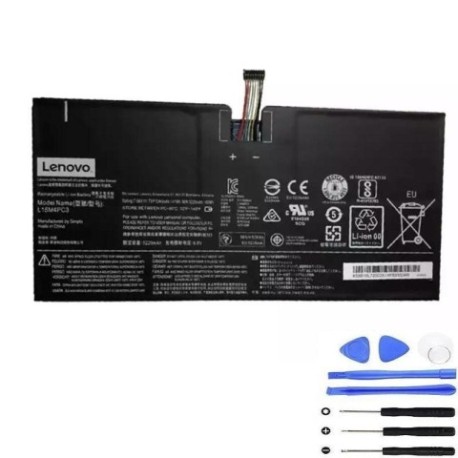
Battery models & part numbers
| Reference / P/N |
|---|
| L15L4PC3 |
| Lenovo-L15M4PC3-41Wh |
Compatible laptop models
| Model |
|---|
| Lenovo 5B10L72502 |
| Lenovo 5B10L79291 |
| Lenovo 5B10M65425 |
| Lenovo IdeaPad Miix 720-12IKB |
| Lenovo IdeaPad Miix 720-12IKB (80VV) |
Introduction
The Lenovo L15M4PC3 41Wh battery is designed for specific Lenovo laptop models commonly used in Australia and New Zealand. This high-quality replacement ensures your device maintains optimal performance and mobility.
Common signs you need a replacement
| Symptom | Cause | Verification | Recommendation |
|---|---|---|---|
| Battery drains quickly | Ageing cells | Check battery health in system settings | Replace if capacity below 50% |
| Laptop won’t hold charge | Failed battery circuit | Test with power adapter removed | Immediate replacement needed |
| Battery swelling | Internal damage | Visual inspection | Replace immediately for safety |
| Overheating during use | Inefficient charging | Monitor temperature with software | Replace to prevent damage |
How to check compatibility
Verify your laptop model matches one of the compatible models listed above. Check your device’s bottom label or system information for the exact model number. The battery part number should also match L15L4PC3 or Lenovo-L15M4PC3-41Wh.
When to replace
Replace your battery when it no longer holds sufficient charge for your needs, shows physical damage, or reaches 2-3 years of regular use. Most laptop batteries in AU/NZ climates last 300-500 charge cycles.
Installation guide (overview)
Power off your laptop and disconnect all cables. Remove the bottom panel using appropriate screwdrivers. Carefully disconnect the old battery connector and remove any mounting screws. Install the new battery, reconnect the connector, and reassemble your device.
Usage & care tips
Keep your battery between 20-80% charge for optimal lifespan. Avoid exposing your laptop to temperatures above 45°C. Store in cool, dry conditions when not in use. Calibrate your battery monthly by fully charging and discharging.
Safety & recycling in AU/NZ
Never attempt to open or modify lithium-ion batteries. Dispose of old batteries at authorised recycling centres across Australia and New Zealand. Many electronics retailers offer free battery recycling services.
FAQ
How long does shipping take to AU/NZ?
Most orders arrive within 5-10 business days depending on your location.
Is this battery genuine Lenovo?
This is a high-quality compatible replacement battery that meets or exceeds original specifications.
What warranty is provided?
This battery comes with a 12-month warranty covering manufacturing defects.
Can I install this battery myself?
Yes, with basic technical skills and proper tools. Follow our installation guide carefully.
How do I recycle my old battery?
Take it to any authorised battery recycling centre in your area – most are free.
What’s the battery capacity?
This is a 41Wh lithium-ion battery providing reliable performance for compatible Lenovo models.
Will this work with my charger?
Yes, it’s compatible with your original Lenovo power adapter and charging system.