Lenovo L15M2PB6 30Wh Battery Replacement Guide
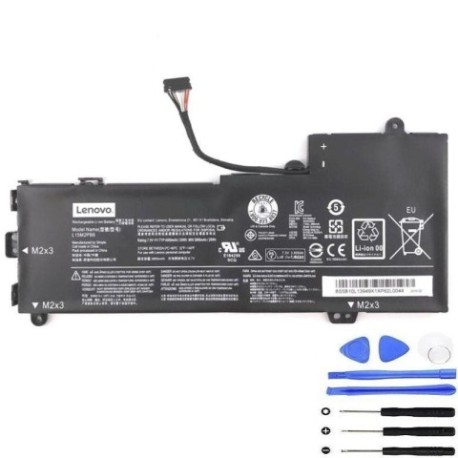
Introduction
Keep your Lenovo laptop running at peak performance with our genuine replacement battery. This comprehensive guide helps Australian and New Zealand consumers identify compatibility, recognise replacement signs, and install their new battery safely.
Battery models & part numbers
| Reference / P/N |
|---|
| 5B10L13948 |
| 5B10L13949 |
| Lenovo-L15M2PB6-30Wh |
Compatible laptop models
| Model |
|---|
| Lenovo Flex 4-1130 (80U3) |
| Lenovo IdeaPad 2in1-11 (81CX) |
| Lenovo IdeaPad 310S-11IAP (80U4) |
| Lenovo Yoga 310-11IAP (80U2) |
Common signs you need a replacement
| Symptom | Cause | Verification | Recommendation |
|---|---|---|---|
| Battery drains quickly | Reduced capacity from age/cycles | Check battery health in system settings | Replace if capacity below 60% |
| Laptop won’t hold charge | Failed battery cells | Test with power adapter removed | Immediate replacement needed |
| Battery swelling | Internal chemical breakdown | Visual inspection of battery case | Replace immediately – safety risk |
| Overheating during use | Inefficient power delivery | Monitor temperature with software | Replace if consistently over 45°C |
How to check compatibility
Verify your laptop model matches our compatibility list above. Check the label on your current battery for part numbers. For Australian and New Zealand consumers, ensure you purchase from authorised retailers to guarantee compatibility and safety standards.
When to replace
Replace your battery when it no longer holds sufficient charge for your needs, shows physical damage, or reaches 2-3 years of regular use. Most lithium-ion batteries maintain optimal performance for 300-500 charge cycles.
Installation guide (overview)
1. Power off laptop and disconnect charger
2. Remove bottom panel screws
3. Carefully disconnect old battery connector
4. Install new battery and reconnect
5. Replace panel and power on
Note: Always consult your device’s service manual for specific instructions.
Usage & care tips
• Avoid complete discharge cycles
• Store between 15-25°C when not in use
• Use original Lenovo chargers
• Calibrate battery monthly by fully charging then discharging
• Keep firmware updated for optimal battery management
Safety & recycling in AU/NZ
In Australia and New Zealand, battery disposal is regulated. Never dispose of lithium-ion batteries in household waste. Use dedicated battery recycling centres or return to authorised collection points. Swollen batteries require immediate professional handling due to fire risk.
FAQ
How long does shipping take in Australia?
Typically 3-7 business days depending on location.
Is this battery genuine Lenovo?
Yes, we supply original equipment manufacturer batteries.
What warranty is provided?
12-month warranty covering manufacturing defects.
Can I install this myself?
Yes, with basic technical skills and proper tools.
How do I recycle my old battery?
Use Batteryback or similar recycling programmes available nationally.
Will this improve my laptop’s performance?
Yes, a new battery restores original runtime and reliability.
Is overnight charging safe?
Modern laptops have protection circuits, but avoid regular overnight charging.