Battery models & part numbers
| Reference / P/N |
|---|
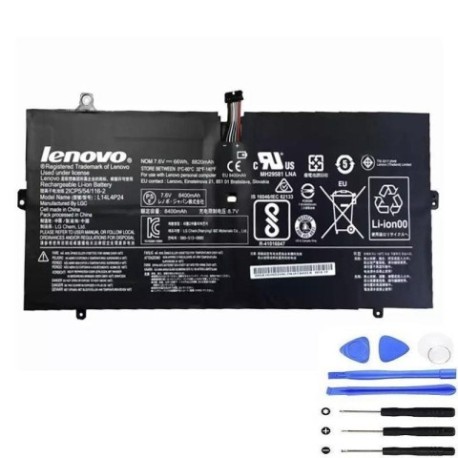
| Lenovo 2ICP5/54/116-2 |
| Lenovo 5B10H43261 |
| Lenovo 5B10H55224 |
| Lenovo L14L4P24-66Wh |
| Lenovo L14M4P24 |
Compatible laptop models
| Model |
|---|
| Lenovo Yoga 3 Pro |
| Lenovo Yoga 4 Pro 900-13ISK 900-ISE |
| Lenovo Yoga 4 Pro(Yoga 900) |
| Lenovo Yoga 900-13ISK |
| Lenovo Yoga 900-13ISK (80MK/80SD) |
| Lenovo Yoga 900-13ISK 80MK |
| Lenovo Yoga 900-13ISK 80SD |
| Lenovo Yoga 900-13ISK2 |
| Lenovo Yoga 900-13ISK2 (80UE) |
| Lenovo Yoga 900-13ISK2 80UE |
| Lenovo Yoga 900-IFI |
| Lenovo Yoga 900-ISE |
Introduction
Keep your Lenovo Yoga laptop running at peak performance with our genuine replacement battery. This high-quality 66Wh battery is designed specifically for your device and comes with full Australian compliance.
Common signs you need a replacement
| Symptoms | Causes | Verification | Recommendation |
|---|---|---|---|
| Battery drains quickly | Ageing cells, reduced capacity | Check battery health in system settings | Consider replacement if under 50% capacity |
| Laptop shuts down unexpectedly | Voltage drops under load | Monitor battery percentage during use | Replace if frequent shutdowns occur |
| Battery won’t charge fully | Charging circuit issues, cell damage | Check charging status and time | Replace if charging stops below 80% |
| Battery swelling or overheating | Internal short circuits, chemical breakdown | Visual inspection, temperature check | Immediate replacement required for safety |
How to check compatibility
Verify your laptop model matches our compatibility list above. Check your current battery part number (usually printed on the battery) or look up your laptop’s model number in system information.
When to replace
Replace your battery when you notice significant performance degradation, typically after 2-3 years of regular use or when capacity drops below 60% of original specification.
Installation guide (overview)
Power off your laptop and disconnect all cables. Remove the bottom cover using appropriate screwdrivers. Disconnect the old battery connector and remove mounting screws. Install the new battery, reconnect the connector, and reassemble your device.
Usage & care tips
Avoid extreme temperatures (ideal range 15-25°C). Don’t leave your laptop plugged in constantly. Calibrate your battery monthly by fully charging then discharging. Store at 40-60% charge if not using for extended periods.
Safety & recycling in AU/NZ
This battery meets Australian safety standards. Never attempt to open or modify the battery. At end of life, recycle through authorised e-waste centres – most electronics retailers offer free battery recycling services.
FAQ
How long does delivery take in Australia?
Most orders are delivered within 3-7 business days to metro areas, slightly longer for regional locations.
Is this battery genuine Lenovo?
This is a high-quality replacement battery designed to meet or exceed original specifications and comes with full Australian compliance.
What warranty do you offer?
All our batteries come with a 12-month warranty covering manufacturing defects.
Will this work with my specific Yoga model?
Check the compatibility table above – if your model is listed, this battery is designed to work perfectly with your device.
How do I know if I need a new battery?
If your laptop runs out of power quickly, won’t hold a charge, or shows battery warnings in your operating system, it’s likely time for replacement.
Is installation difficult?
Most users can install this battery with basic technical skills and appropriate tools. Follow our guide or consult a professional if unsure.
Can I recycle my old battery?
Yes – never dispose of batteries in household waste. Use authorised recycling centres available at most electronics stores.