Lenovo L13M6P71 50Wh Battery Replacement Guide
Find the perfect replacement battery for your Lenovo laptop with our comprehensive compatibility guide and installation tips.
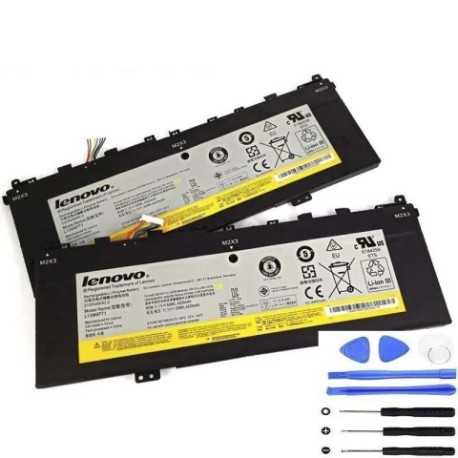
Battery models & part numbers
| Reference / P/N |
|---|
| L13S6P71 |
| Lenovo-L13M6P71-50Wh |
Compatible laptop models
| Model |
|---|
| Lenovo 11S121500229 |
| Lenovo 121500229 |
| Lenovo 121500234 |
| Lenovo 31CP4 |
| Lenovo 35015601 |
| Lenovo Yoga 2 13 |
| Lenovo Yoga 2 13 (20344) |
| Lenovo Yoga 2 13 (59440091) |
| Lenovo Yoga 2 13 (59440094) |
| Lenovo Yoga 2 13 (594x) |
| Lenovo Yoga 2 13 (80DM) |
| Lenovo Yoga 2 13 (80DN) |
Introduction
The Lenovo L13M6P71 50Wh battery is a high-quality replacement designed specifically for various Lenovo laptop models. This genuine-compatible battery ensures optimal performance and reliability for your device.
Common signs you need a replacement
| Symptom | Cause | Verification | Recommendation |
|---|---|---|---|
| Battery won’t charge | Ageing cells or faulty charging circuit | Check power adapter and charging port | Replace battery if other components test OK |
| Rapid power drain | Reduced battery capacity | Monitor battery life over multiple cycles | Consider replacement if under 2 hours |
| Laptop shuts down unexpectedly | Battery unable to maintain voltage | Check battery health in system settings | Replace immediately to prevent data loss |
| Battery swelling | Internal chemical breakdown | Visual inspection for bulging | Replace urgently – safety hazard |
How to check compatibility
Verify your laptop model matches one of the compatible models listed above. Check your laptop’s bottom label or system information for the exact model number. You can also remove your current battery and compare the part number with our compatibility list.
When to replace
Replace your battery when it holds less than 50% of its original capacity, shows physical damage, or fails to charge properly. Most laptop batteries need replacement after 2-3 years of regular use.
Installation guide (overview)
1. Power off your laptop and disconnect all cables
2. Remove the bottom panel (consult your laptop’s service manual)
3. Disconnect the battery connector from the motherboard
4. Remove any screws securing the battery
5. Install the new battery in reverse order
6. Charge fully before first use
Usage & care tips
• Avoid extreme temperatures (ideal range 15-25°C)
• Don’t leave laptop plugged in constantly
• Perform full discharge cycles monthly
• Store with 40-60% charge if not using for extended periods
• Use only authorised chargers and accessories
Safety & recycling in AU/NZ
In Australia and New Zealand, lithium-ion batteries must be recycled properly. Never dispose of batteries in household waste. Take used batteries to your local recycling centre or electronic waste collection point. Many retailers offer battery recycling services.
FAQ
How long does this battery last?
Typically 2-3 years with normal use, or approximately 500 charge cycles.
Is this battery genuine Lenovo?
This is a high-quality compatible battery that meets or exceeds original specifications.
What’s the warranty period?
Most replacement batteries come with a 12-month warranty – check with your supplier.
Can I install this battery myself?
Yes, most users can install it following our guide, but seek professional help if unsure.
How do I maximise battery life?
Avoid full discharges, keep between 20-80% charge when possible, and store in cool conditions.
What if my model isn’t listed?
Double-check your laptop’s exact model number. If still not listed, this battery may not be compatible.
Is overnight charging safe?
Modern laptops have protection circuits, but it’s best to unplug once fully charged to extend battery life.