Battery models & part numbers
| Reference / P/N |
|---|
| 121500112 |
| 121500113 |
| 121500121 |
| 121500123 |
| 121500202 |
| 121500237 |
| 35008674 |
| 35018307 |
| 35019270 |
| 35024239 |
| L12L4K01-48Wh |
| L12M4F02 |
| L12M4K01 |
| L12S4E21 |
| L12S4K01 |
Compatible laptop models
| Model |
|---|
| Lenovo IdeaPad P400 Touch |
| Lenovo IdeaPad P400 Touch (59371991) |
| Lenovo IdeaPad P500 (6279) |
| Lenovo IdeaPad Z500 |
| Lenovo IdeaPad Z500 (20202) |
| Lenovo IdeaPad Z500 (5931) |
| Lenovo IdeaPad Z500 (MBYDGGE) |
| Lenovo IdeaPad Z500 (MBYECGE) |
| Lenovo IdeaPad Z500 (MBYM5GE) |
| Lenovo IdeaPad Z500 (MBYP9GE) |
| Lenovo IdeaPad Z500 (MBYPAGE) |
| Lenovo IdeaPad Z500 Touch |
| Lenovo IdeaPad Z500 Touch (59367170) |
| Lenovo IdeaPad Z510 |
| Lenovo IdeaPad Z510 (20287) |
| Lenovo IdeaPad Z510 (59386905) |
| Lenovo IdeaPad Z510 (59393214) |
| Lenovo IdeaPad Z510 (59393216) |
| Lenovo IdeaPad Z510 (59393217) |
| Lenovo IdeaPad Z510 (59400165) |
| Lenovo IdeaPad Z510 (59400167) |
| Lenovo IdeaPad Z510 (59400169) |
| Lenovo IdeaPad Z510 (59401669) |
| Lenovo IdeaPad Z510 (59405950) |
| Lenovo IdeaPad Z510 (Type 80A3) |
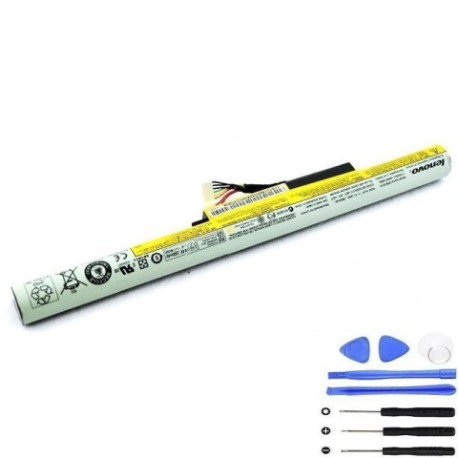
Introduction
If your Lenovo laptop is showing signs of battery fatigue, our genuine replacement battery restores optimal performance. This 48Wh power solution is specifically designed for multiple Lenovo IdeaPad models commonly used across Australia and New Zealand.
Common signs you need a replacement
| Symptoms | Causes | Verification | Recommendation |
|---|---|---|---|
| Rapid power drain | Battery degradation | Check power settings | Consider replacement |
| Swollen battery case | Age/heat damage | Visual inspection | Replace immediately |
| Not holding charge | Cell failure | Battery health test | New battery needed |
| Overheating during use | Internal resistance | Temperature monitoring | Safety replacement |
How to check compatibility
Verify your laptop model matches our compatibility list above. Check your current battery’s part number (usually printed on the battery) against our reference numbers. For Australian and New Zealand customers, ensure you’re purchasing from authorised suppliers for warranty protection.
When to replace
Replace your battery when it no longer holds sufficient charge for your needs, shows physical swelling, or your laptop indicates battery health warnings. Most lithium-ion batteries last 2-3 years with regular use in typical AU/NZ conditions.
Installation guide (overview)
Power off your laptop and disconnect from mains. Remove the bottom panel (consult your laptop manual for specific instructions). Disconnect the old battery connector and remove any securing screws. Install the new battery, reconnect, and reassemble. First charge should be uninterrupted for optimal calibration.
Usage & care tips
Store your laptop in cool, dry conditions (15-25°C ideal). Avoid complete discharges – recharge when battery reaches 20-30%. For long-term storage, maintain 40-60% charge. Use only genuine Lenovo chargers to ensure proper voltage regulation and safety.
Safety & recycling in AU/NZ
Never attempt to open or modify the battery. Dispose of old batteries at authorised recycling centres – most electronics retailers in Australia and New Zealand offer free battery recycling services. Do not dispose in household waste due to fire risk and environmental regulations.
FAQ
How long does shipping take to AU/NZ? Typically 7-14 business days depending on your location.
Is this battery genuine Lenovo? Yes, this is an original specification replacement battery.
What warranty is provided? 12-month warranty covering manufacturing defects.
Can I install this myself? Yes, with basic technical skills and proper precautions.
Will this work with my charger? Compatible with standard Lenovo 65W chargers used in AU/NZ.
How do I recycle my old battery? Take to any Officeworks, JB Hi-Fi, or similar electronics retailer for free recycling.
What if my model isn’t listed? Contact our support team with your exact laptop model for verification.