Battery models & part numbers
| Reference / P/N |
|---|
| L12L4A02 |
| L12L4E01-32Wh |
| L12M4A02 |
| L12M4E01 |
| L12S4A02 |
| L12S4E01 |
| L14C4E01 |
| SB10F22076 |
| SB10F22078 |
| SB10F22099 |
| SB10G46707 |
Compatible laptop models
| Model |
|---|
| 121500171 |
| 121500172 |
| 121500173 |
| 121500174 |
| 121500175 |
| 121500176 |
| 121500256 |
| 121500257 |
| 121500270 |
| 35012656 |
| 35017770 |
| 35024240 |
| 35044422 |
| 35044710 |
| 35044732 |
| 35045229 |
| 5B10H15335 |
| 5B10H15336 |
| 5B10K10161 |
| 5B10K10191 |
| 5B10K10199 |
| 5B10K10206 |
| 5B10K10211 |
| 5B10K10238 |
| 5B10K10240 |
| B70-80 (80MR) |
| G405s |
| G40-80 |
| G40-80 (80E4) |
| G40-80 (80JE) |
| G40-80 (80KY) |
| G410S Touch |
| G41-25 |
| G41-35 (80M7) |
| G500s |
| G500s (20245) |
| G500s (59367693) |
| G500s (59381251) |
| G500s (59381624) |
| G500s (59393076) |
| G500s (59401659) |
| G500s (80AD/80AV) |
| G50-30 (80G0) |
| G50-45 |
| G50-45 (80E3) |
| G50-45 (80E5) |
| G50-45 (80G0) |
| G50-45 (80J1/80MQ) |
| G50-45 (80MQ) |
| G50-45 (A6-6310) |
| G505s |
| G505s (20255) |
| G505s (59401773) |
| G505s (59405605) |
| G505s (80AM) |
| G50-70 |
| G50-70 (59419321) |
| G50-70 (59423397) |
| G50-70 (59423402) |
| G50-70 (59424215) |
| G50-70 (59424799) |
| G50-70 (59424800) |
| G50-70 (59426467) |
| G50-70 (59427091) |
| G50-70 (59427095) |
| G50-70 (59427099) |
| G50-70 (59427103) |
| G50-70 (59427212) |
| G50-70 (59427213) |
| G50-70 (59427214) |
| G50-70 (59427215) |
| G50-70 (59427216) |
| G50-70 (59429163) |
| G50-70 (59431557) |
| G50-70 (59440034) |
| G50-70 (59440786) |
| G50-70 (59441257) |
| G50-70 (59443619) |
| G50-70 (80DY) |
| G50-70m |
| G50-80 |
| G50-80 (80E3) |
| G50-80 (80E5) |
| G50-80 (80KR/80L0/80L4/80R0) |
| G50-80 (80L0) |
| G510s (80CJ) |
| G510s Touch |
| G51-35 |
| G51-35 (80M8) |
| G70-35 (80Q5) |
| G70-70 (80HW) |
| G70-80 (80FF) |
| IdeaPad S410p |
| IdeaPad S410p-00397 |
| IdeaPad S410p-3561 |
| IdeaPad Z710 |
| IdeaPad Z710 (20250) |
| IdeaPad Z710 (59385450) |
| IdeaPad Z710 (59387520) |
| IdeaPad Z710 (59387522) |
| IdeaPad Z710 (59393209) |
| IdeaPad Z710 (59393210) |
| IdeaPad Z710 (59393211) |
| IdeaPad Z710 (59424270) |
| IdeaPad Z710 (59435690) |
| S40-70 |
| S40-70 (80GQ) |
| S510p |
| S510p (20298) |
| S510p Touch |
| Z40-70 |
| Z40-70 (59425584) |
| Z40-70 (59425585) |
| Z40-70 (80E6) |
| Z40-75 |
| Z40-75 (80DW) |
| Z50-70 |
| Z50-70 (1351548) |
| Z50-70 (20354) |
| Z50-70 (59415168) |
| Z50-70 (59420313) |
| Z50-70 (59421169) |
| Z50-70 (59421631) |
| Z50-70 (59424259) |
| Z50-70 (59424260) |
| Z50-70 (59424261) |
| Z50-70 (59424262) |
| Z50-70 (59424715) |
| Z50-70 (59424716) |
| Z50-70 (59427356) |
| Z50-70 (59427654) |
| Z50-70 (59427656) |
| Z50-70 (59427812) |
| Z50-70 (59427893) |
| Z50-70 (59428675) |
| Z50-70 (59429174) |
| Z50-70 (59429403) |
| Z50-70 (59441113) |
| Z50-70 (59442408) |
| Z50-75 |
| Z50-75 (80EC) |
| Z70-80 |
| Z70-80 (80FG) |
Introduction
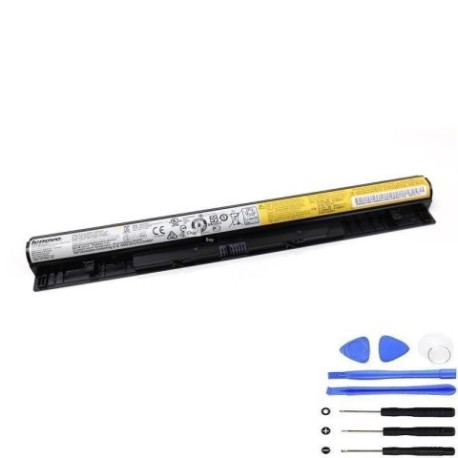
If your Lenovo laptop is showing signs of battery fatigue, our genuine replacement battery restores optimal performance. Compatible with numerous Lenovo models across the G, IdeaPad, and Z series, this 32Wh battery delivers reliable power for work and study.
Common signs you need a replacement
| Symptom | Cause | Verification | Recommendation |
|---|---|---|---|
| Battery drains quickly | Ageing cells, reduced capacity | Check battery health in system settings | Replace if capacity below 60% |
| Laptop won’t hold charge | Failed battery circuitry | Test with power adapter removed | Immediate replacement needed |
| Battery swelling | Internal gas buildup | Visual inspection, uneven surface | Replace immediately for safety |
| Overheating during use | Inefficient power conversion | Monitor temperature above 45°C | Replace to prevent damage |
| Random shutdowns | Voltage instability | System logs, sudden power loss | Replace battery module |
How to check compatibility
Verify your laptop model matches our compatibility list above. Check your current battery’s part number (usually printed on the battery) or locate your laptop model number on the bottom casing or under the battery compartment. Cross-reference with our tables to ensure perfect fit.
When to replace
Most laptop batteries last 2-4 years with regular use. Replace when battery health drops below 70% capacity, you experience rapid discharge (less than 1 hour), physical swelling occurs, or your system frequently reports battery errors.
Installation guide (overview)
1. Power down laptop and disconnect charger
2. Remove bottom panel or battery compartment cover
3. Disconnect old battery connector (usually a small plug)
4. Remove mounting screws if present
5. Install new battery and reconnect
6. Replace cover and power on
Note: Some models may require authorised service centre installation.
Usage & care tips
• Avoid complete discharges – recharge at 20-30%
• Store between 15-25°C when not in use
• Calibrate monthly: charge to 100%, use until shutdown, then recharge fully
• Keep connectors clean and free from dust
• Use only genuine Lenovo-approved chargers
Safety & recycling in AU/NZ
Never dispose of lithium batteries in household waste. In Australia, use Batteryback or council e-waste services. In New Zealand, utilise accredited recycling centres like Computer Recycling or eDay collections. Damaged or swollen batteries require special handling – contact your local authorised recycling centre.
FAQ
How long does delivery take in Australia?
Typically 3-7 business days for metro areas, 5-10 days for regional locations.
Is this battery genuine Lenovo?
Yes, this is an authentic Lenovo part with full manufacturer warranty.
Will this work with my specific model variant?
Check our comprehensive compatibility list above – all listed variants are supported.
What’s the warranty period?
12 months manufacturer warranty from date of purchase.