Battery models & part numbers
| Reference / P/N |
|---|
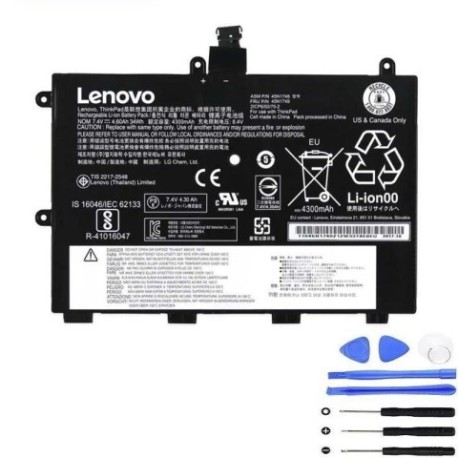
| Lenovo-45N1748-34Wh |
Compatible laptop models
| Model |
|---|
| Lenovo 45N1749 |
| Lenovo 45N1750 |
| Lenovo 45N1751 |
| Lenovo ThinkPad 11e |
| Lenovo ThinkPad 11e (20DA/20D9) |
| Lenovo ThinkPad 11e (20ED) |
| Lenovo ThinkPad 11e 2nd Gen (20ED/20EE) |
| Lenovo ThinkPad 11e Chromebook (20DB/20DU) |
| Lenovo ThinkPad Yoga 11e (20D9) |
| Lenovo ThinkPad Yoga 11e (20DA) |
| Lenovo ThinkPad Yoga 11e (20E5) |
| Lenovo ThinkPad Yoga 11e (20E7) |
| Lenovo ThinkPad Yoga 11e Chromebook (20DB) |
| Lenovo ThinkPad Yoga 11e Chromebook (20DU) |
Introduction
Keep your Lenovo ThinkPad 11e series laptop running at peak performance with our genuine replacement battery. Designed specifically for Australian and New Zealand conditions, this 34Wh battery ensures reliable power for your educational or business needs.
Common signs you need a replacement
| Symptoms | Causes | Verification | Recommendation |
|---|---|---|---|
| Battery drains quickly | Ageing cells, frequent charging cycles | Check battery health in system settings | Consider replacement if under 50% capacity |
| Laptop won’t hold charge | Failed battery cells, internal damage | Test with power adapter disconnected | Immediate replacement needed |
| Battery swelling or overheating | Chemical degradation, safety hazard | Visual inspection, temperature check | Stop using immediately and replace |
| Inconsistent power delivery | Worn connectors, unstable voltage | Monitor system power reports | Replace to prevent system damage |
How to check compatibility
Verify your laptop model matches exactly with our compatibility list above. Check your device’s bottom label or system information (Settings > About) for the complete model number including any codes in brackets.
When to replace
Replace your battery when you notice significant performance decline, typically after 2-3 years of regular use. For safety, replace immediately if you observe any swelling, overheating, or physical damage to the battery casing.
Installation guide (overview)
Power off your laptop and disconnect from mains power. Remove the bottom panel using appropriate screwdrivers. Disconnect the old battery connector and carefully remove any securing screws. Install the new battery, reconnect the power connector, and reassemble your device.
Usage & care tips
For optimal battery life, avoid complete discharges and store your device in temperatures between 10°C and 35°C. Use only authorised Lenovo chargers and avoid leaving your laptop plugged in continuously for extended periods.
Safety & recycling in AU/NZ
Never attempt to open or modify the battery. Dispose of old batteries at authorised recycling centres – most electronics retailers in Australia and New Zealand offer free battery recycling services. Never dispose of lithium batteries in household waste.
FAQ
How long does delivery take in Australia?
Most metropolitan areas receive delivery within 3-5 business days, regional areas may take 5-7 business days.
Is this battery genuine Lenovo?
Yes, this is an authentic Lenovo 45N1748 battery meeting all original manufacturer specifications.
What’s the warranty period?
This battery comes with a 12-month warranty covering manufacturing defects.
Will this work with both AU and NZ power systems?
Yes, the battery is compatible with both Australian 230V and New Zealand 230V power systems.
How do I check my current battery health?
On Windows, use the Battery Report feature in Command Prompt. On Chrome OS, check chrome://power in your browser.
Can I install this battery myself?
Yes, with basic technical skills and the right tools. Follow our installation guide or seek professional assistance if unsure.
What if my model isn’t listed?
Contact our support team with your exact model number for compatibility verification before purchase.