Battery models & part numbers
| Reference / P/N |
|---|
| 45N1701 |
| 45N1702 |
| 45N1703 |
| Lenovo-45N1702-45Wh |
Compatible laptop models
| Model |
|---|
| Lenovo Carbon X1 i7-4600 |
| Lenovo ThinkPad X1 Carbon 2th Gen (20A7/20A8) |
| Lenovo ThinkPad X1 X1C Carbon Gen 2 14 i7-4600 |
| ThinkPad Carbon X1 i7-4600 |
| ThinkPad New X1 Carbon 20BT |
| ThinkPad X1 20BS |
| ThinkPad X1 20BT |
| ThinkPad X1 Carbon (20A7) |
| ThinkPad X1 Carbon 2014 |
| ThinkPad X1 Carbon 2015 |
| ThinkPad X1 Carbon 20A7 |
| ThinkPad X1 Carbon 20A8 |
| ThinkPad X1 Carbon 20BS |
| ThinkPad X1 Carbon 20BT |
| ThinkPad X1 Carbon Gen 3 |
| ThinkPad X1 Carbon Touch |
| ThinkPad X1 Carbon Touch(20BS) |
| ThinkPad X1 Carbon Touch(N3NA) |
| ThinkPad X1 Carbon(20HQ) |
| ThinkPad X1c X1 New Carbon 2015 |
Introduction
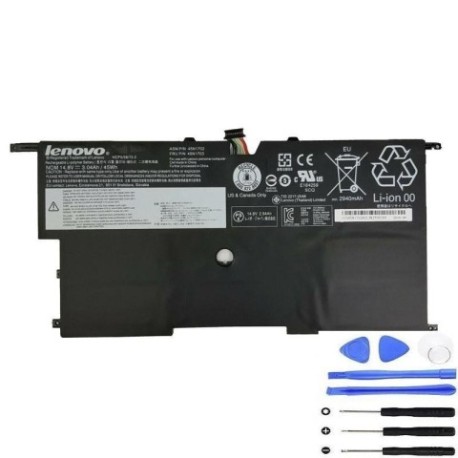
Keep your Lenovo ThinkPad X1 Carbon running at peak performance with our genuine replacement battery. This 45Wh power solution is designed specifically for your laptop model and meets all Australian safety standards.
Common signs you need a replacement
| Symptoms | Causes | Verification | Recommendation |
|---|---|---|---|
| Battery drains quickly | Ageing cells, reduced capacity | Check battery health in system settings | Consider replacement if under 50% capacity |
| Laptop won’t hold charge | Failed battery cells | Test with power adapter disconnected | Immediate replacement needed |
| Battery swelling | Internal damage, overheating | Visual inspection of battery compartment | Replace immediately for safety |
| Inconsistent charging | Worn connectors, faulty circuitry | Monitor charging behaviour over time | Replace if persistent issues |
How to check compatibility
Verify your laptop model matches one in our compatibility table above. Check your current battery’s part number (usually found on the battery label) against our reference numbers. For Australian customers, ensure your device was originally sold in the AU/NZ region for optimal performance.
When to replace
Replace your battery when runtime drops below 2 hours, charging becomes unreliable, or physical damage is visible. Most Lenovo batteries last 2-3 years with regular use in Australian conditions.
Installation guide (overview)
Power off your laptop and disconnect all cables. Remove the bottom cover (consult your user manual for specific instructions). Disconnect the old battery connector and remove any securing screws. Install the new battery, reconnect the connector, and reassemble. First charge should be for at least 4 hours.
Usage & care tips
Store batteries at room temperature (15-25°C). Avoid complete discharges – recharge when battery reaches 20%. Don’t leave your laptop plugged in constantly. For Australian conditions, avoid exposing batteries to direct sunlight or temperatures above 35°C.
Safety & recycling in AU/NZ
This battery meets Australian safety standards. Never attempt to open or modify the battery. Dispose of old batteries at authorised recycling centres – most electronics retailers in Australia offer free battery recycling services.
FAQ
How long does shipping take in Australia?
Most orders are delivered within 3-5 business days to metro areas, 5-7 days to regional centres.
Is this battery genuine Lenovo?
Yes, this is an original Lenovo part number 45N1702 with full compatibility.
What warranty do you offer?
All our batteries come with a 12-month warranty covering manufacturing defects.
Will this work with my Australian power adapter?
Yes, this battery is compatible with all standard Lenovo power adapters sold in Australia.
How do I check my current battery health?
In Windows, type “battery report” in the search bar and run the battery health diagnostic.
Can I install this myself?
Yes, most ThinkPad models have user-replaceable batteries. Refer to our installation guide above.
Do you ship to New Zealand?
Yes, we ship to both Australia and New Zealand with similar delivery timeframes.