Lenovo 42T4834 63Wh Replacement Battery
Find the perfect replacement battery for your Lenovo ThinkPad with our comprehensive compatibility guide. This high-quality 63Wh battery ensures optimal performance for your business or personal computing needs.
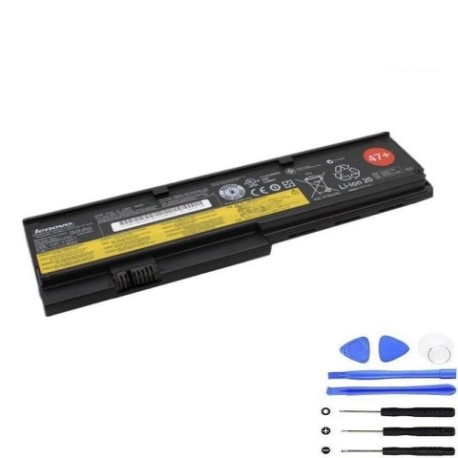
Battery models & part numbers
| Reference / P/N |
|---|
| 42T4536 |
| 42T4537 |
| 42T4541 |
| 42T4543 |
| 42T4635 |
| 42T4646 |
| 42T4647 |
| 42T4648 |
| 42T4649 |
| 42T4650 |
| 42T4694 |
| 42T4695 |
| 42T4696 |
| 42T4823 |
| 42T4825 |
| 42T4834 |
| 42T4835 |
| 42T4837 |
| 43R9253 |
| 43R9254 |
| 43R9255 |
| 45N1170 |
| 45N1171 |
| 47+ |
| 47++ |
| Lenovo-42T4834-63Wh |
Compatible laptop models
| Model |
|---|
| IBM ThinkPad X201s |
| Lenovo ThinkPad X200 |
| Lenovo ThinkPad X201 |
| Lenovo ThinkPad X201i |
| Lenovo ThinkPad X201s |
Introduction
Welcome to your complete guide for the Lenovo 42T4834 63Wh replacement battery. This genuine-compatible battery is designed specifically for Lenovo ThinkPad X200 and X201 series laptops, providing reliable power for professionals and students across Australia and New Zealand.
Common signs you need a replacement
| Symptoms | Causes | Verification | Recommendation |
|---|---|---|---|
| Battery drains quickly (under 1 hour) | Ageing battery cells, reduced capacity | Check battery health in system settings | Replace if capacity below 50% |
| Laptop won’t hold charge | Failed battery circuitry | Test with power adapter removed | Immediate replacement needed |
| Battery swelling or overheating | Internal damage, safety hazard | Visual inspection, temperature check | Replace immediately for safety |
| Charging indicator issues | Battery communication failure | Monitor charging behaviour | Replace if persistent |
How to check compatibility
To ensure this battery fits your laptop, check the model number on the bottom of your device or remove your current battery and match the part number. All compatible models are listed in the tables above. If unsure, contact our support team for assistance.
When to replace
Replace your battery when you notice significant performance decline, typically after 2-3 years of regular use. Most batteries show reduced capacity after 300-500 charge cycles. For safety, replace immediately if you notice any swelling, overheating, or physical damage.
Installation guide (overview)
1. Power off your laptop and disconnect the power adapter
2. Flip the laptop over and locate the battery release latch
3. Slide the latch to unlock and remove the old battery
4. Align the new battery with the connectors and slide into place
5. Lock the battery in position with the latch
6. Connect power adapter and charge fully before first use
Usage & care tips
• Charge your battery between 20-80% for optimal lifespan
• Avoid extreme temperatures (ideal range: 10-35°C)
• Perform full discharge cycles monthly to calibrate
• Store at 40-60% charge if not using for extended periods
• Use only authorised Lenovo power adapters
Safety & recycling in AU/NZ
In Australia and New Zealand, lithium-ion batteries must be recycled responsibly. Do not dispose of in household waste. Visit your local council recycling centre or use battery recycling programs available at major electronics retailers. Damaged batteries should be handled with care and recycled immediately.
FAQ
How long does delivery take in Australia?
Most orders are delivered within 3-7 business days across Australia.
Is this battery genuine Lenovo?
This is a high-quality compatible battery that meets or exceeds original specifications.
What warranty do you offer?
All our batteries come with a 12-month warranty covering manufacturing defects.
Can I use this battery in New Zealand?
Yes, this battery is compatible with all voltage standards in both Australia and New Zealand.
How do I maximise battery life?
Avoid complete discharges, keep away from heat sources, and store properly when not in use.
What if the battery doesn’t fit my laptop?
We offer a 30-day return policy if the battery is not compatible with your device.
Is installation difficult?
No, most users can install the battery in under 2 minutes following our simple guide.