Lenovo 42T4523 44Wh Battery Replacement Guide
Find the perfect replacement battery for your Lenovo ThinkPad in Australia and New Zealand. Our comprehensive guide covers compatible models, installation tips, and safety information.
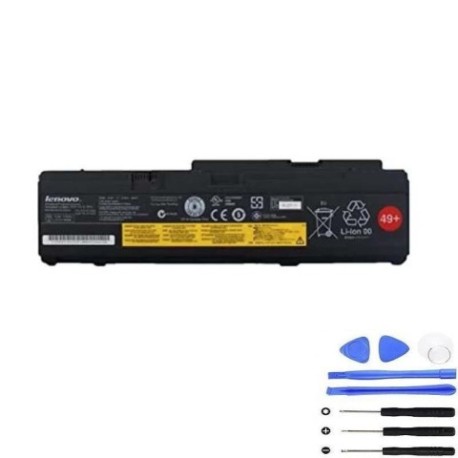
Battery models & part numbers
| Reference / P/N |
|---|
| 42T4521 |
| 42T4522 |
| 42T4523 |
| 42T4642 |
| 42T4643 |
| 43R1965 |
| 43R1967 |
| ASM 42T4519 |
| ASM 42T4523 |
| FRU 42T4518 |
| FRU 42T4522 |
| Lenovo-42T4523-44Wh |
Compatible laptop models
| Model |
|---|
| ThinkPad Reserve Edition 8748 |
| ThinkPad X300 |
| ThinkPad X300 2748 |
| ThinkPad X300 2749 |
| ThinkPad X300 6476 |
| ThinkPad X300 6477 |
| ThinkPad X300 6478 |
| ThinkPad X301 |
| Thinkpad X301 2774 |
| Thinkpad X301 2776 |
| Thinkpad X301 2777 |
| Thinkpad X301 2778 |
| Thinkpad X301 2779 |
| Thinkpad X301 4057 |
Introduction
The Lenovo 42T4523 44Wh battery is a high-quality replacement power solution for various ThinkPad models. Designed to meet original equipment specifications, this battery ensures reliable performance for Australian and New Zealand users.
Common signs you need a replacement
| Symptom | Cause | Verification | Recommendation |
|---|---|---|---|
| Short battery life | Ageing battery cells | Check power settings | Replace battery |
| Laptop won’t charge | Battery failure | Test with power adapter | Replace battery |
| Battery swelling | Internal damage | Visual inspection | Replace immediately |
| Overheating | Faulty battery | Temperature check | Replace battery |
How to check compatibility
Check your laptop’s model number on the bottom case or in system information. Compare it with our compatible models list above. You can also remove your current battery and match the part number with our reference list.
When to replace
Replace your battery when it holds less than 50% of its original capacity, shows physical damage, or fails to charge properly. Most laptop batteries last 2-3 years with regular use in AU/NZ conditions.
Installation guide (overview)
1. Power off your laptop and disconnect the charger
2. Remove the old battery by sliding the release latch
3. Align the new battery with the connector
4. Slide into place until it clicks
5. Charge fully before first use
Usage & care tips
• Avoid extreme temperatures (ideal range 15-25°C)
• Calibrate battery monthly by fully discharging then charging
• Store in cool, dry place when not in use
• Use authorised chargers only
Safety & recycling in AU/NZ
Dispose of old batteries at authorised recycling centres. Never dispose in household waste. In Australia, use Batteryback or similar programmes. In New Zealand, check with local council recycling services.
FAQ
How long does delivery take in Australia?
Most orders are delivered within 3-7 business days to metro areas.
Is this battery genuine Lenovo?
This is a high-quality replacement battery that meets original specifications.
What warranty is provided?
This battery comes with a 12-month warranty covering manufacturing defects.
Can I use this battery in New Zealand?
Yes, this battery is compatible with power systems in both Australia and New Zealand.
How do I maximise battery life?
Avoid complete discharges, keep between 20-80% charge when possible, and store in cool conditions.
What if my model isn’t listed?
Check your battery’s part number against our reference list for compatibility.