Battery models & part numbers
| Reference / P/N |
|---|
| Lenovo 01AV422 |
| Lenovo 01AV423-24Wh |
| Lenovo 01AV424 |
| Lenovo 01AV425 |
| Lenovo 01AV426 |
| Lenovo 01AV427 |
| Lenovo 01AV428 |
| Lenovo 01AV452 |
| Lenovo 01AV490 |
| Lenovo 01AV491 |
| Lenovo 01AV492 |
| Lenovo 3ICP6/38/64 |
| Lenovo 4X50M08810 |
| Lenovo 4X50M08811 |
| Lenovo 4X50M08812 |
| Lenovo 61 61+ 61++ |
| Lenovo SB10K97580 |
| Lenovo SB10K97581 |
| Lenovo SB10K97582 |
| Lenovo SB10K97584 |
| Lenovo SB10K97597 |
Compatible laptop models
| Model |
|---|
| Lenovo ThinkPad 25 (20K7) |
| Lenovo ThinkPad A475 (20KL/20KM) |
| Lenovo ThinkPad A485 (20MU/20MV) |
| Lenovo ThinkPad P51S T470 T570 T480 T580 |
| Lenovo ThinkPad P51s (20HB/20HC) |
| Lenovo ThinkPad P51s (20JY/20K0) |
| Lenovo ThinkPad P52s (20LB/20LC) |
| Lenovo ThinkPad T470 (20HD/20HE) |
| Lenovo ThinkPad T470 (20JM/20JN) |
| Lenovo ThinkPad T480 (20L5) |
| Lenovo ThinkPad T480 (20L5/20L6) |
| Lenovo ThinkPad T480 (20L6) |
| Lenovo ThinkPad T570 (20H9/20HA) |
| Lenovo ThinkPad T570 (20JW/20JX) |
| Lenovo ThinkPad T580 (20L9/20LA) |
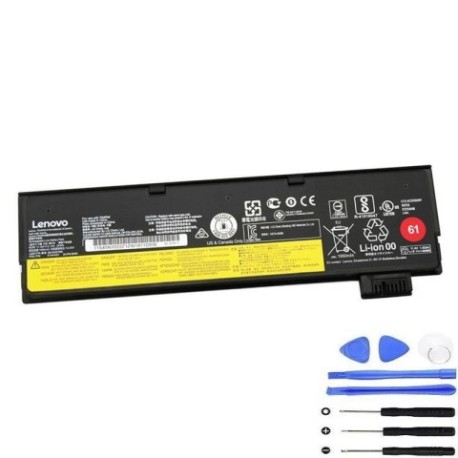
Introduction
Keep your Lenovo ThinkPad running at peak performance with our authorised replacement battery. The Lenovo 01AV423 24Wh battery is engineered to meet original equipment specifications, ensuring reliable power for your business or personal computing needs across Australia and New Zealand.
Common signs you need a replacement
| Symptoms | Causes | Verification | Recommendation |
|---|---|---|---|
| Short battery life | Ageing cells | Check power settings | Consider replacement |
| Laptop shuts down unexpectedly | Battery degradation | Monitor battery health | Replace battery |
| Battery won’t charge fully | Charging circuit issues | Test with different charger | Inspect battery |
| Battery swelling | Internal damage | Visual inspection | Replace immediately |
How to check compatibility
Verify your laptop model matches our compatibility list above. Check your current battery’s part number or consult your laptop’s documentation. For Australian and New Zealand customers, ensure you’re purchasing from authorised suppliers to guarantee compatibility and safety standards.
When to replace
Replace your battery when runtime drops below 50% of original capacity, charging takes significantly longer, or you notice physical swelling. Most Lenovo batteries last 2-3 years with regular use in typical AU/NZ office environments.
Installation guide (overview)
Power down your laptop and disconnect from power. Remove the bottom panel, disconnect the old battery, and install the new unit. Ensure proper connection and reassemble. Always follow manufacturer guidelines for your specific ThinkPad model.
Usage & care tips
Maintain battery health by avoiding extreme temperatures (ideal range 15-25°C). Calibrate monthly by fully charging then discharging. Store in cool, dry conditions when not in use. Avoid leaving your laptop plugged in constantly.
Safety & recycling in AU/NZ
Dispose of old batteries responsibly through authorised recycling centres. In Australia, use Batteryback or council collection services. In New Zealand, utilise accredited e-waste recyclers. Never dispose of lithium batteries in household waste.
FAQ
How long does shipping take to AU/NZ?
Typically 5-10 business days depending on your location.
Is this battery genuine Lenovo?
This is a high-quality replacement meeting original specifications.
What warranty is provided?
12-month warranty covering manufacturing defects.
Can I use this battery with different ThinkPad models?
Only with compatible models listed above.
How do I check my current battery health?
Use Lenovo Vantage software or system BIOS battery information.
Is installation difficult?
Most ThinkPad batteries are user-replaceable with basic tools.
What if my model isn’t listed?
Contact our support team for compatibility verification.