Battery models & part numbers
| Reference / P/N |
|---|
| Lenovo 00HW046 |
| Lenovo SB10J78993 |
| Lenovo SB10J78994 |
| Lenovo-00HW045-37Wh |
Compatible laptop models
| Model |
|---|
| Lenovo ThinkPad X1 Tablet Gen. 1 |
| Lenovo ThinkPad X1 Tablet Gen. 1 (20GG/20GH) |
| Lenovo ThinkPad X1 Tablet Gen. 2 |
| Lenovo ThinkPad X1 Tablet Gen. 2 (20JB/20JC) |
Introduction
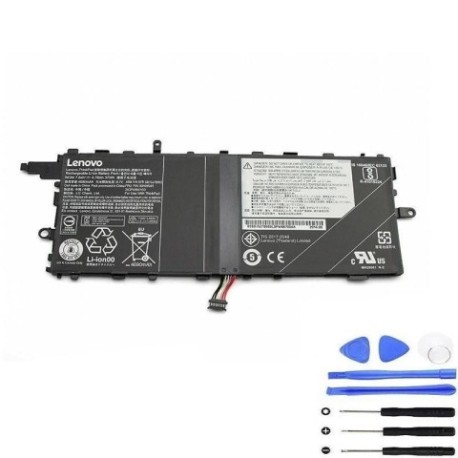
Keep your Lenovo ThinkPad X1 Tablet performing at its best with a genuine replacement battery. Our authorised Lenovo 00HW045 37Wh battery is designed specifically for your device, ensuring optimal performance and safety.
Common signs you need a replacement
| Symptoms | Possible Causes | How to Verify | Recommendation |
|---|---|---|---|
| Battery drains quickly | Ageing battery cells | Check battery health in system settings | Consider replacement if under 50% capacity |
| Laptop won’t hold charge | Faulty battery circuit | Test with power adapter disconnected | Replace immediately |
| Battery swelling | Internal damage or overheating | Visual inspection | Replace urgently for safety |
| Inconsistent charging | Worn charging components | Monitor charging patterns | Replace if persistent |
How to check compatibility
Verify your laptop model matches our compatible list above. Check your current battery’s part number (usually found on the battery label) against our reference numbers. For exact matching, consult your device’s documentation or contact Lenovo support.
When to replace
Replace your battery when you notice significant performance decline, typically after 2-3 years of regular use. If your battery shows any swelling, overheating, or fails to charge properly, replace it immediately for safety reasons.
Installation guide (overview)
1. Power off your laptop and disconnect all cables. 2. Remove the bottom cover (consult your device manual for specific instructions). 3. Disconnect the old battery connector. 4. Remove any screws securing the battery. 5. Install the new battery and reconnect. 6. Replace the cover and power on.
Usage & care tips
• Avoid extreme temperatures (ideal range 10-35°C)
• Don’t leave your laptop plugged in constantly
• Perform regular calibration cycles
• Store in cool, dry conditions when not in use
• Use only authorised Lenovo chargers
Safety & recycling in AU/NZ
Always purchase genuine batteries from authorised retailers. In Australia and New Zealand, dispose of old batteries at designated recycling centres. Never dispose of lithium batteries in household waste due to fire risk. Check with your local council for battery recycling options.
FAQ
How long does this battery last?
Typically 2-3 years with normal use, or approximately 500 charge cycles.
Is this battery genuine Lenovo?
Yes, this is an authorised replacement part with original specifications.
What’s the warranty period?
Most genuine batteries come with 12 months warranty – check product details.
Can I install it myself?
Yes, with basic technical skills and proper tools. Follow our installation guide carefully.
How do I recycle my old battery?
Take it to any battery recycling centre or electronics retailer offering recycling services.
What if my model isn’t listed?
Contact us with your exact model number for compatibility verification.
Is fast charging supported?
Yes, this battery supports standard Lenovo fast charging technology.