Lenovo 00HW022 24Wh Battery Replacement Guide
Find the perfect replacement battery for your Lenovo ThinkPad with our comprehensive compatibility guide and expert installation advice.
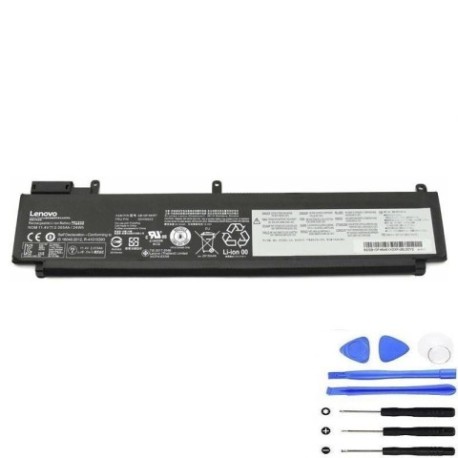
Battery models & part numbers
| Reference / P/N |
|---|
| 00HW022 |
| 00HW023 |
| 00WH036 |
| 00WH037 |
| 3ICP4/43/86 |
| Lenovo-00HW022-24Wh |
| SB10F46460 |
| SB10F46461 |
| SB10F46474 |
Compatible laptop models
| Model |
|---|
| Lenovo ThinkPad T460s (20FA/20F9) |
| Lenovo ThinkPad T470s (20HF/20HG) |
| Lenovo ThinkPad T470s (20JS/20JT) |
Introduction
The Lenovo 00HW022 24Wh battery is a high-quality replacement power solution designed specifically for compatible ThinkPad models. This authorised replacement ensures optimal performance and reliability for your business or personal computing needs.
Common signs you need a replacement
| Symptom | Cause | Verification | Recommendation |
|---|---|---|---|
| Short battery life | Ageing cells | Check system battery report | Replace battery |
| Laptop won’t hold charge | Failed battery circuit | Test with power adapter only | Immediate replacement |
| Battery swelling | Internal damage | Visual inspection | Replace immediately |
| Overheating during use | Faulty temperature regulation | Monitor temperature readings | Replace for safety |
How to check compatibility
Verify your laptop’s compatibility by checking the model number on the bottom label or through your system information. Cross-reference with our compatibility tables above to ensure perfect fitment.
When to replace
Replace your battery when you notice significant performance degradation, typically after 2-3 years of regular use. Most batteries retain about 80% capacity after 300-500 charge cycles.
Installation guide (overview)
Power off your laptop and disconnect all cables. Remove the bottom panel, disconnect the old battery connector, and carefully lift out the battery. Install the new battery, reconnect the connector, and replace the panel.
Usage & care tips
Store batteries at room temperature (15-25°C), avoid complete discharges, and don’t leave your laptop plugged in constantly. For optimal lifespan, maintain charge between 20-80% when possible.
Safety & recycling in AU/NZ
Never attempt to open or modify batteries. In Australia and New Zealand, dispose of old batteries at authorised recycling centres. Many electronics retailers offer free battery recycling services.
FAQ
How long does shipping take to AU/NZ?
Most orders arrive within 5-10 business days depending on your location.
Is this battery genuine Lenovo?
This is a high-quality compatible replacement that meets or exceeds original specifications.
What’s the warranty period?
This battery comes with a 12-month warranty covering manufacturing defects.
Can I use this battery with newer ThinkPad models?
No, this battery is specifically designed for the compatible models listed above.
How do I calibrate the new battery?
Charge to 100%, use until it shuts down, then recharge fully. Repeat this process 2-3 times.
What’s the battery capacity in millimetres?
The battery dimensions are approximately 260mm x 90mm x 20mm.
Is overnight charging safe?
Modern laptops have protection circuits, but it’s best to unplug once fully charged for optimal battery health.