Battery models & part numbers
| Reference / P/N |
|---|
| 00HW020 |
| 00HW021 |
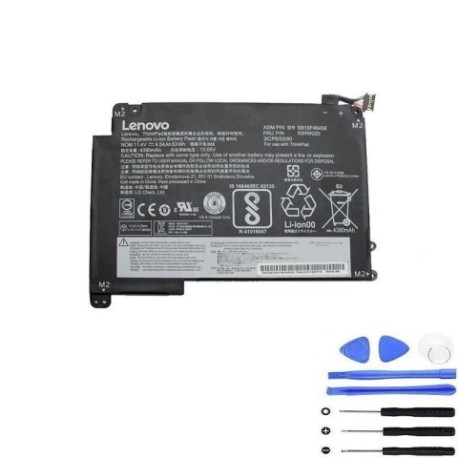
| 8SSB10F46458 |
| 8SSB10F46459 |
| SB10F46458 |
| SB10F46459 |
Compatible laptop models
| Model |
|---|
| Lenovo ThinkPad P40 Yoga (20GQ) |
| Lenovo ThinkPad P40 Yoga (20GR) |
| Lenovo ThinkPad S3 Yoga 14 (20DM) |
| Lenovo ThinkPad Yoga 460 (20EL) |
| Lenovo ThinkPad Yoga 460 (20EM) |
Introduction
Keep your Lenovo ThinkPad performing at its best with our genuine 53Wh replacement battery. This high-quality battery is specifically designed for multiple Yoga series models, ensuring optimal performance and reliability.
Common signs you need a replacement
| Symptoms | Causes | Verification | Recommendation |
|---|---|---|---|
| Battery drains quickly | Ageing cells, reduced capacity | Check battery health in system settings | Consider replacement if under 50% capacity |
| Laptop won’t hold charge | Faulty battery circuit | Test with power adapter disconnected | Immediate replacement needed |
| Battery swelling | Internal damage, overheating | Visual inspection, uneven surface | Replace immediately for safety |
| System shuts down unexpectedly | Voltage drops, poor connection | Monitor battery percentage drops | Replace to prevent data loss |
How to check compatibility
Verify your laptop model matches one listed above. Check your current battery’s part number (usually printed on the battery) or look up your laptop’s specifications in system information. All compatible models are Lenovo ThinkPad Yoga series with specific model codes.
When to replace
Replace your battery when it holds less than 50% of its original capacity, shows physical damage, or causes system instability. Most batteries need replacement after 2-3 years of regular use. In Australia’s climate, heat can accelerate battery degradation.
Installation guide (overview)
Power off your laptop and disconnect all cables. Remove the bottom cover (consult your model’s service manual). Disconnect the old battery connector and remove any screws. Install the new battery, reconnect the connector, and reassemble. Always use authorised service centres if unsure.
Usage & care tips
Avoid extreme temperatures – ideal operating range is 10°C to 35°C. Don’t leave your laptop plugged in constantly. Calibrate your battery monthly by fully charging then discharging to 20%. Store in cool, dry conditions when not in use for extended periods.
Safety & recycling in AU/NZ
Never attempt to open or modify the battery. Dispose of old batteries at authorised recycling centres – most electronics retailers offer free battery recycling. In Australia, check with Batteryback or your local council. In New Zealand, use recognised e-waste recyclers.
FAQ
How long does shipping take in Australia?
Typically 3-7 business days depending on your location.
Is this battery genuine Lenovo?
Yes, this is an original Lenovo battery with full compatibility.
What warranty do you offer?
12-month warranty covering manufacturing defects.
Can I install this myself?
Yes, with basic technical skills, though we recommend professional installation.
Will this work with my charger?
Yes, compatible with standard Lenovo 65W and 90W adapters.
How do I check battery health?
Use Lenovo Vantage software or Windows battery report.
Do you ship to New Zealand?
Yes, with standard international shipping options.