Battery models & part numbers
| Reference / P/N |
|---|
| HP HSTNN-DB9Z |
| HP L97352-2C2 |
| HP L97352-2D1 |
| HP L97357-005 |
| HP WS04 |
| HP WS04066 |
| HP-WS04XL-66.52Wh |
Compatible laptop models
| Model |
|---|
| HP Spectre x360 14-ea0000s |
| HP Spectre x360 14-ea1000s |
| HP Spectre x360 14-ea1s |
| HP Spectre x360 14-ef0000s |
| HP Spectre x360 14-ef2000s |
| HP Spectre x360 14t-ea000s |
Introduction
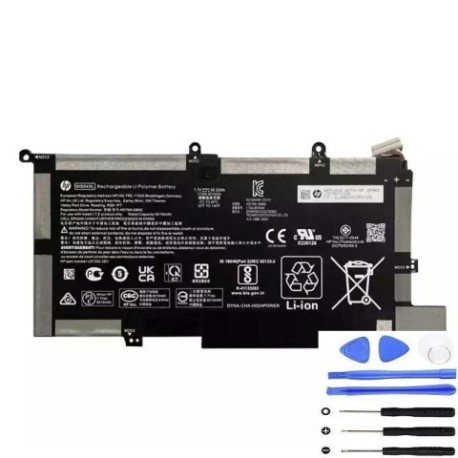
Keep your HP Spectre x360 14 series laptop performing at its best with a genuine HP WS04XL 66.52Wh battery replacement. This high-capacity battery is designed specifically for your convertible laptop’s power requirements.
Common signs you need a replacement
| Symptoms | Causes | Verification | Recommendation |
|---|---|---|---|
| Battery drains quickly (under 2 hours) | Ageing cells, reduced capacity | Check battery health in Windows | Consider replacement if below 60% capacity |
| Laptop shuts down unexpectedly | Voltage drops under load | Monitor battery percentage drops | Replace immediately for reliable use |
| Battery won’t charge fully | Charging circuit issues, worn cells | Check charging indicator lights | Test with different charger first |
| Laptop bulging or case separation | Battery swelling, safety hazard | Visual inspection, feel for bumps | Stop using immediately and replace |
| Overheating during charging | Internal resistance increase | Monitor temperature with software | Replace if consistently over 45°C |
How to check compatibility
Verify your laptop’s compatibility by checking the model number on the bottom casing or in System Information (type “msinfo32” in Windows search). Compare against our compatible models list above. You can also check your current battery’s part number by removing the bottom panel.
When to replace
Replace your battery when it holds less than 60% of its original capacity, shows physical damage, or causes performance issues. Most HP Spectre batteries last 2-3 years with regular use before needing replacement.
Installation guide (overview)
1. Power off laptop and disconnect charger
2. Remove bottom panel screws (Torx T5 recommended)
3. Carefully disconnect battery connector
4. Remove battery mounting screws
5. Install new battery and reconnect
6. Replace panel and power on
Note: Always use authorised repair centres if unsure.
Usage & care tips
• Avoid frequent full discharges – keep between 20-80% when possible
• Store at room temperature (15-25°C ideal)
• Use original HP charger for optimal performance
• Calibrate battery monthly by fully charging then discharging
• Avoid leaving laptop plugged in constantly at 100%
Safety & recycling in AU/NZ
In Australia and New Zealand, lithium-ion batteries must be recycled properly. Do not dispose in household waste. Use battery recycling programmes at Officeworks, Battery World, or council recycling centres. Damaged or swollen batteries should be handled with care and recycled immediately.
FAQ
How long does shipping take in Australia?
Most orders arrive within 3-7 business days depending on your location.
Is this battery genuine HP?
Yes, this is an original HP battery with full compatibility and warranty.
Will this work with my Spectre x360 14 from 2021?
Yes, all compatible models listed are supported regardless of purchase year.
Do I need special tools for installation?
A Torx T5 screwdriver is recommended for the bottom panel screws.
What’s the warranty on this battery?
This battery comes with a standard 12-month warranty.
Can I use this battery for international travel?
Yes, the battery meets international aviation standards for carry-on luggage.
How do I dispose of my old battery safely?
Take it to any authorised battery recycling centre in your area.