Battery models & part numbers
| Reference / P/N |
|---|
| 694864-851 |
| 695192-001 |
| H4Q45AA |
| HP-VK04-41Wh.jpg |
| HSTNN-YB4D |
| HSTNN-YB4M |
| TPN-Q113 |
| TPN-Q114 |
| TPN-Q115 |
| VOLKS |
Compatible laptop models
| Model |
|---|
| HP Pavilion 14 14-c000 Chromebook |
| HP Pavilion 14 Laptop Notebooks |
| HP Pavilion 14-b100 15-b100 Sleekbook |
| HP Pavilion 14-b100 Ultrabook |
| HP Pavilion 14ts |
| HP Pavilion 14zs |
| HP Pavilion 15s |
| HP Pavilion 15ts |
| HP Pavilion 15zs |
| HP Pavilion m4-1000 Notebook PC |
| HP Pavilion Sleekbook 14s |
| HP Pavilion Sleekbook 14-Bs |
| HP Pavilion Sleekbook 14-b000 15-b000 |
| HP Pavilion Sleekbook 14ts |
| HP Pavilion Sleekbook 14zs |
| HP Pavilion Sleekbook 14Z-Bs |
| HP Pavilion Sleekbook 15s |
| HP Pavilion Sleekbook 15-Bs |
| HP Pavilion Sleekbook 15ts |
| HP Pavilion Sleekbook 15zs |
| HP Pavilion TouchSmart 14s |
| HP Pavilion TouchSmart 14-Bs |
| HP Pavilion TouchSmart 14-b100 Sleekbook |
| HP Pavilion TouchSmart 15 15-b000s |
| HP Pavilion TouchSmart 15-Bs |
| HP Pavilion Touchsmart 15-b100 Sleekbook |
| HP Pavilion Ultrabook 14-Bs |
| HP Pavilion Ultrabook 14-b000 15-b000 |
Introduction
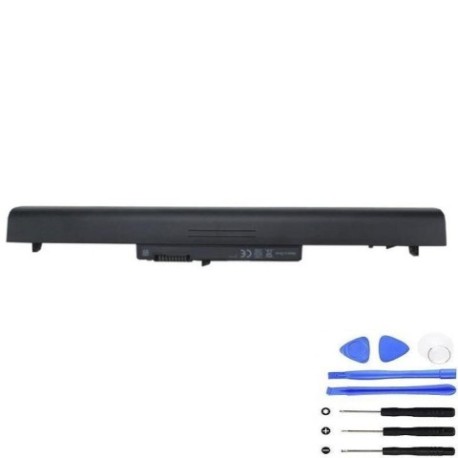
Keep your HP Pavilion laptop running smoothly with a genuine HP VK04 41Wh battery replacement. This high-quality battery is compatible with a wide range of HP Pavilion models and part numbers, ensuring reliable performance for work, study, or entertainment.
Common signs you need a replacement
| Symptom | Cause | How to verify | Recommendation |
|---|---|---|---|
| Battery drains quickly | Ageing cells, reduced capacity | Check battery health in system settings | Consider replacement if under 2 hours runtime |
| Laptop shuts down unexpectedly | Battery can’t hold charge | Monitor if it occurs when unplugged | Replace to prevent data loss |
| Battery won’t charge fully | Faulty charging circuit or worn battery | Check charging percentage over time | Replace if stuck below 80% capacity |
| Battery swelling or overheating | Internal damage, safety hazard | Visual inspection, feel for heat | Replace immediately, do not use |
How to check compatibility
Verify your laptop’s compatibility by checking the part number on your current battery (usually on the underside) or your laptop model in system settings. Cross-reference with the tables above to ensure a perfect fit.
When to replace
Replace your battery when you notice significant runtime reduction (less than 2 hours), charging issues, or physical damage like swelling. Most laptop batteries last 2–4 years with regular use.
Installation guide (overview)
1. Power off and unplug your laptop. 2. Remove the bottom panel (check your model’s manual for screws). 3. Disconnect the old battery connector. 4. Remove any screws securing the battery. 5. Insert the new HP VK04 battery and reconnect. 6. Replace the panel and power on.
Usage & care tips
• Avoid full discharges; charge between 20–80% for longevity.
• Store in a cool, dry place (15–25°C ideal).
• Use only authorised HP chargers.
• Calibrate monthly by fully charging then discharging to 5%.
Safety & recycling in AU/NZ
Never dispose of batteries in household waste. In Australia and New Zealand, take used batteries to designated recycling centres or electronics retailers. Damaged or swollen batteries should be handled with care and recycled promptly.
FAQ
How long does the HP VK04 battery last?
Typically 2–4 years with normal use, or about 500 charge cycles.
Is this battery genuine HP?
Yes, it meets HP’s original specifications and compatibility.
Can I replace the battery myself?
Yes, most HP Pavilion models allow user replacement with basic tools.
What’s the warranty?
Check the product page for current warranty details, usually 12–24 months.
How do I recycle my old battery?
Use Batteryback.org.au in Australia or local council services in NZ.
Will this battery work with my charger?
Yes, it’s compatible with standard HP 45W/65W chargers.
What if my model isn’t listed?
Double-check your part number or contact support for confirmation.