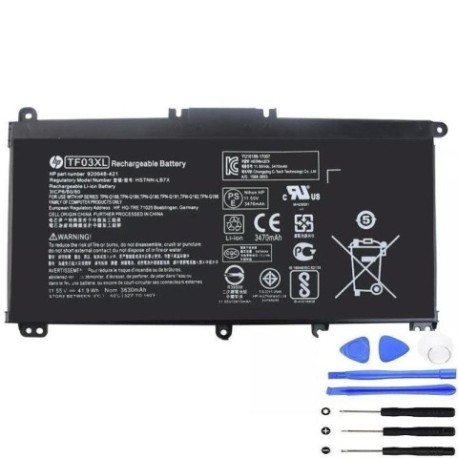
Battery models & part numbers
| Reference / P/N |
|---|
| HP TF03041XL |
| HP-TF03XL-41.9Wh |
| HSTNN-LB7X |
| TPN-C131 |
| TPN-Q188 |
| TPN-Q189 |
| TPN-Q190 |
| TPN-Q191 |
| TPN-Q192 |
| TPN-Q196 |
Compatible laptop models
| Model |
|---|
| HP 14-bp000s |
| HP 14-bp100s |
| HP 14s-be100txs |
| HP 15t-cc000s |
| HP 15z-cd000s |
| HP 920046-121 |
| HP 920046-421 |
| HP 920046-541 |
| HP 920046-AC1 |
| HP 920070-855 |
| HP 920070-856 |
| HP Pavilion 14-bf000s |
| HP Pavilion 14-bf100s |
| HP Pavilion 14-bk000s |
| HP Pavilion 14-bk100s |
| HP Pavilion 15-cc000s |
| HP Pavilion 15-cc100s |
| HP Pavilion 15-cc500s |
| HP Pavilion 15-cc600s |
| HP Pavilion 15-cc700s |
| HP Pavilion 15-cd000s |
| HP Pavilion 15-ck000s |
| HP Pavilion 15z-cd000s |
| HP Pavilion x360 14-cd0000s |
| HP Pavilion x360 14-cd0100s |
| HP Pavilion x360 14-cd0200s |
| HP Pavilion x360 14-cd0300s |
| HP Pavilion x360 14-cd0400s |
| HP Pavilion x360 14-cd0500s |
| HP Pavilion x360 14-cd0600s |
| HP Pavilion x360 14-cd0700s |
| HP Pavilion x360 14-cd1000s |
| HP Pavilion x360 14-cd1100s |
| HP Pavilion x360 14-cd1300s |
| HP Pavilion x360 14-cd1400s |
| HP Pavilion x360 14-cd1500s |
| HP Pavilion x360 14-cd1700s |
| HP Pavilion x360 14-dd0000s |
Introduction
If your HP laptop is showing signs of battery fatigue, our genuine HP TF03XL 41.9Wh replacement battery restores optimal performance. This high-quality battery is compatible with numerous HP Pavilion and standard models across Australia and New Zealand.
Common signs you need a replacement
| Symptom | Cause | Verification | Recommendation |
|---|---|---|---|
| Short battery life | Ageing cells, reduced capacity | Check power settings, monitor usage | Consider replacement if under 2 hours |
| Laptop shuts down unexpectedly | Battery can’t maintain voltage | Note shutdown at specific charge levels | Replace immediately to prevent data loss |
| Battery won’t charge fully | Faulty charging circuit or cells | Check charging indicator and percentage | Test with different charger first |
| Battery swelling or overheating | Internal damage or failure | Visual inspection, feel for heat | Replace urgently for safety |
| System reports battery error | Communication failure with laptop | Check device manager or HP diagnostics | Replace with compatible battery |
How to check compatibility
Verify your laptop model matches our compatibility list above. Check your current battery’s part number (usually printed on the battery) against our reference numbers. For Australian and New Zealand customers, ensure you’re purchasing from authorised retailers for warranty protection.
When to replace
Most laptop batteries last 2-3 years with regular use. Replace when battery life drops below 50% of original capacity, or if you experience any safety concerns like swelling. In AU/NZ’s varying climates, extreme temperatures can accelerate battery degradation.
Installation guide (overview)
1. Power off laptop and disconnect charger
2. Remove bottom panel screws
3. Carefully disconnect old battery connector
4. Remove mounting screws and old battery
5. Install new HP TF03XL battery
6. Reconnect connector and reassemble
7. Charge fully before first use
Usage & care tips
• Avoid frequent full discharges – partial charges are better
• Store between 15-25°C when not in use
• Don’t leave laptop plugged in constantly
• Calibrate battery monthly by fully charging then discharging
• Use genuine HP chargers for optimal performance
Safety & recycling in AU/NZ
Never attempt to open or modify lithium-ion batteries. In Australia, recycle through Batteryback.org.au programmes. In New Zealand, use recognised e-waste recycling centres. Both countries have strict regulations for battery disposal – never place in household rubbish.
FAQ
How long does shipping take in Australia?
Most metro areas receive orders within 3-5 business days. Regional areas may take slightly longer.
Is this battery genuine HP?
Yes, this is an authentic HP TF03XL battery meeting all original specifications and safety standards.
What warranty do you offer?
All our batteries come with a 12-month warranty covering manufacturing defects.
Will this work with my HP Pavilion x360?
Yes, if your model appears in our compatibility list above, it will work perfectly.
How do I check my current battery health?
Use HP Battery Check in Windows or check power settings for battery report.
Can I install this myself?
Yes, most HP laptops have user-replaceable batteries. Follow our installation guide or seek professional help if unsure.
Do you ship to New Zealand?
Yes, we ship to both Australia and New Zealand with standard and express options available.