Battery models & part numbers
| Reference / P/N |
|---|
| HP 849570-541 |
| HP 849910-850 |
| HP HSTNN-UB7A |
| HP TE03XL |
| HP-TE03XL-61.6Wh |
| HP TPN-Q173 |
Compatible laptop models
| Model |
|---|
| HP Omen 15-ax000 |
| HP Omen 15t-ax000 |
| HP Omen 15t-ax200 |
| HP Pavilion 15-bc000 |
Introduction
Keep your HP laptop performing at its best with a genuine HP TE03XL 61.6Wh battery replacement. This high-quality battery is designed to restore your device’s mobility and reliability.
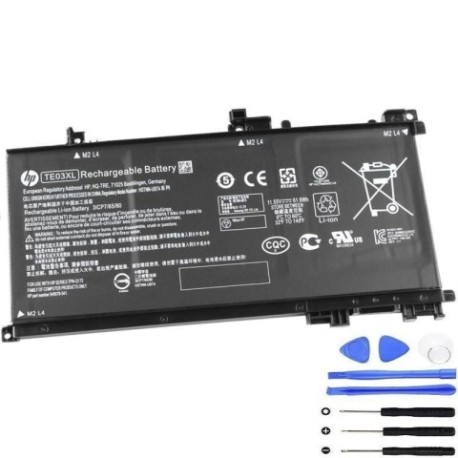
Common signs you need a replacement
| Symptoms | Possible Causes | How to Verify | Recommendation |
|---|---|---|---|
| Battery drains quickly | Ageing cells, reduced capacity | Check battery health in system settings | Consider replacement if under 50% capacity |
| Laptop won’t hold charge | Faulty battery circuit | Test with power adapter disconnected | Immediate replacement needed |
| Battery swelling | Internal damage, overheating | Visual inspection of battery compartment | Replace immediately for safety |
| Unexpected shutdowns | Voltage instability | Monitor during high-performance tasks | Battery replacement recommended |
How to check compatibility
Verify your laptop model matches the compatible models listed above. Check your current battery’s part number against our reference list. For HP devices, you can find this information in BIOS settings or on the physical battery label.
When to replace
Replace your battery when you notice significant performance degradation, typically after 2-3 years of regular use. If your battery health shows less than 60% capacity or you experience any swelling, replacement is urgent.
Installation guide (overview)
1. Power off laptop and disconnect all cables
2. Remove the bottom panel (consult your model’s service manual)
3. Disconnect old battery connector
4. Remove mounting screws and old battery
5. Install new battery and reconnect
6. Replace panel and power on
Usage & care tips
• Avoid extreme temperatures (store between 15-25°C)
• Don’t leave laptop plugged in constantly
• Perform regular calibration cycles
• Keep battery contacts clean
• Use authorised HP chargers only
Safety & recycling in AU/NZ
In Australia and New Zealand, lithium-ion batteries must be recycled at authorised collection centres. Never dispose of batteries in household waste. Check with your local council for battery recycling options or return to HP recycling programmes.
FAQ
How long does shipping take to Australia/NZ?
Typically 7-14 business days depending on your location.
Is this battery genuine HP?
Yes, this is an authentic HP battery with full compatibility.
What warranty is provided?
12-month warranty covering manufacturing defects.
Can I install this myself?
Yes, with basic technical skills and proper tools. Follow our installation guide carefully.
How do I check my current battery health?
Use HP Battery Check in Windows or check BIOS battery information.
What if my model isn’t listed?
Contact our support team with your exact laptop model for compatibility verification.
Is overnight charging safe?
Modern HP laptops have protection circuits, but we recommend unplugging once fully charged.