Battery models & part numbers
| Reference / P/N |
|---|
| 800232-241 |
| 800232-271 |
| 800232-541 |
| 800514-001 |
| 821691-001 |
| 854050-421 |
| 854050-541 |
| 854109-850 |
| HP-ST03XL-49Wh |
| HSTNN-DB6V |
| HSTNN-I42C |
| HSTNN-L42C |
| HSTNN-LB7K |
| HSTNN-UB6T |
| HSTNN-UB7D |
| SN03XL |
| SN03044XL |
| ST03XL |
| T7B33AA |
Compatible laptop models
| Model |
|---|
| HP EliteBook 720 G4s |
| HP EliteBook 725 G3s |
| HP EliteBook 725 G4s |
| HP EliteBook 820 G3s |
| HP EliteBook 820 G4s |
| HP EliteBook 828 G3s |
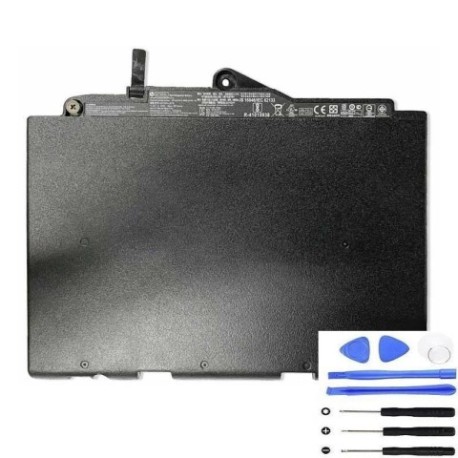
Introduction
Keep your HP EliteBook running at peak performance with our authorised HP ST03XL 49Wh replacement battery. This high-quality battery is designed to meet original specifications and is compatible with multiple HP laptop models.
Common signs you need a replacement
| Symptoms | Causes | Verification | Recommendation |
|---|---|---|---|
| Battery drains quickly | Ageing cells, reduced capacity | Check battery health in system settings | Consider replacement if under 2 hours runtime |
| Laptop won’t hold charge | Failed battery cells | Test with power adapter disconnected | Replace immediately if no power without adapter |
| Battery swelling or overheating | Internal damage, safety risk | Visual inspection, temperature check | Replace urgently – safety hazard |
| Inconsistent charging | Worn connectors, battery wear | Monitor charging patterns | Replace if charging stops randomly |
How to check compatibility
Verify your laptop model matches our compatibility list above. Check your current battery’s part number (usually printed on the battery) against our reference numbers. For HP EliteBook models, compatibility is confirmed for G3 and G4 series as listed.
When to replace
Replace your battery when runtime drops below 2 hours, charging becomes inconsistent, or physical damage/swelling occurs. Most HP batteries last 2-3 years with regular use before needing replacement.
Installation guide (overview)
Power off and unplug your laptop. Remove the bottom panel (usually secured with screws). Disconnect the old battery connector and remove mounting screws. Install the new battery, reconnect, and reassemble. Always refer to your laptop’s service manual for detailed instructions.
Usage & care tips
Avoid extreme temperatures (ideal range 10°C to 35°C). Don’t leave your laptop plugged in constantly – occasional discharge cycles help maintain battery health. Store in cool, dry conditions when not in use for extended periods.
Safety & recycling in AU/NZ
Never attempt to open or modify the battery. Dispose of old batteries at authorised recycling centres – never in household waste. In Australia, use Batteryback or council e-waste services. In New Zealand, utilise accredited e-waste recyclers.
FAQ
How long does delivery take in Australia?
Most metropolitan areas receive orders within 3-5 business days. Regional areas may take 5-7 business days.
Is this battery genuine HP?
This is a high-quality replacement battery designed to meet original HP specifications and performance standards.
What warranty do you offer?
We provide a 12-month warranty covering manufacturing defects and performance issues.
Can I use this battery with newer HP models?
This battery is specifically designed for compatible G3 and G4 EliteBook models. Check compatibility above before purchase.
How do I recycle my old battery?
Take your old battery to any authorised e-waste recycling centre. Many office supply stores and council facilities accept them free of charge.
Will this battery work with my docking station?
Yes, this replacement battery maintains full compatibility with HP docking stations and accessories.
What’s the battery capacity?
This is a 49Wh (watt-hour) battery providing typical runtime of 4-6 hours depending on usage and laptop settings.