HP SO04XL 42Wh Battery Replacement Guide
Find the perfect replacement battery for your HP laptop with our comprehensive compatibility guide and expert tips for Australian and New Zealand users.
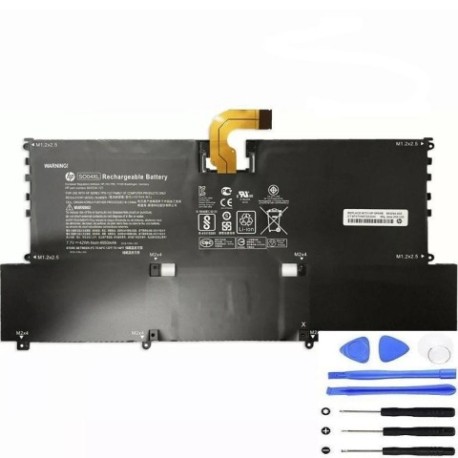
Battery models & part numbers
| Reference / P/N |
|---|
| HP 843534-121 |
| HP 843534-1C1 |
| HP 844199-855 |
| HP 908309-1C1 |
| HP 908319-855 |
| HP HSTNN-IB7J |
| HP HSTNN-IB7R |
| HP SO04038XL-PL |
| HP SO04042XL |
| HP-SO04XL-42Wh |
Compatible laptop models
| Model |
|---|
| HP Spectre 13-Vs |
| HP Spectre 13-v000s |
| HP Spectre 13-v100s |
| HP Spectre Pro 13 G1s |
| HP TPN-C127 |
Introduction
The HP SO04XL 42Wh battery is a high-quality replacement solution for various HP Spectre and compatible laptop models. This guide helps Australian and New Zealand users identify compatibility and make informed purchasing decisions.
Common signs you need a replacement
| Symptom | Cause | Verification | Recommendation |
|---|---|---|---|
| Rapid power drain | Battery degradation | Check battery health in system settings | Consider replacement if under 50% capacity |
| Laptop won’t hold charge | Failed battery cells | Test with power adapter disconnected | Immediate replacement needed |
| Battery swelling | Internal damage or age | Visual inspection of battery compartment | Replace immediately for safety |
| Overheating during use | Inefficient power delivery | Monitor temperature with system tools | Replace to prevent damage |
How to check compatibility
Verify your laptop’s model number on the bottom case or in system information. Cross-reference with our compatibility tables above. For HP Spectre models, check the specific variant (13-Vs, 13-v000s, etc.) to ensure perfect fit.
When to replace
Replace your battery when it holds less than 50% of its original capacity, shows physical damage, or causes system instability. Most HP batteries last 2-3 years with regular use before requiring replacement.
Installation guide (overview)
Power off your laptop and disconnect all cables. Remove the bottom panel using the appropriate screwdriver. Disconnect the old battery connector and remove mounting screws. Install the new HP SO04XL battery, reconnect the connector, and reassemble. Always consult your device’s service manual for detailed instructions.
Usage & care tips
Store batteries at room temperature (15-25°C). Avoid complete discharges – recharge when battery reaches 20-30%. Don’t leave your laptop plugged in constantly. Use authorised HP chargers for optimal performance.
Safety & recycling in AU/NZ
Never attempt to open or modify batteries. Damaged batteries should be taken to authorised recycling centres. In Australia, use Batteryback or similar programmes. In New Zealand, utilise e-waste collection services. Never dispose of batteries in household waste.
FAQ
Q: Is this battery genuine HP?
A: Our HP SO04XL 42Wh battery meets or exceeds original specifications and is fully compatible with listed models.
Q: What warranty do you offer?
A: We provide a 12-month warranty covering manufacturing defects for Australian and New Zealand customers.
Q: How long does shipping take to AU/NZ?
A: Most orders arrive within 5-7 business days to major cities, with rural areas taking slightly longer.
Q: Can I install this battery myself?
A: Yes, with basic technical skills and proper tools. Follow our installation overview or seek professional help if unsure.
Q: What’s the battery capacity?
A: This is a 42Wh lithium-ion battery providing optimal performance for compatible HP laptops.
Q: Do you provide installation instructions?
A: Basic installation guidance is provided above. For detailed steps, consult your device’s service manual.