HP SK02XL 30Wh Battery Replacement Guide
Find the perfect replacement battery for your HP laptop with our comprehensive compatibility guide and installation instructions.
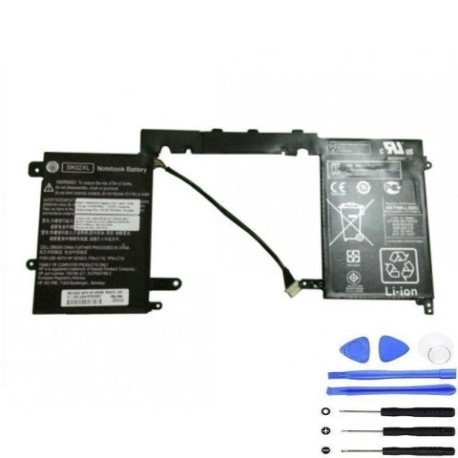
Battery models & part numbers
| Reference / P/N |
|---|
| 756186-421 |
| 756416-001 |
| HP-SK02XL-30Wh |
| HSTNN-LB6G |
| TPN-C118 |
| TPN-C119 |
Compatible laptop models
| Model |
|---|
| HP Pavilion 13-R000 X2 |
| HP Pavilion 13-R030CA X2 |
| HP Pavilion 13-R050CA X2 |
| HP Pavilion 13-R100DX X2 |
| HP Pavilion 13-R100DX X2 Detachable PC |
| HP Pavilion X2 Detachable |
| HP Split x2 13-R010dx 13.3 |
| HP Split X2 Detachable |
Introduction
The HP SK02XL 30Wh battery is designed for various HP Pavilion and Split X2 models, providing reliable power for your mobile computing needs across Australia and New Zealand.
Common signs you need a replacement
| Symptoms | Causes | Verification | Recommendation |
|---|---|---|---|
| Battery drains quickly | Ageing cells | Check battery health in system settings | Consider replacement if under 50% capacity |
| Laptop won’t hold charge | Failed battery circuit | Test with power adapter disconnected | Immediate replacement needed |
| Battery swelling | Internal damage | Visual inspection | Stop using immediately and replace |
| Overheating during use | Faulty temperature regulation | Monitor temperature readings | Replace to prevent damage |
How to check compatibility
Verify your laptop model matches our compatibility list above. Check your current battery’s part number (usually printed on the battery) or consult your laptop’s documentation.
When to replace
Replace your battery when it no longer holds sufficient charge for your needs, shows physical damage, or your system indicates reduced capacity (typically after 2-3 years of regular use).
Installation guide (overview)
Power off your laptop and disconnect all cables. Remove the bottom panel, disconnect the old battery connector, remove mounting screws, install the new battery, reconnect the connector, and reassemble your laptop.
Usage & care tips
Avoid extreme temperatures (ideal range 15-25°C), don’t leave your laptop plugged in constantly, and perform occasional full discharge cycles to maintain battery health.
Safety & recycling in AU/NZ
In Australia and New Zealand, dispose of old batteries at authorised recycling centres. Never dispose of lithium batteries in household waste due to fire risk.
FAQ
How long does this battery last?
Typically 2-4 hours depending on usage and laptop settings.
Is installation difficult?
Moderate difficulty – requires basic technical skills and appropriate tools.
Does this come with a warranty?
Yes, most replacement batteries include a 12-month warranty.
Will this work with my specific model?
Check the compatibility tables above – if your model is listed, it will work.
How do I recycle my old battery?
Take it to any authorised battery recycling centre in Australia or New Zealand.
What tools do I need for installation?
Typically a Phillips screwdriver and plastic spudger for safe disassembly.
Can I use this battery internationally?
Yes, laptop batteries are universal and work with any power supply.