HP RH03XL 45Wh Battery Replacement Guide
Find the perfect replacement battery for your HP laptop with our comprehensive compatibility guide for Australian and New Zealand customers.
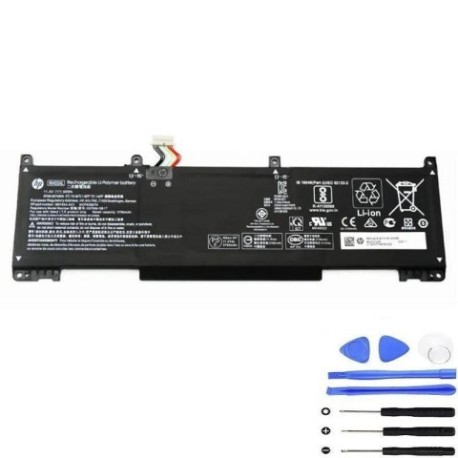
Battery models & part numbers
| Reference / P/N |
|---|
| HP RH03 |
| HP RH03042XL-PL |
| HP RH03045XL |
| HP RH03045XL-PL |
| HP TPN-DB0B |
| HP-RH03XL-45Wh |
Compatible laptop models
| Model |
|---|
| HP 191D4AV |
| HP HSTNN-IB9P |
| HP HSTNN-IB9Q |
| HP HSTNN-OB1T |
| HP HSTNN-UB7X |
| HP M01524-171 |
| HP M01524-1D1 |
| HP M01524-2B1 |
| HP M01524-2B2 |
| HP M01524-2C1 |
| HP M01524-2C2 |
| HP M01524-541 |
| HP M01524-AC1 |
| HP M01524-AC2 |
| HP M02027-002 |
| HP M02027-005 |
| HP M75017-2B1 |
| HP ProBook 430 G8s |
| HP ProBook 440 G8s |
| HP ProBook 445 G8s |
| HP ProBook 450 G8s |
| HP ProBook 455 G8s |
| HP ProBook 630 G8s |
| HP ProBook 640 G8s |
| HP ProBook 650 G8s |
Introduction
The HP RH03XL 45Wh battery is a high-quality replacement designed specifically for HP ProBook G8 series laptops and compatible models. This guide helps Australian and New Zealand customers find the right battery and understand the replacement process.
Common signs you need a replacement
| Symptom | Cause | Verification | Recommendation |
|---|---|---|---|
| Battery drains quickly | Ageing cells, reduced capacity | Check battery health in system settings | Replace if capacity below 60% |
| Laptop won’t hold charge | Failed battery cells | Test with power adapter removed | Immediate replacement needed |
| Battery swelling | Chemical degradation, safety hazard | Visual inspection, case separation | Replace immediately, do not use |
| Overheating during use | Internal resistance increase | Monitor temperature, check vents | Replace to prevent damage |
How to check compatibility
Verify your laptop model matches our compatibility list above. Check the label on your current battery for part numbers like HP RH03 or HP-RH03XL-45Wh. You can also find your laptop model number on the bottom case or in system information.
When to replace
Replace your battery when it no longer holds sufficient charge for your needs, shows physical damage, or your system indicates reduced capacity. Most laptop batteries last 2-4 years with regular use in Australian and New Zealand conditions.
Installation guide (overview)
1. Power off laptop and disconnect charger
2. Remove bottom case screws
3. Carefully disconnect old battery connector
4. Remove mounting screws and old battery
5. Install new battery and reconnect
6. Replace bottom case and power on
7. Allow full charge cycle before use
Usage & care tips
• Avoid complete discharges – recharge at 20-30%
• Store in cool, dry conditions (15-25°C ideal)
• Use authorised HP chargers only
• Calibrate monthly with full discharge/charge cycle
• Avoid extreme temperatures and direct sunlight
Safety & recycling in AU/NZ
In Australia and New Zealand, lithium-ion batteries must be recycled properly. Do not dispose in household waste. Use battery recycling services at electronics retailers or council recycling centres. Damaged or swollen batteries should be handled with care and recycled immediately.
FAQ
How long does shipping take in Australia?
Most orders arrive within 3-7 business days depending on your location.
Is this battery genuine HP?
This is a high-quality compatible replacement that meets or exceeds original specifications.
What warranty is provided?
Our batteries come with a 12-month warranty covering manufacturing defects.
Can I use this battery in New Zealand?
Yes, this battery is compatible with power systems in both Australia and New Zealand.
How do I maximise battery life?
Avoid extreme temperatures, use power-saving modes, and maintain 20-80% charge when possible.
Is installation difficult?
Most users can install it themselves following our guide, or seek professional help if unsure.
What if my model isn’t listed?
Contact our support team with your exact laptop model for compatibility verification.