HP PW04XL 48Wh Battery Replacement Guide
Find the perfect replacement battery for your HP Spectre XT Ultrabook with our comprehensive AU/NZ guide.
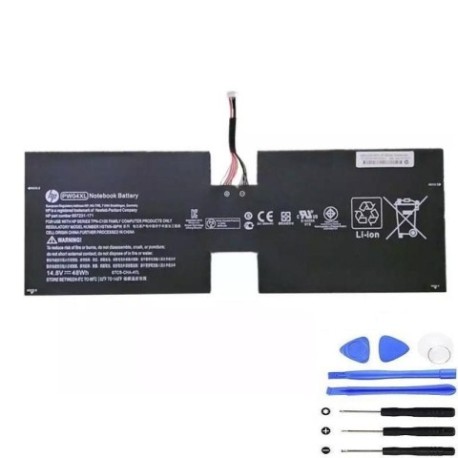
Battery models & part numbers
| Reference / P/N |
|---|
| 697231-171 |
| 697311-001 |
| HP-PW04XL-48Wh |
| HSTNN-IBPW |
| TPN-C105 |
Compatible laptop models
| Model |
|---|
| HP Spectre XT TouchSmart Ultrabook 15-4000 |
| HP Spectre XT TouchSmart Ultrabook 15t-4000 |
| HP Spectre XT TouchSmart Ultrabook CTO 15t-4000 |
Introduction
The HP PW04XL 48Wh battery is an authorised replacement power solution designed specifically for HP Spectre XT Ultrabook series. This high-quality battery ensures optimal performance and reliability for your device.
Common signs you need a replacement
| Symptoms | Causes | Verification | Recommendation |
|---|---|---|---|
| Rapid power drain | Battery degradation | Check battery health in system settings | Consider replacement if under 50% capacity |
| Laptop won’t hold charge | Cell failure | Monitor charge retention | Replace immediately |
| Swelling or bulging | Internal damage | Visual inspection | Replace urgently for safety |
| Overheating during use | Internal short circuit | Temperature monitoring | Replace to prevent damage |
How to check compatibility
Verify your laptop model matches the compatible models listed above. Check your current battery part number located on the battery itself or in system information. Cross-reference with our compatibility tables for confirmation.
When to replace
Replace your battery when you notice significant performance decline, typically after 2-3 years of regular use. Immediate replacement is required for any physical damage, swelling, or safety concerns.
Installation guide (overview)
Power off your laptop and disconnect from power. Remove the bottom panel using appropriate tools. Carefully disconnect the old battery and install the new HP PW04XL battery. Reassemble and charge fully before first use.
Usage & care tips
Store batteries at room temperature (15-25°C). Avoid complete discharges; charge when battery reaches 20-30%. Don’t expose to extreme temperatures or moisture. Use only authorised chargers.
Safety & recycling in AU/NZ
Never attempt to open or modify batteries. Dispose of old batteries at authorised recycling centres. In Australia, use Batteryback or similar programmes. In New Zealand, utilise local council recycling services.
FAQ
How long does the HP PW04XL battery last?
Typically 2-3 years with normal use, or approximately 500 charge cycles.
Is this battery compatible with my HP Spectre XT?
Yes, if your model matches those listed in our compatibility table.
What warranty is available?
Most authorised retailers offer 12-month warranties in Australia and New Zealand.
How do I recycle my old battery?
Take it to any authorised battery recycling centre – never dispose in household waste.
Can I use this battery with other HP models?
No, it’s specifically designed for the Spectre XT Ultrabook series listed above.
What’s the charging time?
Approximately 2-3 hours for full charge from empty.
Is installation difficult?
Moderate difficulty – follow our guide or seek professional assistance if unsure.