HP MG04XL 40Wh Battery Replacement
Find the perfect replacement battery for your HP laptop with our comprehensive compatibility guide and expert installation advice.
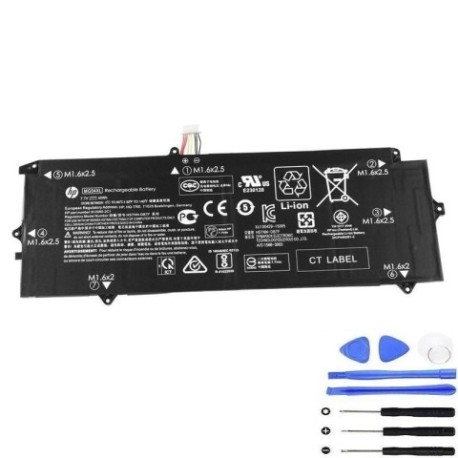
Battery models & part numbers
| Reference / P/N |
|---|
| HP 812060-2C1 |
| HP 812148-855 |
| HP 812205-001 |
| HP HSTNN-DB7F |
| HP HSTNN-I72C |
| HP MG04 |
| HP MG04040XL-PL |
| HP-MG04XL-40Wh |
Compatible laptop models
| Model |
|---|
| HP Elite x2 1012 G1s |
Introduction
The HP MG04XL 40Wh battery is designed to provide reliable power for your HP Elite x2 1012 G1s tablet. This high-quality replacement battery ensures your device maintains optimal performance throughout the day.
Common signs you need a replacement
| Symptoms | Causes | Verification | Recommendation |
|---|---|---|---|
| Battery drains quickly | Ageing battery cells | Check battery health in system settings | Consider replacement if below 50% capacity |
| Laptop won’t hold charge | Failed battery components | Test with different power adapter | Replace battery immediately |
| Battery swelling | Internal chemical reactions | Visual inspection | Stop using and replace urgently |
| Overheating during charging | Faulty charging circuit | Monitor temperature with software | Replace if consistently above 45°C |
How to check compatibility
Verify your laptop model matches the compatible models listed above. Check your current battery’s part number against our reference list. For HP Elite x2 1012 G1s tablets, this battery is specifically designed to fit perfectly and provide optimal performance.
When to replace
Replace your battery when you notice significant performance degradation, typically after 2-3 years of regular use. If your battery health shows less than 50% of original capacity or you experience any safety concerns like swelling, replacement is recommended.
Installation guide (overview)
Power off your device completely. Remove the back cover carefully using appropriate tools. Disconnect the old battery connector and remove any securing screws. Install the new HP MG04XL battery, reconnect the connector, and reassemble your device. Always refer to official HP documentation or seek professional assistance if unsure.
Usage & care tips
Avoid extreme temperatures – store and use between 10°C and 35°C. Don’t leave your device plugged in constantly after full charge. Perform regular calibration by fully discharging and recharging monthly. Keep battery contacts clean and dry.
Safety & recycling in AU/NZ
In Australia and New Zealand, battery disposal is regulated. Never dispose of lithium-ion batteries in household waste. Use authorised battery recycling centres available at most electronics retailers. Check with your local council for specific recycling programmes in your area.
FAQ
How long does this battery last?
The HP MG04XL 40Wh battery typically provides 3-5 hours of normal usage, depending on your device settings and applications.
Is this battery genuine HP?
This is a high-quality replacement battery designed to meet or exceed original specifications and is fully compatible with your HP device.
What’s the warranty period?
Most replacement batteries come with a 12-month warranty – check with your supplier for specific terms.
Can I install this myself?
Yes, with basic technical skills and proper tools. However, if you’re uncomfortable, we recommend seeking professional installation services.
How do I recycle my old battery?
Take your old battery to any authorised electronics retailer or recycling centre in Australia or New Zealand for proper disposal.
Will this battery work with my charger?
Yes, this battery is designed to work with your original HP charger and charging system.
How long until I receive my order?
Delivery times vary by location within Australia and New Zealand, typically 3-7 business days for most metropolitan areas.