HP KI04 41Wh Laptop Battery Replacement
Find the perfect replacement battery for your HP laptop with our comprehensive compatibility guide. This HP-KI04-41Wh battery delivers reliable power for various HP Pavilion and standard models across Australia and New Zealand.
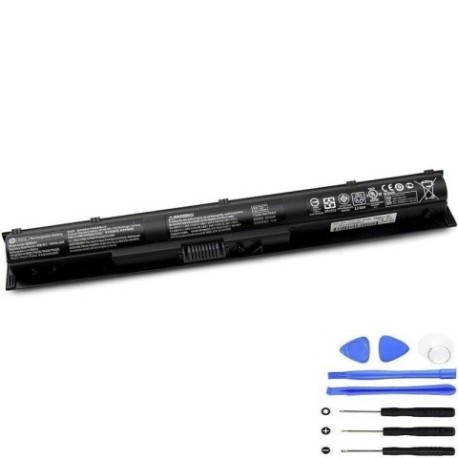
Battery models & part numbers
| Reference / P/N |
|---|
| HP 800009-121 |
| HP 800009-141 |
| HP 800009-221 |
| HP 800009-241 |
| HP 800009-251 |
| HP 800009-421 |
| HP 800010-421 |
| HP 800014-800 |
| HP 800049-001 |
| HP 800050-001 |
| HP 822904-A21 |
| HP HP 800050-001 |
| HP HP KI04048-CL |
| HP HP TPN-Q159 |
| HP HSTNN-DB6T |
| HP HSTNN-LB6R |
| HP HSTNN-LB6S |
| HP HSTNN-UB6P |
| HP KI04041 |
| HP KI04048 |
| HP KI04048-CL |
| HP N2L84AA |
| HP N2L84AA#ABB |
| HP TPN-Q158 |
| HP TPN-Q159 |
| HP TPN-Q160 |
| HP TPN-Q161 |
| HP TPN-Q162 |
| HP TPN-Q163 |
| HP-KI04-41Wh |
Compatible laptop models
| Model |
|---|
| HP 14-d000s |
| HP 14-g000s |
| HP 14-r000s |
| HP 14-r100s |
| HP 14-r200s |
| HP 15-d000s |
| HP 15-g000s |
| HP 15-g100s |
| HP 15-g200s |
| HP Pavilion 14-ab000 (Touch)s |
| HP Pavilion 14-ab000s |
| HP Pavilion 14-ab100 (Touch)s |
| HP Pavilion 14-ab100s |
| HP Pavilion 14t-ab000s |
| HP Pavilion 15-ab000s |
| HP Pavilion 15-ab100s |
| HP Pavilion 15-ab200s |
| HP Pavilion 15-ab500s |
| HP Pavilion 15-an000s |
| HP Pavilion 15-bj000s |
| HP Pavilion 15-BJ018CAs |
| HP Pavilion 17-g000s |
| HP Pavilion 17-g100s |
| HP Pavilion 17-g200s |
| HP Pavilion Gaming 15-ak000s |
| HP Pavilion Gaming 15-ec2000s |
Introduction
The HP KI04 41Wh battery is a high-quality replacement power source designed specifically for various HP laptop models. With 41 watt-hours of capacity, this battery provides reliable performance for work, study, and entertainment across Australia and New Zealand.
Common signs you need a replacement
| Symptoms | Causes | Verification | Recommendation |
|---|---|---|---|
| Battery drains quickly | Ageing cells, reduced capacity | Check battery health in system settings | Consider replacement if under 50% capacity |
| Laptop won’t hold charge | Failed battery cells | Test with power adapter disconnected | Immediate replacement needed |
| Battery swelling | Internal damage, overheating | Visual inspection, case misalignment | Replace immediately for safety |
| Overheating during use | Inefficient power delivery | Monitor temperature, check vents | Replace to prevent damage |
| Charging indicator issues | Battery communication failure | Test with different power sources | Battery replacement likely required |
How to check compatibility
To ensure this battery fits your HP laptop, check the model number on the bottom case or under the battery compartment. Compare it against our compatibility tables above. You can also check your current battery’s part number – if it matches any in our reference list, this replacement will work perfectly.
When to replace
Replace your HP battery when you notice significant performance decline, typically after 2-3 years of regular use. Key indicators include reduced runtime (less than 60 minutes), failure to charge completely, or physical swelling. For optimal performance and safety, don’t wait until the battery fails completely.
Installation guide (overview)
1. Power off your laptop and disconnect the AC adapter
2. Remove the bottom panel or battery compartment cover
3. Disconnect the battery connector from the motherboard
4. Remove any screws securing the battery
5. Lift out the old battery and insert the new HP-KI04-41Wh
6. Reconnect the battery connector and replace screws
7. Reassemble your laptop and charge fully before first use
Usage & care tips
• Avoid complete discharges – recharge when battery reaches 20-30%
• Store in cool, dry conditions between 15-25°C
• Calibrate your battery monthly by fully charging then discharging
• Use only HP-authorised chargers and accessories
• Keep battery contacts clean and free from debris
Safety & recycling in AU/NZ
In Australia and New Zealand, lithium-ion batteries must be disposed of responsibly. Never dispose of batteries in household waste. Use authorised battery recycling centres or return to electronics retailers. Damaged or swollen batteries should be handled with care and recycled immediately to prevent safety hazards.
FAQ
How long does the HP KI04 41Wh battery last?
With normal use, expect 2-4 hours of runtime depending on your laptop model and usage patterns. High-performance tasks will reduce battery life.
Is this battery compatible with my HP Pavilion?
Check our compatibility tables above. This battery works with multiple HP Pavilion models including the 14, 15, and 17 series from 2014-2017.