Battery models & part numbers
| Reference / P/N |
|---|
| HP-HK04XL-78Wh |
| HSTNN-IB9J |
| L83796-171 |
| L84352-005 |
Compatible laptop models
| Model |
|---|
| HP EliteBook x360 1030 G7s |
| HP EliteBook x360 1030 G8s |
| HP EliteBook x360 1040 G7s |
| HP EliteBook x360 1040 G8s |
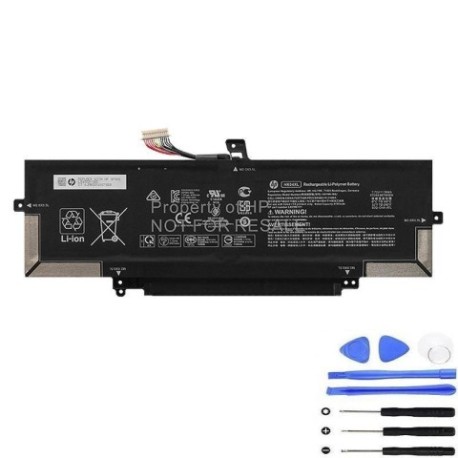
Introduction
Keep your HP EliteBook x360 running at peak performance with our genuine replacement battery. This 78Wh power solution ensures your device maintains optimal battery life and reliability.
Common signs you need a replacement
| Symptoms | Causes | Verification | Recommendation |
|---|---|---|---|
| Battery drains quickly | Ageing battery cells | Check battery health in system settings | Consider replacement if below 60% capacity |
| Laptop won’t hold charge | Degraded battery chemistry | Test with different power adapter | Replace battery immediately |
| Battery swelling | Internal pressure build-up | Visual inspection of battery compartment | Replace urgently – safety hazard |
| Random shutdowns | Voltage instability | Monitor system performance | Replace to prevent data loss |
How to check compatibility
Verify your laptop model matches the compatible models listed above. Check your current battery’s part number against our reference list. For certainty, consult your device’s service manual or contact HP support.
When to replace
Replace your battery when it holds less than 60% of its original capacity, shows physical damage, or causes performance issues. Most batteries need replacement after 2-3 years of regular use.
Installation guide (overview)
Power down your laptop completely. Remove the bottom cover using appropriate tools. Disconnect the old battery connector. Install the new battery and reassemble. Always follow manufacturer guidelines or seek professional installation.
Usage & care tips
Avoid extreme temperatures (ideal range 15-25°C). Don’t leave your laptop plugged in constantly. Calibrate your battery monthly by fully charging then discharging. Store in cool, dry conditions if not used for extended periods.
Safety & recycling in AU/NZ
Never attempt to open or modify the battery. Dispose of old batteries at authorised recycling centres. In Australia, use Batteryback or similar programmes. In New Zealand, utilise local council e-waste facilities. Never dispose of batteries in household waste.
FAQ
How long does this battery last?
Typically 2-3 years with normal use, or approximately 500 charge cycles.
Is this battery genuine HP?
Yes, this is an authentic HP replacement part with full compatibility.
What’s the warranty period?
Most replacement batteries come with a 12-month warranty.
Can I install it myself?
Yes, with basic technical skills and proper tools, though professional installation is recommended.
How do I check my current battery health?
Use HP Battery Check in Windows or check power settings in system preferences.
What’s the delivery time in Australia?
Typically 3-7 business days for most metropolitan areas.
Do you ship to New Zealand?
Yes, we offer shipping to both Australia and New Zealand with similar delivery times.