HP GH02XL 47.3Wh Battery Replacement Guide
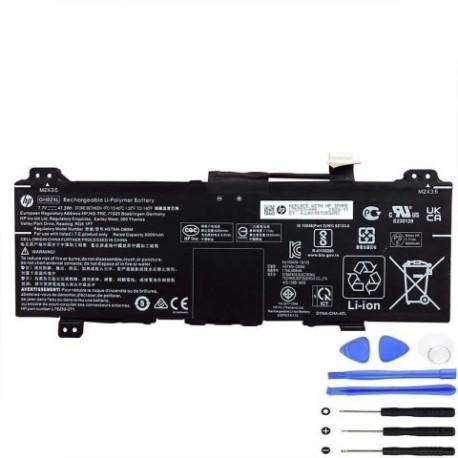
Battery models & part numbers
| Reference / P/N |
|---|
| HP 4473A9-2S1P |
| HP BQ40Z552 |
| HP GH02047XL |
| HP HSTNN-DB9M |
| HP HSTNN-UB7V |
| HP L75253-1C1 |
| HP L75253-1D1 |
| HP L75253-271 |
| HP L75253-2C1 |
| HP L75253-541 |
| HP L75783-005 |
| HP-GH02XL-47.3Wh |
Compatible laptop models
| Model |
|---|
| HP Chromebook 11 G8 |
| HP Chromebook 11 G8 EE |
| HP Chromebook 11A G8 |
| HP Chromebook 11A G8 EE |
| HP Chromebook 14 G6 |
| HP Chromebook 14A-NA000 |
| HP Chromebook X360 11 G3 |
| HP Chromebook x360 14 inch 14b-cb0000 |
| HP Chromebook x360 14a-ca0000 |
Introduction
If your HP Chromebook is struggling to hold a charge or shutting down unexpectedly, you likely need a battery replacement. The HP GH02XL 47.3Wh battery is the authorised replacement for multiple HP Chromebook models commonly used in Australian and New Zealand schools and workplaces.
Common signs you need a replacement
| Symptom | Cause | Verification | Recommendation |
|---|---|---|---|
| Battery drains quickly (under 2 hours) | Ageing battery cells | Check battery health in settings | Replace battery |
| Laptop shuts down at 20-30% charge | Faulty battery calibration | Monitor shutdown percentage | Replace and recalibrate |
| Battery won’t charge past 80% | Charging circuit failure | Test with different charger | Replace battery |
| Battery swelling or overheating | Internal damage | Visual inspection | Immediate replacement |
How to check compatibility
Check your laptop’s model number on the bottom case or in system settings. Compare it against our compatibility list above. You can also remove your current battery and match the part number printed on it.
When to replace
Replace your battery when it holds less than 50% of its original capacity, shows physical damage, or causes unexpected shutdowns. Most HP Chromebook batteries last 2-3 years with regular use.
Installation guide (overview)
1. Power off and unplug your Chromebook. 2. Remove the bottom case screws. 3. Carefully disconnect the old battery connector. 4. Remove any securing screws or tabs. 5. Install the new HP GH02XL battery. 6. Reconnect the battery connector. 7. Replace the bottom case. Always refer to official HP documentation for detailed instructions.
Usage & care tips
• Avoid extreme temperatures (ideal range 10°C to 35°C)
• Don’t leave your laptop plugged in constantly
• Perform occasional full discharge cycles
• Store in cool, dry conditions when not in use
Safety & recycling in AU/NZ
Never attempt to open or modify lithium-ion batteries. In Australia and New Zealand, recycle old batteries at authorised collection centres. Many electronics retailers offer free battery recycling services.
FAQ
How long does shipping take to AU/NZ?
Most orders arrive within 5-10 business days depending on your location.
Is this battery genuine HP?
This is a high-quality replacement battery compatible with HP specifications.
What’s the warranty period?
Typically 12 months from date of purchase.
Can I install it myself?
Yes, with basic technical skills and proper tools. Follow safety guidelines.
Will it work with my charger?
Yes, it’s designed to work with your original HP Chromebook charger.
How do I dispose of my old battery?
Take it to any battery recycling centre in Australia or New Zealand.