Battery models & part numbers
| Reference / P/N |
|---|
| HP 801517-541 |
| HP 801554-001 |
| HP 801554-002 |
| HP C103XL |
| HP CI03 |
| HP CI03048XL |
| HP CIO3XL |
| HP HSTNN-I66C-4 |
| HP HSTNN-I66C-5H |
| HP HSTNN-I66C-5U |
| HP HSTNN-I67C-4 |
| HP HSTNN-I67C-5 |
| HP HSTNN-LB6T |
| HP HSTNN-UB6Q |
| HP T7B31AA |
| HP-CI03XL-48Wh |
Compatible laptop models
| Model |
|---|
| HP ProBook 640 G2s |
| HP ProBook 640 G3s |
| HP ProBook 645 G2s |
| HP ProBook 645 G3s |
| HP ProBook 650 G2s |
| HP ProBook 650 G3s |
| HP ProBook 655 G2s |
| HP ProBook 655 G3s |
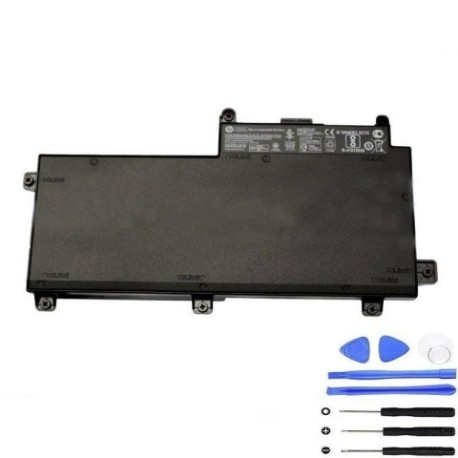
Introduction
Keep your HP ProBook running at peak performance with our genuine replacement battery. Designed specifically for Australian and New Zealand conditions, this 48Wh power solution ensures reliable performance for business and personal use.
Common signs you need a replacement
| Symptom | Cause | Verification | Recommendation |
|---|---|---|---|
| Short battery life | Ageing cells | Check power settings | Consider replacement |
| Swelling case | Internal damage | Visual inspection | Replace immediately |
| Not holding charge | Worn components | Battery test | New battery needed |
| Overheating | Faulty circuits | Temperature check | Safety replacement |
How to check compatibility
Verify your laptop model matches our compatibility list above. Check your current battery’s part number against our reference table. For certainty, consult your device’s system information or original documentation.
When to replace
Replace your battery when runtime drops below 50% of original capacity, typically after 2-3 years of regular use. Swelling, overheating or failure to charge indicate immediate replacement is required for safety.
Installation guide (overview)
Power down and unplug your laptop. Remove the bottom panel using appropriate screwdrivers. Disconnect the old battery connector and lift out. Insert new battery, reconnect, and reassemble. First charge for 4-6 hours.
Usage & care tips
Avoid complete discharges; recharge at 20-30% remaining. Store between 15-25°C. Calibrate monthly by fully charging then discharging. Keep contacts clean and dry for optimal performance.
Safety & recycling in AU/NZ
Dispose of old batteries at authorised collection centres. Never incinerate or dispose in household waste. In Australia, use Batteryback services. In New Zealand, utilise accredited e-waste recyclers.
FAQ
How long does delivery take in Australia?
Most metropolitan areas receive orders within 3-5 business days. Regional areas may take 5-7 business days.
Is this battery genuine HP?
Yes, this is an authentic HP replacement part with full manufacturer warranty and compatibility assurance.
What warranty do you offer?
All our batteries come with 12 months warranty covering manufacturing defects and performance issues.
Can I install this myself?
Yes, most users can install following our guide. If unsure, consult a professional technician for assistance.
How do I recycle my old battery?
Return to any Officeworks store in Australia or PlaceMakers in NZ, or check your local council’s e-waste program.
What’s the battery capacity?
This 48Wh battery provides approximately 4-6 hours of typical usage depending on your power settings and applications.
Is fast charging supported?
Yes, this battery supports HP’s fast charge technology, reaching 50% capacity in approximately 45 minutes.