HP BO03XL 32Wh Battery Replacement Guide
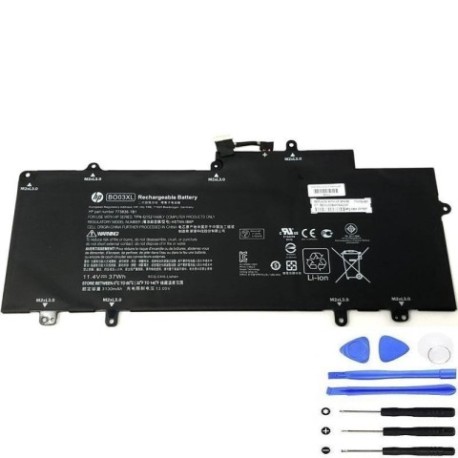
Introduction
Find the perfect replacement battery for your HP Chromebook with our comprehensive compatibility guide. The HP BO03XL 32Wh battery is designed to restore your laptop’s performance and mobility.
Battery models & part numbers
| Reference / P/N |
|---|
| 751895-1B1 |
| 751895-1C1 |
| 752235-005 |
| 774159-001 |
| BO03037XL |
| HP-BO03XL-32Wh |
| TPN-Q137 |
Compatible laptop models
| Model |
|---|
| HP Chromebook 14 G3s |
| HP Chromebook 14-x000s |
Common signs you need a replacement
| Symptom | Cause | Verification | Recommendation |
|---|---|---|---|
| Short battery life | Ageing cells | Check system power report | Replace if under 50% capacity |
| Laptop shuts down unexpectedly | Voltage drops | Monitor battery percentage | Immediate replacement needed |
| Battery won’t charge fully | Charging circuit failure | Test with different charger | Replace battery and check charger |
| Physical swelling | Internal damage | Visual inspection | Stop using immediately |
How to check compatibility
Verify your laptop model matches our compatibility list above. Check your current battery’s part number located on the battery label or in system information.
When to replace
Replace your battery when it holds less than 50% of its original capacity, shows physical damage, or causes unexpected shutdowns. Most batteries last 2-3 years with regular use.
Installation guide (overview)
Power off your Chromebook and disconnect the charger. Remove the bottom panel, disconnect the old battery connector, and install the new HP BO03XL battery. Reassemble and charge fully before first use.
Usage & care tips
Store batteries at room temperature (15-25°C), avoid complete discharges, and don’t leave your laptop plugged in constantly. Calibrate monthly by fully charging then discharging to 10%.
Safety & recycling in AU/NZ
Never puncture or expose batteries to extreme heat. In Australia and New Zealand, recycle old batteries at authorised collection centres. Check with your local council for recycling options.
FAQ
How long does shipping take in Australia?
Most orders ship within 1-2 business days with delivery times varying by location.
Is this battery genuine HP?
This is a high-quality compatible replacement battery that meets HP specifications.
What’s the warranty period?
Our batteries come with a 12-month warranty covering manufacturing defects.
Can I install this myself?
Yes, with basic technical skills and proper tools. Follow our installation guide carefully.
How do I check my battery health?
Use Chrome OS battery health tools or third-party diagnostic software to monitor capacity.
What if my model isn’t listed?
Contact our support team with your laptop’s exact model number for compatibility verification.
Do you ship to New Zealand?
Yes, we ship to both Australia and New Zealand with competitive shipping rates.