Battery models & part numbers
| Reference / P/N |
|---|
| HP BN06 |
| HP BN06072 |
| HP HSTNN-IB9A |
| HP L68235-1C1 |
| HP L68299-005 |
| HP-BN06XL-72.9Wh |
Compatible laptop models
| Model |
|---|
| HP Spectre X360 15-EBs |
| HP Spectre x360 15-eb0000s |
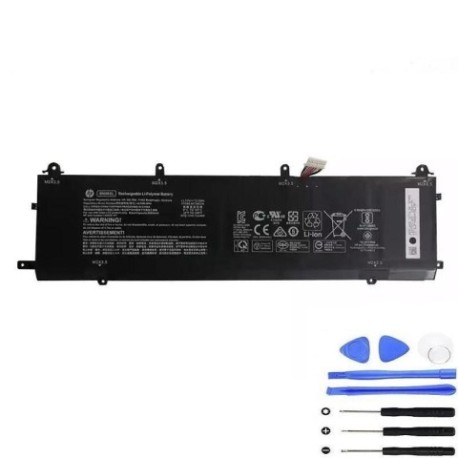
Introduction
Keep your HP Spectre performing at its best with our genuine replacement battery. This 72.9Wh power solution restores your laptop’s mobility and reliability.
Common signs you need a replacement
| Symptoms | Causes | Verification | Recommendation |
|---|---|---|---|
| Battery drains quickly | Ageing cells | Check battery health in system settings | Consider replacement if under 50% capacity |
| Laptop won’t hold charge | Failed battery circuits | Test with power adapter disconnected | Replace immediately |
| Battery swelling | Internal damage | Visual inspection | Replace urgently – safety risk |
| Unexpected shutdowns | Voltage drops | Monitor during heavy usage | Replace to prevent data loss |
How to check compatibility
Verify your laptop model matches our compatibility list above. Check your current battery’s part number (usually printed on the battery) against our reference numbers.
When to replace
Replace your battery when it no longer holds sufficient charge for your needs, shows physical damage, or your system reports significantly reduced capacity.
Installation guide (overview)
Power down your laptop completely. Remove the bottom cover using appropriate tools. Disconnect the old battery and install the new one, ensuring proper connection. Reassemble and charge fully before first use.
Usage & care tips
Avoid extreme temperatures (ideal range 10-35°C). Don’t leave your laptop plugged in constantly. Calibrate your battery monthly by fully discharging then recharging. Store in cool, dry conditions if not used for extended periods.
Safety & recycling in AU/NZ
Never attempt to open or modify the battery. Dispose of old batteries at authorised recycling centres – never in household waste. In Australia, use Batteryback or similar programmes. In New Zealand, utilise council e-waste services.
FAQ
How long does this battery last?
Typically 2-3 years with normal use, or 500+ charge cycles.
Is installation difficult?
Moderate difficulty – requires technical confidence and proper tools.
Does this affect my warranty?
Installing third-party batteries may void manufacturer warranty – check your terms.
How long for delivery in Australia?
Usually 3-7 business days to major centres.
Can I use this battery overseas?
Yes, it’s compatible with international voltage standards.
What if it doesn’t fit my laptop?
Verify your model number carefully – returns accepted for incompatible items.
Is this genuine HP?
This is a high-quality compatible replacement meeting original specifications.