Battery models & part numbers
| Reference / P/N |
|---|
| HP 808397-421 |
| HP 808451-001 |
| HP 808451-002 |
| HP AI06096XL |
| HP AI06096XL-PR |
| HP HSTNN-C86C |
| HP HSTNN-LB6X |
| HP-AI06XL-96Wh |
Compatible laptop models
| Model |
|---|
| HP ZBook 17 G3s |
Introduction
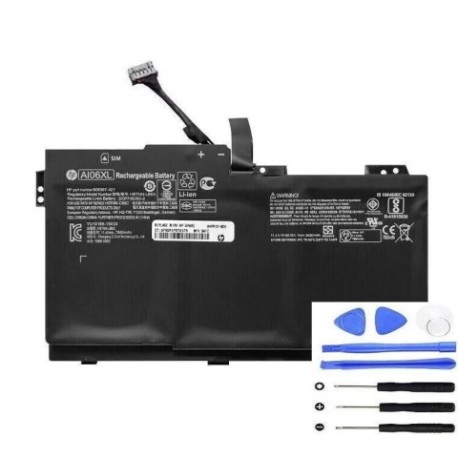
Keep your HP workstation running at peak performance with our genuine HP AI06XL 96Wh replacement battery. Specifically designed for Australian and New Zealand conditions, this high-capacity battery ensures your ZBook 17 G3s maintains optimal power throughout your workday.
Common signs you need a replacement
| Symptoms | Causes | Verification | Recommendation |
|---|---|---|---|
| Battery drains quickly | Ageing cells, reduced capacity | Check power settings, run diagnostics | Consider replacement if under 2 hours |
| Laptop won’t hold charge | Faulty battery circuit | Test with power adapter removed | Immediate replacement needed |
| Battery swelling/bulging | Internal gas buildup | Visual inspection, uneven surface | Stop use immediately, replace urgently |
| Overheating during use | Inefficient power delivery | Monitor temperature, check vents | Replace to prevent damage |
| Random shutdowns | Voltage instability | Note when shutdowns occur | Replace to maintain productivity |
How to check compatibility
Verify your laptop’s compatibility by checking the model number on the bottom casing or in System Information. Cross-reference with our compatibility table above. For ZBook 17 G3s users, this battery is specifically designed for your workstation’s power requirements.
When to replace
Replace your battery when it holds less than 50% of its original capacity, shows physical damage, or causes system instability. Most HP batteries last 2-3 years with regular use in AU/NZ conditions.
Installation guide (overview)
Power down your laptop and disconnect all cables. Remove the bottom panel using the appropriate screwdriver. Disconnect the old battery connector and remove any securing screws. Install the new battery, reconnect the connector, and reassemble. Always consult your device’s service manual or seek professional installation if unsure.
Usage & care tips
For optimal battery life in Australian and New Zealand conditions: avoid extreme temperatures (ideal range 15-25°C), calibrate monthly by fully charging then discharging, store at 40-60% charge if not using for extended periods, and use HP-approved chargers. Keep connections clean and dry.
Safety & recycling in AU/NZ
Never attempt to open or modify the battery casing. Dispose of old batteries at authorised recycling centres across Australia and New Zealand. Many electronics retailers offer free battery recycling services. Never dispose of lithium batteries in household waste due to fire risk.
FAQ
How long does shipping take to AU/NZ?
Most orders arrive within 5-7 business days to major Australian and New Zealand cities.
Is this battery genuine HP?
Yes, this is an authentic HP battery with full manufacturer warranty.
What’s the warranty period?
This battery comes with a 12-month warranty covering manufacturing defects.
Will this work with my ZBook 17 G3?
This battery is specifically designed for ZBook 17 G3s models as listed in our compatibility table.
How do I check my current battery health?
Use HP Battery Check in HP Support Assistant or check Power Options in Windows System settings.
Can I use this battery internationally?
Yes, the battery operates on standard voltage ranges compatible with international power systems.
What if my laptop model isn’t listed?
Contact our support team with your exact model number for compatibility verification.