HP AD03XL 51.4Wh Battery Replacement Guide
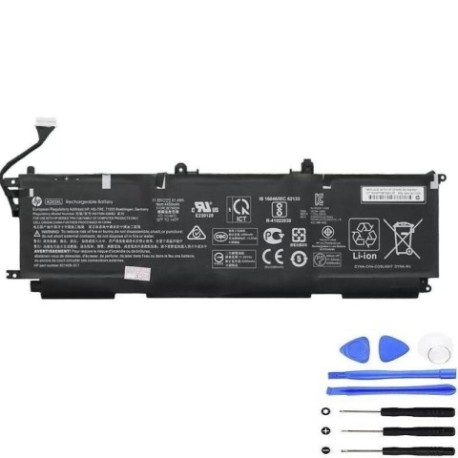
Battery models & part numbers
| Reference / P/N |
|---|
| HP AD03051XL |
| HP AD03XL |
| HP HSTNN-DB8D |
| HP-AD03XL-51.4Wh |
| HP 921409-271 |
| HP 921409-2C1 |
| HP 921439-855 |
Compatible laptop models
| Model |
|---|
| HP Envy 13-ad000s |
| HP Envy 13-ad100s |
| HP Envy 13-ad1xxs |
Introduction
If your HP Envy 13 series laptop is struggling to hold charge or experiencing battery issues, our comprehensive guide helps Australian and New Zealand users find the right HP AD03XL 51.4Wh replacement battery. This authorised replacement ensures optimal performance for your compatible HP laptop models.
Common signs you need a replacement
| Symptoms | Causes | Verification | Recommendation |
|---|---|---|---|
| Rapid battery drain | Ageing battery cells | Check battery health in system settings | Consider replacement if under 50% capacity |
| Laptop won’t charge | Faulty battery circuit | Test with different charger | Replace battery if charger works |
| Battery swelling | Internal damage | Visual inspection | Replace immediately for safety |
| Overheating | Degraded battery | Monitor temperature during use | Replace if consistently over 45°C |
How to check compatibility
Verify your laptop model matches our compatibility list above. Check your current battery’s part number (usually printed on the battery) against our reference numbers. For HP Envy 13 series laptops manufactured between 2016-2018, this battery is typically compatible.
When to replace
Replace your battery when it holds less than 50% of its original capacity, shows physical damage, or causes system instability. Most laptop batteries last 2-4 years with regular use in Australian and New Zealand conditions.
Installation guide (overview)
1. Power off laptop and disconnect charger
2. Remove bottom panel screws (typically 8-10 Phillips head screws)
3. Carefully disconnect old battery connector
4. Remove mounting screws holding battery in place
5. Install new HP AD03XL battery and reconnect
6. Replace bottom panel and power on
Usage & care tips
• Avoid complete discharge – charge when battery reaches 20%
• Store in cool, dry conditions (15-25°C ideal)
• Calibrate new battery by fully charging and discharging once
• Use original HP charger for optimal performance
• Avoid leaving laptop in hot cars or direct sunlight
Safety & recycling in AU/NZ
In Australia and New Zealand, laptop batteries must be recycled through authorised e-waste centres. Never dispose of lithium-ion batteries in household waste. Many electronics retailers offer free battery recycling services. Handle batteries with care to avoid short circuits.
FAQ
How long does shipping take to AU/NZ?
Typically 7-14 business days depending on your location.
Is this battery genuine HP?
This is a high-quality compatible replacement meeting original specifications.
What warranty is offered?
Most replacement batteries come with 12-month warranty coverage.
Can I install this myself?
Yes, with basic technical skills and proper tools, self-installation is straightforward.
Will this work with my HP Envy 13 touch model?
Yes, compatible with all HP Envy 13 models listed in our compatibility table.
How do I recycle my old battery?
Contact your local council or electronics retailer for battery recycling options.
What if my laptop model isn’t listed?
Double-check your exact model number and contact support for verification.