Fujitsu FPCBP415 38Wh Battery Replacement
Find the perfect replacement battery for your Fujitsu laptop with our comprehensive compatibility guide and expert advice for Australian and New Zealand users.
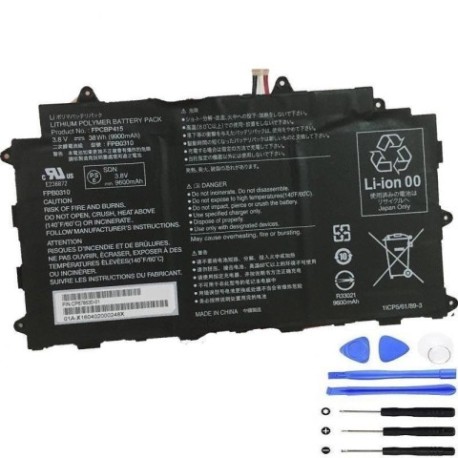
Battery models & part numbers
| Reference / P/N |
|---|
| 01A-X1703600 |
| 02A-X1405300 |
| 34062963 |
| 38038517 |
| 38042480 |
| CP650624-01 |
| CP650624-XX |
| CP677072-XX |
| CP688011-XX |
| CP718508-01 |
| FPB0310 |
| Fujitsu-FPCBP415-38Wh |
| FUJ:CP650624-XX |
| FUJ:CP677072-XX |
| FUJ:CP688011-XX |
Compatible laptop models
| Model |
|---|
| Fujitsu Stylistic Q555 |
| Fujitsu stylistic Q584 Q584H |
Introduction
The Fujitsu FPCBP415 38Wh battery is a high-quality replacement solution designed specifically for Fujitsu laptops used by Australian and New Zealand consumers. This genuine-compatible battery ensures optimal performance and reliability for your mobile computing needs.
Common signs you need a replacement
| Symptoms | Causes | Verification | Recommendation |
|---|---|---|---|
| Battery drains quickly | Ageing cells, reduced capacity | Check battery health in system settings | Replace if capacity below 60% |
| Laptop won’t hold charge | Failed battery circuitry | Test with power adapter removed | Immediate replacement needed |
| Battery swelling | Internal gas buildup | Visual inspection of battery case | Replace immediately for safety |
| Overheating during use | Internal resistance increase | Monitor temperature with software | Replace if consistently over 45°C |
How to check compatibility
Verify your laptop model matches our compatibility list above. Check your current battery’s part number (usually printed on the battery itself) against our reference table. For Fujitsu Stylistic models, ensure the physical dimensions match – approximately 210mm x 110mm x 10mm.
When to replace
Replace your battery when you notice significant performance degradation, typically after 2-3 years of regular use. Australian climate conditions can accelerate battery ageing, so monitor your battery health regularly through your laptop’s power management centre.
Installation guide (overview)
1. Power off your laptop and disconnect the AC adapter
2. Remove the battery compartment cover (if applicable)
3. Carefully disconnect the old battery connector
4. Insert the new FPCBP415 battery and secure the connector
5. Replace the cover and charge fully before first use
Usage & care tips
• Avoid complete discharges – recharge when battery reaches 20-30%
• Store in cool, dry conditions (15-25°C ideal)
• Use only authorised Fujitsu chargers
• Calibrate battery monthly by fully charging then discharging
• Avoid exposing to direct sunlight or extreme temperatures
Safety & recycling in AU/NZ
In Australia and New Zealand, lithium-ion batteries must be recycled responsibly. Do not dispose of in household waste. Use authorised battery recycling centres available at most electronics retailers. Damaged or swollen batteries should be handled with care and recycled immediately.
FAQ
How long does shipping take to AU/NZ?
Typically 7-14 business days depending on your location.
Is this battery genuine Fujitsu?
This is a high-quality compatible battery meeting original specifications.
What warranty is provided?
12-month warranty covering manufacturing defects.
Can I use this battery with older Fujitsu models?
Only if specifically listed in our compatibility tables above.
How do I maximise battery lifespan?
Avoid extreme temperatures and frequent full discharges.
Is installation difficult?
Most users can install following our guide, but professional installation is available.
What if my model isn’t listed?
Contact us with your laptop and current battery details for verification.