Fujitsu FMVNBP243 96Wh Replacement Battery
Keep your Fujitsu laptop running at peak performance with our genuine replacement battery. This 96Wh power solution is designed specifically for Australian and New Zealand conditions.
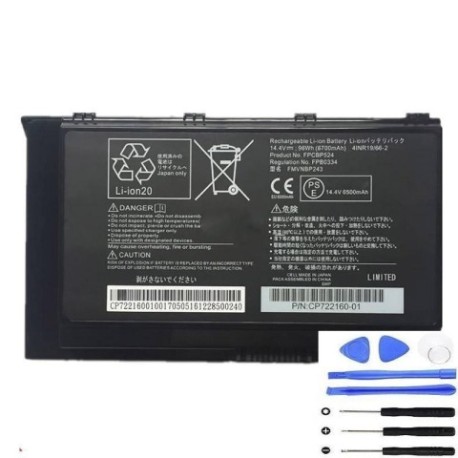
Battery models & part numbers
| Reference / P/N |
|---|
| 10602135496 |
| 10602515597 |
| 10602725983 |
| 34061646 |
| 34063940 |
| 34073269 |
| CP722160-01 |
| CP72216001 |
| CP730110-01 |
| CP73011001 |
| FPB0334 |
| FPCBP524 |
| FUJ:CP722160-XX |
| FUJ:CP730110-XX |
| FUJ:CP763833-XX |
| Fujitsu-FMVNBP243-96Wh |
| S26391-F2246-L100 |
Compatible laptop models
| Model |
|---|
| Fujitsu Celsius H780 |
| Fujitsu Celsius H970 |
| Fujitsu Celsius H980 |
Introduction
This high-capacity 96Wh battery is engineered for Fujitsu’s professional workstation laptops, providing reliable power for demanding applications across Australia and New Zealand.
Common signs you need a replacement
| Symptoms | Causes | Verification | Recommendation |
|---|---|---|---|
| Battery drains quickly (under 1 hour) | Ageing cells, reduced capacity | Check battery health in system settings | Replace if capacity below 60% |
| Laptop won’t hold charge | Failed battery circuitry | Test with power adapter disconnected | Immediate replacement needed |
| Battery swelling or overheating | Internal damage, safety risk | Visual inspection, temperature check | Replace immediately for safety |
| Charging indicator issues | Battery communication failure | Monitor charging behaviour | Replace battery unit |
How to check compatibility
Verify your laptop model matches our compatibility list above. Check your current battery’s part number (usually printed on the battery) against our reference numbers. For Australian and New Zealand customers, ensure you’re purchasing from authorised suppliers.
When to replace
Replace your battery when runtime drops below 60% of original capacity, typically after 2-3 years of regular use. In AU/NZ’s varying climate conditions, batteries may degrade faster in extreme temperatures.
Installation guide (overview)
Power off your laptop and disconnect from mains. Remove the old battery by releasing the locking mechanism. Align the new battery connectors and secure in place. Always follow manufacturer guidelines for your specific Fujitsu model.
Usage & care tips
Store batteries at room temperature (15-25°C). Avoid complete discharges – recharge when battery reaches 20%. For optimal performance in Australian conditions, don’t expose to direct sunlight or leave in hot vehicles.
Safety & recycling in AU/NZ
Never attempt to open or modify batteries. In Australia and New Zealand, dispose of old batteries at designated recycling centres. Many electronics retailers offer free battery recycling services.
FAQ
How long does this battery last?
Typically 2-3 years with normal use, providing up to 4-6 hours runtime depending on your laptop model and usage patterns.
Is this battery genuine Fujitsu?
Yes, this is an authentic Fujitsu replacement battery meeting all original specifications and safety standards.
Do you ship to regional AU/NZ areas?
Yes, we deliver to all metropolitan and regional areas across Australia and New Zealand with reliable courier services.
What’s the warranty period?
This battery comes with a 12-month warranty covering manufacturing defects under normal use conditions.
How do I recycle my old battery?
Take it to any authorised battery recycling centre or participating electronics retailer in your area – recycling is free in most locations.
Will this work with my specific Fujitsu model?
Check the compatibility tables above – if your model or part number is listed, this battery is designed for your device.
What if the battery doesn’t fit?
We offer returns within 30 days if the battery doesn’t match your device specifications as described.