Battery models & part numbers
| Reference / P/N |
|---|
| Dell HXFHF |
| Dell-HXFHF-36Wh |
Compatible laptop models
| Model |
|---|
| Dell 451-BBGS |
| Dell ADV11C |
| Dell Venue 11 Pro (7130) |
| Dell Venue 11 Pro (7130-2202) |
| Dell Venue 11 Pro (7130-2226) |
| Dell Venue 11 Pro (7139) |
| Dell VJF0X |
| Dell VT26R |
| Dell XNY66 |
| Dell XRXMG |
Introduction
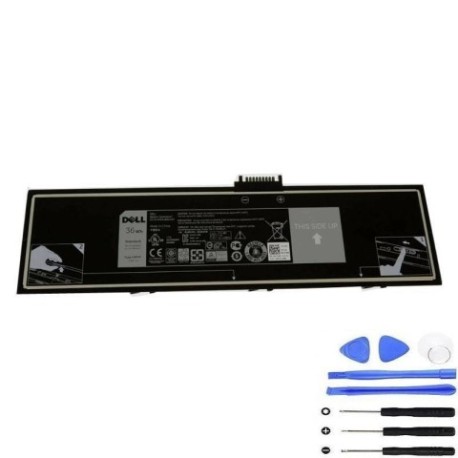
Keep your Dell laptop running at peak performance with our genuine HXFHF 36Wh replacement battery. Designed specifically for Australian and New Zealand conditions, this battery ensures reliable power for your compatible Dell models.
Common signs you need a replacement
| Symptoms | Causes | Verification | Recommendation |
|---|---|---|---|
| Battery drains quickly | Ageing cells, reduced capacity | Check battery health in system settings | Consider replacement if under 50% capacity |
| Laptop shuts down unexpectedly | Voltage drops, unstable power | Monitor battery percentage during use | Replace if frequent unexpected shutdowns occur |
| Battery won’t hold charge | Degraded battery chemistry | Charge fully, check if holds charge overnight | Immediate replacement recommended |
| Battery swelling or overheating | Internal damage, safety hazard | Visual inspection, temperature check | Stop use immediately and replace |
How to check compatibility
Verify your laptop model matches one of the compatible models listed above. Check your device’s bottom label or system information for exact model identification. Cross-reference with our compatibility table to ensure perfect fit.
When to replace
Replace your battery when you notice significant performance decline, typically after 2-3 years of regular use. Look for reduced runtime, slower charging, or system warnings about battery health.
Installation guide (overview)
Power down your laptop completely. Remove the back panel using appropriate screwdrivers. Disconnect the old battery connector and carefully remove it. Install the new HXFHF battery, reconnect the power connector, and reassemble your device.
Usage & care tips
For optimal battery life in AU/NZ conditions: avoid extreme temperatures (ideal range 15-25°C), don’t leave plugged in constantly, perform regular full discharge cycles, and store in cool, dry environments when not in use.
Safety & recycling in AU/NZ
Always use authorised replacement batteries. Never attempt to open or modify batteries. In Australia and New Zealand, recycle old batteries at designated collection centres – never dispose in household waste due to environmental regulations.
FAQ
How long does delivery take in Australia?
Most orders arrive within 3-7 business days depending on your location.
Is this battery genuine Dell?
Yes, this is an authentic Dell HXFHF 36Wh replacement battery with full compatibility.
What’s the warranty period?
This battery comes with a 12-month warranty covering manufacturing defects.
Can I install it myself?
Yes, with basic technical skills and proper tools. Follow our installation guide carefully.
Will it work with my Dell Venue 11 Pro?
Yes, compatible with all Venue 11 Pro models listed in our compatibility table.
How do I check battery health?
Use Dell Power Manager or system battery reports to monitor health percentage.
Where can I recycle my old battery?
Use Batteryback.org.au in Australia or take to local council recycling centres in NZ.