Battery models & part numbers
| Reference / P/N |
|---|
| 0DM3WC |
| 0F3YGT |
| 0F3YGTY |
| 0H2V87 |
| 0V4940 |
| 2ICP5/57/78-2 |
| 2X39G |
| 451-BBYE |
| 453-BBCF |
| DM3WC |
| Dell-F3YGT-60Wh |
| H2V87 |
| KG7VF |
| MYJ96 |
| ODM3WC |
| OH2V87 |
| OMYJ96 |
| OV494O |
| V4940 |
Compatible laptop models
| Model |
|---|
| Dell Latitude (7290) |
| Dell Latitude (7290-194XR) |
| Dell Latitude (7290-4R27G) |
| Dell Latitude (7290-8M9F9) |
| Dell Latitude (7290-DWTKV) |
| Dell Latitude (7480-CY4FG) |
| Dell Latitude (7480-D4CWR) |
| Dell Latitude 12 (7280) |
| Dell Latitude 12 (7280-K8X0T) |
| Dell Latitude 12 (7280-KHY0C) |
| Dell Latitude 12 (7290) |
| Dell Latitude 12 (E7280) |
| Dell Latitude 13 (7380) |
| Dell Latitude 13 (7380-1TJ4H) |
| Dell Latitude 13 (7380-2171) |
| Dell Latitude 13 (7380-2195) |
| Dell Latitude 13 (7380-2201) |
| Dell Latitude 13 (7380-5V3J4) |
| Dell Latitude 13 (7380-6WTFK) |
| Dell Latitude 13 (7380-J0XN6) |
| Dell Latitude 13 (7380-JXRC8) |
| Dell Latitude 13 (7390) |
| Dell Latitude 13 (7390-1TJ4H) |
| Dell Latitude 13 (7390-1VDD0) |
| Dell Latitude 13 (7390-30HX1) |
| Dell Latitude 13 (7390-6008) |
| Dell Latitude 13 (7390-6Y9TV) |
| Dell Latitude 13 (7390-8G9VH) |
| Dell Latitude 13 (7390-G2MJM) |
| Dell Latitude 13 (7390-N61HP) |
| Dell Latitude 13 (7390-P41XT) |
| Dell Latitude 13 (7390-P8Y6Y) |
| Dell Latitude 13 (7390-RWVXC) |
| Dell Latitude 13 (7390-TC3D8) |
| Dell Latitude 13 (7390-XPWYP) |
| Dell Latitude 14 (7480) |
| Dell Latitude 14 (7490) |
| Dell Latitude 14 (7490-0VKWY) |
| Dell Latitude 14 (7490-2N59D) |
| Dell Latitude 14 (7490-3Y29W) |
| Dell Latitude 14 (7490-54GMM) |
| Dell Latitude 14 (7490-6PWF0) |
| Dell Latitude 14 (7490-7CW12) |
| Dell Latitude 14 (7490-8700) |
| Dell Latitude 14 (7490-9743N) |
| Dell Latitude 14 (7490-D0R43) |
| Dell Latitude 14 (7490-D5M69) |
| Dell Latitude 14 (7490-DD9F2) |
| Dell Latitude 14 (7490-FK3WG) |
| Dell Latitude 14 (7490-K40NF) |
| Dell Latitude 14 (7490-M2R7G) |
| Dell Latitude 14 (7490-M6D30) |
| Dell Latitude 14 (7490-NFV7X) |
| Dell Latitude 14 (7490-NN5YD) |
| Dell Latitude 14 (7490-V7MCC) |
| Dell Latitude 14 (7490-WV4N3) |
| Dell Latitude 14 (7490-X7W06) |
| Dell Latitude 7480 |
| Dell Latitude 7480 (00MG3) |
| Dell Latitude 7480 (8CG05) |
| Dell Latitude 7480 (KG9V9) |
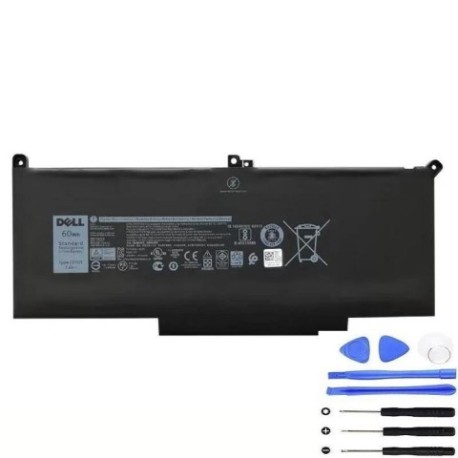
Introduction
Keep your Dell Latitude laptop running at peak performance with our genuine F3YGT 60Wh replacement battery. This high-quality battery is designed specifically for Dell Latitude 12, 13, and 14 series laptops, providing reliable power for work and study across Australia and New Zealand.
Common signs you need a replacement
| Symptom | Cause | Verification | Recommendation |
|---|---|---|---|
| Short battery life | Ageing cells | Check power settings | Replace battery |
| Laptop won’t hold charge | Battery degradation | Test with power adapter | New battery needed |
| Swelling/bulging | Internal damage | Visual inspection | Immediate replacement |
| Overheating | Faulty cells | Monitor temperature | Replace urgently |
| Random shutdowns | Power delivery issues | Check battery health | Battery replacement |
How to check compatibility
Verify your laptop model matches our compatibility list above. Check your current battery’s part number (usually printed on the battery) or look up your laptop’s service tag on Dell’s official website. Our F3YGT 60Wh battery is compatible with Dell Latitude 7280, 7290, 7380, 7390, 7480, and 7490 models.
When to replace
Replace your battery when it holds less than 50% of its original capacity, shows physical damage, or causes unexpected shutdowns. Most Dell batteries last 2-3 years with regular use. For optimal performance in AU/NZ conditions, consider replacement after 18-24 months of heavy use.
Installation guide (overview)
1. Power off your laptop and disconnect the AC adapter. 2. Remove the bottom cover (consult your laptop’s manual). 3. Disconnect the battery connector. 4. Remove any screws securing the battery. 5. Carefully lift out the old battery. 6. Insert the new F3YGT battery. 7. Reconnect the battery connector and replace screws. 8. Reattach the bottom cover. Always refer to Dell’s official documentation for detailed instructions.
Usage & care tips
• Avoid extreme temperatures (ideal range: 10°C to 35°C)
• Don’t leave laptop in hot cars
• Calibrate battery monthly: fully charge, then discharge completely
• Store at 40-60% charge if not using for extended periods
• Use only authorised Dell chargers
Safety & recycling in AU/NZ
In Australia and New Zealand, lithium-ion batteries must be recycled properly. Do not dispose of in household waste. Take used batteries to your local council recycling centre or participating electronics retailers. Many Officeworks and JB Hi-Fi stores offer free battery recycling services.
FAQ
How long does delivery take in Australia?
Typically 3-7 business days for metro areas, 5-10 days for regional areas.
Is this battery genuine Dell?
Yes, this is an authentic Dell F3YGT 60Wh replacement battery.
What’s the warranty period?
12 months warranty from date of purchase.
Can I install it myself?
Yes, with basic technical skills. Follow our installation guide or seek professional help.
How do I check battery health?
Use Dell Power Manager or Windows battery report to monitor health.
Is overnight charging safe?
Modern laptops have protection circuits, but avoid regular overnight charging.
Where can I recycle my old battery?
At any council waste facility or participating retail stores across AU/NZ.