Dell 3V806 51Wh Battery Replacement Guide
Find the right replacement battery for your Dell Alienware laptop with our comprehensive compatibility guide and installation tips.
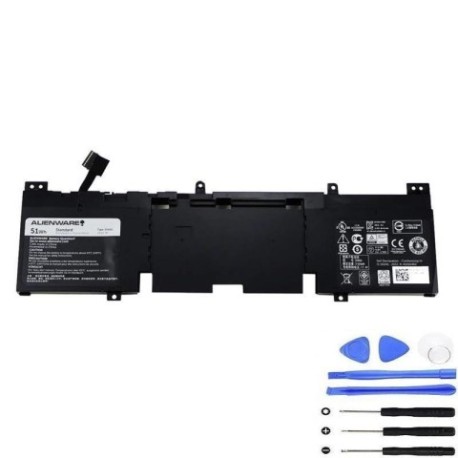
Battery models & part numbers
| Reference / P/N |
|---|
| 02P9KD |
| 2P9KD |
| 3V806 |
| Dell-3V806-51Wh |
Compatible laptop models
| Model |
|---|
| Dell Alienware 13 R1 |
| Dell Alienware 13 R2 |
| Dell T0FWM |
Introduction
The Dell 3V806 51Wh battery is designed specifically for Alienware gaming laptops, providing reliable power for extended gaming sessions and mobile computing.
Common signs you need a replacement
| Symptoms | Causes | Verification | Recommendation |
|---|---|---|---|
| Battery drains quickly | Ageing cells | Check battery health in system settings | Replace if capacity below 60% |
| Laptop won’t hold charge | Failed battery circuit | Test with power adapter removed | Immediate replacement needed |
| Battery swelling | Internal damage | Visual inspection | Replace immediately for safety |
| Overheating during use | Degraded thermal management | Monitor temperature readings | Replace to prevent damage |
How to check compatibility
Verify your laptop model matches the compatible models listed above. Check your current battery’s part number located on the battery label or in system information.
When to replace
Replace your battery when runtime drops below 2 hours, the battery shows physical damage, or system diagnostics indicate poor health. Most batteries need replacement after 2-3 years of regular use.
Installation guide (overview)
Power off and unplug your laptop. Remove the bottom panel, disconnect the old battery connector, remove mounting screws, install the new battery, reconnect, and reassemble. Always use proper anti-static precautions.
Usage & care tips
Avoid extreme temperatures (ideal range 15-25°C). Don’t leave your laptop plugged in constantly. Calibrate your battery monthly by fully charging then discharging. Store in cool, dry conditions when not in use.
Safety & recycling in AU/NZ
Never puncture or disassemble batteries. Dispose of old batteries at authorised recycling centres. In Australia, use Batteryback or council collection services. In New Zealand, use recognised e-waste recyclers.
FAQ
How long does this battery last?
The 51Wh capacity typically provides 3-5 hours of mixed use, depending on your settings and applications.
Is this battery genuine Dell?
This is a high-quality replacement battery compatible with Dell specifications and safety standards.
Does installation void my warranty?
Installing a replacement battery may void any remaining manufacturer warranty. Check your warranty terms first.
How do I recycle my old battery?
Take it to any authorised battery recycling centre or e-waste collection point in your area.
What’s the delivery time in Australia?
Most orders are delivered within 3-7 business days across Australia and New Zealand.
Is there a warranty on this battery?
Yes, replacement batteries typically come with a 12-month warranty against manufacturing defects.
Can I use this battery for international travel?
Yes, the battery meets international safety standards and can be used with compatible power adapters worldwide.