ASUS UX30 Battery Replacement: Complete Guide for AU/NZ Users
If your ASUS UX30 series laptop is struggling to hold a charge or shutting down unexpectedly, you’ve come to the right place. This comprehensive guide covers everything Australian and New Zealand users need to know about replacing their ASUS UX30 battery with the genuine Asus-C31-UX30-36Wh model.
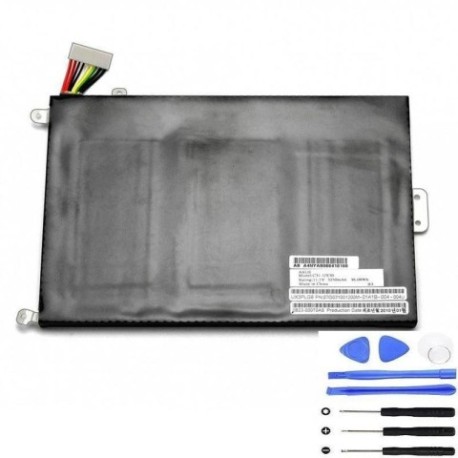
Battery models & part numbers
| Reference / P/N |
|---|
| 07G031001200 |
| 0B23-000T0AS |
| 0B23-00T0AS |
| 90R-NVS1B1000Y |
| A4NYA8066416166 |
| Asus-C31-UX30-36Wh |
Compatible models
| Model |
|---|
| UX30 |
| UX30-A1 |
| UX30KA |
| UX30KU |
| UX30S |
| UX3PLG6 |
Introduction
The ASUS UX30 series represents a significant milestone in ultraportable computing, offering sleek design and reliable performance. However, like all lithium-ion batteries, the original 36Wh power source has a finite lifespan. Understanding when and how to replace your battery can save you from unexpected downtime and extend your laptop’s useful life.
Common signs you need a replacement
| Symptom | Cause | Verification | Recommendation |
|---|---|---|---|
| Battery drains rapidly (under 1 hour) | Reduced capacity from age/cycles | Check battery health in Windows | Consider replacement if under 50% capacity |
| Laptop shuts down unexpectedly | Voltage drops under load | Monitor during intensive tasks | Replace immediately to prevent data loss |
| Battery won’t charge past certain percentage | Cell imbalance or BMS issues | Observe charging pattern | Replace to restore full capacity |
| Battery swelling or physical damage | Internal short circuit or gas buildup | Visual inspection | Replace immediately – safety hazard |
| Overheating during charging | Internal resistance increase | Touch test during charging | Replace to prevent further damage |
How to check compatibility
Finding your exact ASUS model information is crucial for battery compatibility. For UX30 series laptops, check the bottom casing for a sticker containing your model number. You can also access system information through Windows by pressing Windows Key + R, typing “msinfo32” and looking under “System Model”. The ASUS UX30 series uses a specific battery form factor and connector type that’s compatible across all variants listed in our compatibility table.
If you’re purchasing from Australian or New Zealand suppliers, always verify the part number matches one of the authorised references provided. Many third-party sellers may claim compatibility but lack the proper safety certifications required by Australian Consumer Law.
When to replace
Most ASUX UX30 batteries last 2-3 years with regular use before showing significant degradation. If your battery health shows less than 60% of original capacity or you’re experiencing any of the warning signs above, it’s time to consider replacement. Don’t wait until complete failure – proactive replacement prevents data loss and inconvenience.
Installation guide
Replacing the battery in your ASUS UX30 is relatively straightforward. First, ensure the laptop is completely powered off and disconnected from any power source. Flip the laptop over and locate the battery compartment. You’ll typically find several screws securing the battery cover – use the appropriate screwdriver to remove these. Carefully disconnect the battery connector from the motherboard, noting the orientation for reinstallation. Remove any additional screws securing the battery itself, then lift it out. Install the new Asus-C31-UX30-36Wh battery in reverse order, ensuring all connections are secure before replacing covers.
Many Australian users find the process takes 10-15 minutes with basic tools. If you’re uncomfortable with DIY repairs, consider visiting an authorised ASUS service centre in your area.
Usage & care tips
To maximise your new battery’s lifespan, avoid frequent full discharges. Lithium-ion batteries prefer partial discharges rather than complete drain cycles. Keep your laptop in temperature-controlled environments – extreme heat (above 35°C) or cold can accelerate degradation. If storing your laptop for extended periods, charge the battery to around 50-60% and store in a cool, dry place.
For Australian users, be mindful of our climate – don’t leave your laptop in hot cars or direct sunlight for prolonged periods. The ideal operating temperature for your ASUS UX30 battery is between 10°C and 35°C.
Safety & recycling in AU/NZ
Battery safety is paramount. Never attempt to open or modify the battery casing, and avoid exposing batteries to water or extreme temperatures. In Australia and New Zealand, lithium-ion batteries must be recycled properly through authorised collection points. Most electronics retailers offer free battery recycling services. Never dispose of batteries in household waste due to fire risk and environmental concerns.
When purchasing replacement batteries in Australia, look for suppliers who comply with Australian Consumer Law and provide genuine warranty support. The Asus-C31-UX30-36Wh battery should carry appropriate safety certifications for sale in our market.
FAQ
How long does the Asus-C31-UX30-36Wh battery typically last?
With normal usage patterns, expect 2-3 years of reliable performance before noticeable capacity loss. Heavy users might see reduced lifespan, while occasional users may extend it beyond 3 years.
Can I use third-party batteries with my ASUS UX30?
While third-party options exist, we recommend sticking with genuine or high-quality compatible batteries that match the exact specifications. Third-party batteries may lack proper safety circuits and could damage your device.
How do I check my current battery’s health?
In Windows, open Command Prompt as administrator and type “powercfg /batteryreport”. This generates a detailed report showing your battery’s current capacity versus design capacity.
Will replacing the battery void my ASUS warranty?
If your laptop is still under manufacturer warranty, check ASUS’s specific terms. In Australia, consumer law protects your rights, but unauthorised modifications might affect warranty coverage for related components.
How long does installation take?
Most users complete the replacement in 10-20 minutes. The process involves removing the bottom cover, disconnecting the old battery, and installing the new one with basic tools.
Can I replace the battery myself or should I seek professional help?
The ASUS UX30 is designed for relatively easy battery replacement. If you’re comfortable with basic electronics and have the right tools, DIY is feasible. Otherwise, local computer repair shops throughout Australia and New Zealand can assist.
What should I do with my old battery?
Take it to an authorised battery recycling centre. Most Officeworks, JB Hi-Fi, and other electronics retailers in Australia offer free battery recycling services to help protect our environment.
Remember, investing in a quality replacement battery not only restores your laptop’s mobility but also ensures safe, reliable operation for years to come. Whether you’re in Sydney, Melbourne, Auckland, or anywhere across Australia and New Zealand, proper battery maintenance is key to maximising your computing experience.