Battery models & part numbers
| Reference / P/N |
|---|
| 0B200-03490000 |
| Asus-C42N1846-71Wh |
Compatible laptop models
| Model |
|---|
| Asus ZenBook Pro Duo 15 UX581LV |
| Asus ZenBook Pro Duo 15 UX581LV-H2014R |
| Asus ZenBook Pro Duo 15 UX581LV-H2024T |
| Asus ZenBook Pro Duo 15 UX581LV-H2045T |
| Asus ZenBook Pro Duo UX581GV |
| Asus ZenBook Pro Duo UX581GV-H2001R |
| Asus ZenBook Pro Duo UX581GV-H2001T |
| Asus ZenBook Pro Duo UX581GV-H2002R |
| Asus ZenBook Pro Duo UX581GV-H2004 |
| Asus ZenBook Pro Duo UX581GV-H2004R |
| Asus ZenBook Pro Duo UX581GV-H2004T |
| Asus ZenBook Pro Duo UX581GV-H2049R |
| Asus ZenBook Pro Duo UX581GV-H2050R |
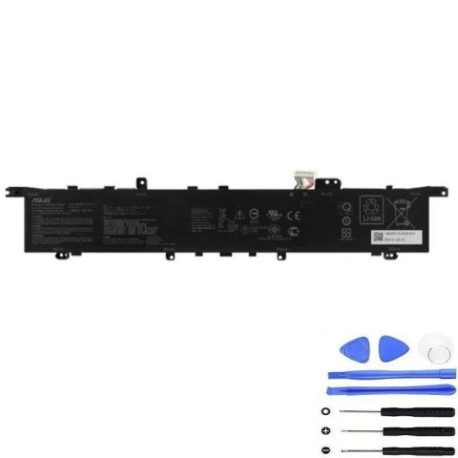
Introduction
Keep your Asus ZenBook Pro Duo performing at its best with our genuine C42N1846 71Wh replacement battery. Designed specifically for Australian and New Zealand conditions, this high-capacity battery ensures your dual-screen workstation maintains optimal performance.
Common signs you need a replacement
| Symptoms | Causes | Verification | Recommendation |
|---|---|---|---|
| Battery drains quickly | Ageing cells, reduced capacity | Check battery health in system settings | Consider replacement if below 60% capacity |
| Laptop won’t hold charge | Failed battery cells | Test with power adapter disconnected | Immediate replacement needed |
| Battery swelling | Internal damage, overheating | Visual inspection, uneven surfaces | Replace immediately for safety |
| Inconsistent charging | Worn connectors, faulty circuitry | Monitor charging patterns | Replace if persistent issues |
| Overheating during use | Inefficient battery operation | Check temperature readings | Replace if exceeding 45°C regularly |
How to check compatibility
Verify your laptop model matches exactly with our compatibility list above. Check your current battery’s part number (usually printed on the battery) or locate your laptop model from the system information in Windows Settings.
When to replace
Replace your battery when it holds less than 60% of its original capacity, shows physical damage, or causes performance issues. Most laptop batteries need replacement every 2-3 years with regular use.
Installation guide (overview)
Power off and unplug your laptop. Remove the bottom panel using the appropriate screwdriver. Disconnect the old battery connector and remove mounting screws. Install the new battery, reconnect the connector, and reassemble. Always refer to official Asus documentation or seek professional assistance if unsure.
Usage & care tips
Avoid extreme temperatures (ideal range 15-25°C). Don’t leave your laptop plugged in constantly. Calibrate your battery monthly by fully charging then discharging to 10%. Store in cool, dry conditions if not using for extended periods.
Safety & recycling in AU/NZ
Never attempt to open or modify the battery. Dispose of old batteries at authorised recycling centres – never in household waste. In Australia, use Batteryback or council e-waste services. In New Zealand, utilise accredited e-waste recyclers. Damaged batteries should be handled by professionals.
FAQ
How long does delivery take in Australia?
Most metropolitan areas receive orders within 3-5 business days. Regional areas may take 5-7 business days.
Is this battery genuine Asus?
Yes, this is an authentic Asus C42N1846 71Wh battery with full manufacturer warranty.
What’s the battery lifespan?
With proper care, expect 2-3 years of optimal performance or approximately 500 charge cycles.
Do you ship to New Zealand?
Yes, we ship throughout New Zealand with standard delivery times of 5-8 business days.
Can I install this myself?
Yes, with basic technical skills. However, we recommend professional installation for warranty purposes.
What if my model isn’t listed?
Contact our support team with your exact laptop model for compatibility verification.
Is there a warranty?
Yes, all our batteries come with a 12-month manufacturer warranty covering defects and performance issues.