Battery models & part numbers
| Reference / P/N |
|---|
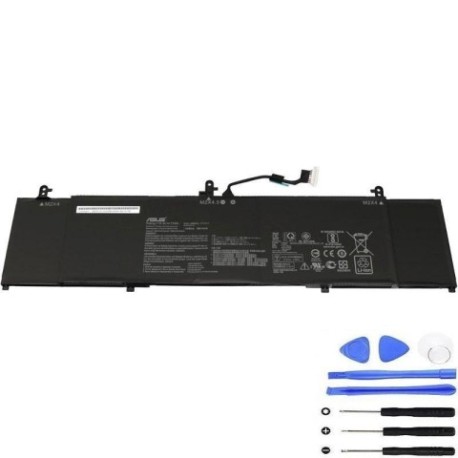
| Asus-C41N1814-73Wh |
Compatible models
| Model |
|---|
| Asus 0B200-03120000 |
| Asus 0B200-03120200 |
| Asus C41PpEH |
| Asus ZenBook 15 UX533FAC |
| Asus ZenBook 15 UX533FD |
| Asus ZenBook 15 UX533FD-A8068T |
| Asus ZenBook 15 UX533FD-A8078T |
| Asus ZenBook 15 UX533FD-A8097T |
| Asus ZenBook 15 UX533FD-A8107T |
| Asus ZenBook 15 UX533FD-A8131T |
| Asus ZenBook 15 UX533FD-A8153T |
| Asus ZenBook 15 UX533FD-A8161T |
| Asus ZenBook 15 UX533FD-A9028T |
| Asus ZenBook 15 UX533FD-A9082T |
| Asus ZenBook 15 UX533FD-A9083T |
| Asus ZenBook 15 UX533FN |
| Asus ZenBook 15 UX533FN-A8021T |
| Asus ZenBook 15 UX533FTC |
| Asus-C41N1814-73Wh |
Introduction
If your ASUS ZenBook 15 UX533 series laptop is struggling with battery life, you’re not alone. The C41N1814 73Wh battery replacement restores your laptop’s original performance and mobility.
Common signs you need a replacement
| Symptoms | Causes | Verification | Recommendation |
|---|---|---|---|
| Battery drains quickly (under 2 hours) | Ageing cells, charge cycles exceeded | Check battery health in Windows settings | Replace if capacity below 60% |
| Laptop shuts down unexpectedly | Voltage drops under load | Monitor during intensive tasks | Immediate replacement needed |
| Battery won’t charge past 80% | Protection circuit activated | Check charging status indicator | Replace to restore full capacity |
| Laptop bulging or uneven surface | Battery swelling | Visual inspection, place on flat surface | Stop using immediately and replace |
How to check compatibility
For ASUS laptops, find your model number on the bottom label or in System Information (press Windows key + R, type “msinfo32”). The C41N1814 battery is specifically designed for ZenBook 15 UX533 variants. Cross-reference with our compatibility table above or use ASUS’s official support site with your serial number.
When to replace
Replace your battery when it holds less than 60% of original capacity, shows physical damage, or causes system instability. Most ASUS batteries last 2-3 years with daily use.
Installation guide
Power off and unplug your ZenBook. Remove the bottom cover screws (Phillips #00). Carefully disconnect the battery connector from the motherboard. Remove the mounting screws and lift out the old battery. Install the new C41N1814, reconnect the connector, and reassemble. Always use anti-static precautions.
Usage & care tips
Avoid frequent full discharges – keep between 20-80% for daily use. Store in cool conditions (15-25°C). Don’t leave plugged in continuously for weeks. Calibrate monthly by charging to 100%, then discharging to 5%.
Safety & recycling in AU/NZ
Never puncture or disassemble lithium batteries. In Australia, recycle through Batteryback or council e-waste programs. In New Zealand, use accredited recyclers like Computer Recycling. Both countries prohibit landfill disposal of laptop batteries.
FAQ
How long does shipping take in Australia?
Most capital cities receive orders within 2-3 business days.
Is this battery genuine ASUS?
This is a high-quality replacement meeting original specifications with 12-month warranty.
Will it work with my Australian charger?
Yes, compatible with all ASUS 65W and higher chargers used in AU/NZ.
How do I dispose of my old battery?
Take to any Officeworks, JB Hi-Fi, or council recycling centre – free in both countries.
What’s the warranty period?
12 months from purchase date with Australian consumer law protections.
Can I install it myself?
Yes, with basic technical skills and proper tools. Follow our installation guide carefully.
How many charge cycles does it support?
Approximately 500 cycles while maintaining above 80% capacity.