Battery models & part numbers
| Reference / P/N |
|---|
| 0B200-03140100 |
| Asus-C41N1802-76Wh |
| CA537177G C41PqJ5 |
Compatible models
| Model |
|---|
| Asus GX701GXR |
| Asus ROG GX701GV |
| Asus ROG GX701GVR |
| Asus ROG GX701GW |
| Asus ROG GX701GWR |
| Asus ROG GX701GX |
| Asus ROG GX701GXR |
| Asus ROG GX701LV |
| Asus ROG GX701LWS |
| Asus ROG GX701LXS |
| Asus ROG GX701LXS8 |
| Asus ROG ZEPHYRUS S GX701 |
| Asus ROG Zephyrus S GX701GV |
| Asus ROG Zephyrus S GX701GVR |
| Asus ROG Zephyrus S GX701GW |
| Asus ROG Zephyrus S GX701GWR |
| Asus ROG Zephyrus S GX701GX |
| Asus ROG Zephyrus S GX701GXR |
| Asus ROG Zephyrus S17 GX701LV |
| Asus ROG Zephyrus S17 GX701LWS |
| Asus ROG Zephyrus S17 GX701LXS |
Introduction
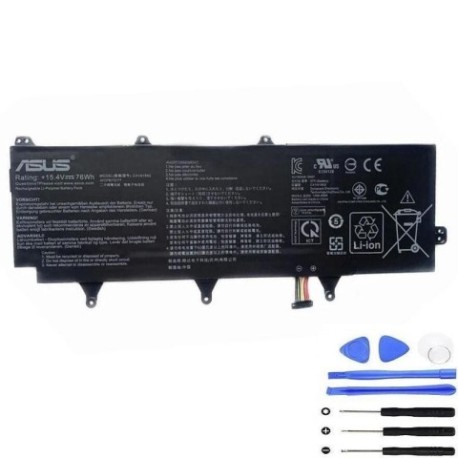
Keep your ASUS ROG Zephyrus S gaming laptop performing at its peak with our genuine replacement battery. Designed specifically for GX701 series models, this 76Wh battery ensures optimal gaming sessions and productivity.
Common signs you need a replacement
| Symptoms | Causes | Verification | Recommendation |
|---|---|---|---|
| Battery drains quickly (under 1 hour) | Ageing cells, high gaming load | Check battery health in Windows | Replace if capacity below 60% |
| Laptop won’t hold charge | Failed battery cells | Test with power adapter removed | Immediate replacement needed |
| Battery swelling or bulging | Internal gas buildup | Visual inspection of battery compartment | Replace immediately – safety risk |
| Inconsistent charging | Worn charging circuit | Monitor charging percentage | Replace battery and check adapter |
How to check compatibility
For ASUS ROG Zephyrus S models, check the model number on the bottom label (GX701 series). You can also find this information in Windows System Information or ASUS official support tools. Cross-reference with our compatible models list above.
When to replace
Replace your battery when it holds less than 60% of original capacity, shows physical damage, or causes system instability. Gaming laptops like the ROG Zephyrus S typically need replacement every 18-24 months with heavy use.
Installation guide
Power off and unplug your laptop. Remove the bottom cover using a Phillips screwdriver. Disconnect the battery connector from the motherboard. Remove the screws securing the battery and lift it out. Install the new battery in reverse order, ensuring proper connector alignment.
Usage & care tips
Avoid complete discharges – recharge at 20-30% remaining. Store between 15-25°C. Don’t leave plugged in constantly. Calibrate monthly by fully charging then discharging to 5%.
Safety & recycling in AU/NZ
Never puncture or disassemble batteries. In Australia and New Zealand, recycle old batteries at authorised collection centres. Check with your local council for battery recycling programs.
FAQ
How long does this battery last?
Up to 3-4 hours for general use, 1-2 hours for gaming depending on settings.
Is this compatible with my GX701LXS8?
Yes, all GX701 series models listed are compatible.
Do you provide warranty?
Check product page for current warranty details – typically 12 months.
How do I verify genuine ASUS battery?
Look for proper labelling and purchase from authorised retailers.
Can I use this with other ASUS models?
Only compatible with listed GX701 series models.
What tools do I need for installation?
Phillips screwdriver and plastic spudger for safe disassembly.
How to dispose of old battery in NZ?
Take to local recycling centre or participating retailers offering battery回收 services.