Battery models & part numbers
| Reference / P/N |
|---|
| Asus-C41N1731-B-66Wh |
Compatible models
| Model |
|---|
| Asus ROG Strix G715GV |
| Asus ROG Strix G715GW |
| Asus ROG Strix GL704GM |
| Asus ROG Strix GL704GV |
| Asus ROG Strix GL704GW |
| Asus ROG Strix SCAR II GL704GM |
| Asus ROG Strix SCAR II GL704GV |
| Asus ROG Strix SCAR II GL704GW |
Introduction
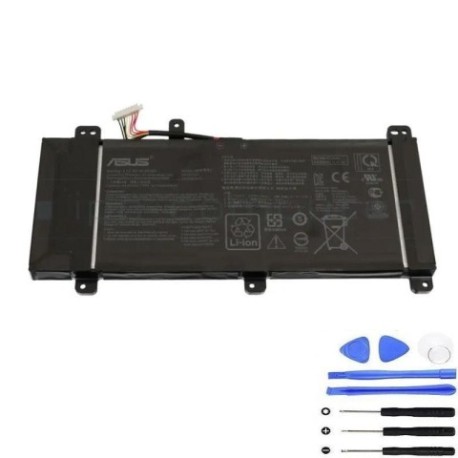
Keep your ASUS ROG Strix gaming laptop performing at its peak with a genuine replacement battery. The C41N1731-B 66Wh battery is specifically designed for your high-performance gaming machine, ensuring reliable power delivery during intense gaming sessions.
Common signs you need a replacement
| Symptoms | Causes | Verification | Recommendation |
|---|---|---|---|
| Battery drains quickly (under 1 hour) | Ageing cells, frequent gaming cycles | Check battery health in Windows Power Settings | Immediate replacement recommended |
| Laptop shuts down unexpectedly | Voltage instability, cell degradation | Monitor battery percentage drops | Replace to prevent data loss |
| Battery won’t charge past 80% | Battery protection mode activated | Check charging status in ASUS software | New battery required |
| Laptop feels hot near battery area | Overworked battery, internal resistance | Use temperature monitoring software | Replace for safety |
How to check compatibility
For ASUS ROG Strix models, locate the exact model number on the bottom label of your laptop. Look for “G715GV”, “GL704GM” or similar identifiers. You can also check in Windows System Information or use ASUS’s official support website with your serial number. The C41N1731-B battery is specifically designed for the ROG Strix G715 and GL704 series gaming laptops.
When to replace
Replace your battery when you notice significant performance drops, typically after 2-3 years of regular gaming use. For ROG Strix models used heavily for gaming, battery life may degrade faster due to high power demands. Consider replacement if your gaming sessions are consistently interrupted by power issues.
Installation guide
For ASUS ROG Strix models, power off completely and disconnect all cables. Remove the bottom panel using a Phillips screwdriver. Locate the battery connector near the centre of the motherboard – carefully disconnect by pulling the connector straight out. Remove the battery mounting screws and lift the battery out. Install the new C41N1731-B battery in reverse order, ensuring all connections are secure.
Usage & care tips
For optimal battery life in your gaming laptop, avoid constant 100% charging during gaming sessions. Store between 20-80% charge when possible. Keep your laptop in well-ventilated areas during gaming to prevent overheating. Use the original ASUS charger for consistent power delivery. Calibrate your battery monthly by draining to 10% then charging fully.
Safety & recycling in AU/NZ
In Australia and New Zealand, lithium-ion batteries must be recycled properly. Do not dispose of with household waste. Use authorised battery recycling centres like Battery World, Officeworks, or council e-waste collection points. Damaged or swollen batteries should be handled with care – place in a fire-proof container and take to a recycling centre immediately.
FAQ
How long does shipping take to AU/NZ?
Most orders arrive within 5-7 business days with express shipping options available.
Is this battery genuine ASUS quality?
Yes, this is an original specification battery meeting ASUS’s strict quality standards for ROG Strix models.
What’s the warranty on this battery?
This battery comes with a 12-month warranty covering manufacturing defects.
Will this battery work with my ROG Strix SCAR II?
Yes, the C41N1731-B is fully compatible with all SCAR II models in the GL704 series.
How do I maintain battery health for gaming?
Avoid extreme temperatures, don’t leave plugged in constantly, and perform monthly calibration cycles.
Can I install this battery myself?
Yes, with basic technical skills and proper tools, most users can safely replace their laptop battery.
What if my model isn’t listed?
Double-check your laptop’s exact model number on the bottom label or contact our support team for verification.