ASUS C31N1841 50Wh Battery Replacement Guide for Australian & New Zealand Users
If your ASUS ZenBook is struggling with battery life, you’ve come to the right place. This comprehensive guide covers everything Australian and New Zealand users need to know about the C31N1841 50Wh replacement battery, including compatible models, installation tips, and local recycling information.
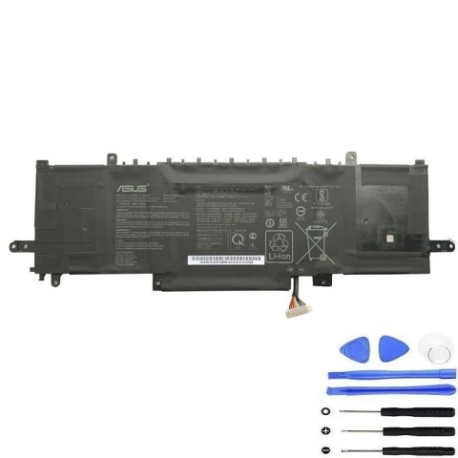
Battery models & part numbers
| Reference / P/N |
|---|
| 0B200-03420200 |
| 0B200-03420300 |
| 0B200-03830000 |
| Asus-C31N1841-50Wh |
| C31PNJ5 |
| CA436981G |
Compatible models
| Model |
|---|
| UX434FAW |
| ZenBook 13 UX333FLC |
| ZenBook 13 UX333FLC-A3170T |
| ZenBook 13 UX333FLC-A3240T |
| ZenBook 13 UX334FA |
| ZenBook 13 UX334FA-A3026T |
| ZenBook 13 UX334FA-A3027T |
| ZenBook 13 UX334FL |
| ZenBook 13 UX334FL-A4011T |
| ZenBook 13 UX334FL-A4021R |
| ZenBook 13 UX334FL-A4021T |
| ZenBook 13 UX334FLC |
| ZenBook 13 UX334FLC-A3175T |
| ZenBook 14 UM433DA |
| ZenBook 14 UM433DA-A5005T |
| ZenBook 14 UM433DA-A5025T |
| ZenBook 14 UM433IQ |
| ZenBook 14 UM433IQ-A5018T |
| ZenBook 14 UM433IQ-A5024 |
| ZenBook 14 UM433IQ-A5026 |
| ZenBook 14 UM433IQ-A5026T |
| ZenBook 14 UX433FLC |
| ZenBook 14 UX433FLC-A5288T |
| ZenBook 14 UX434DA |
| ZenBook 14 UX434FA |
| ZenBook 14 UX434FA-A5101R |
| ZenBook 14 UX434FA-A9130T |
| ZenBook 14 UX434FAW |
| ZenBook 14 UX434FL |
| ZenBook 14 UX434FL-A5801T |
| ZenBook 14 UX434FL-A6026T |
| ZenBook 14 UX434FL-AI034R |
| ZenBook 14 UX434FLC |
| ZenBook 14 UX434FLC-A5177T |
| ZenBook 14 UX434FLC-A5250T |
| ZenBook 14 UX434FLC-A5344T |
| ZenBook 14 UX434FLC-A5370T |
| ZenBook 14 UX434FQ |
| ZenBook 14 UX434FQ-A5017T |
| ZenBook 14 UX434FQ-A5020R |
| ZenBook 14 UX434FQ-A5037T |
| ZenBook 14 UX434IQ |
| ZenBook Flip 14 UX463FA |
| ZenBook Flip 14 UX463FA-AI026T |
| ZenBook Flip 14 UX463FA-AI027T |
| ZenBook Flip 14 UX463FA-AI028T |
| ZenBook Flip 14 UX463FA-AI039T |
| ZenBook Flip 14 UX463FA-AI040R |
| ZenBook Flip 14 UX463FA-AI051T |
| ZenBook Flip 14 UX463FL |
| ZenBook Flip 14 UX463FL-AI025R |
| ZenBook Flip 14 UX463FL-AI041T |
| ZenBook Flip 14 UX463FL-AI055R |
| ZenBook Flip 14 UX463FL-AI057T |
| ZenBook Flip 14 UX463FL-AI068T |
| ZenBook Flip 14 UX463FL-AI093T |
| ZenBook Flip 14 UX463FL-AI097T |
Introduction
Welcome to your complete guide for ASUS C31N1841 50Wh battery replacement. If you’re an Australian or New Zealand user experiencing battery issues with your ZenBook, this resource will walk you through everything from identifying compatibility to proper installation and local disposal options. Laptop batteries typically last 2-4 years with regular use, and replacing them can restore your device’s mobility and performance.
Common signs you need a replacement
| Symptom | Cause | Verification | Recommendation |
|---|---|---|---|
| Battery drains quickly (less than 1 hour) | Reduced capacity from age/cycles | Check battery health in Windows | Consider replacement if below 60% |
| Laptop won’t hold charge | Failed cells or circuitry | Test with different charger | Replace battery immediately |
| Battery swelling or bulging | Gas buildup from degradation | Visual inspection of case | Stop using and replace urgently |
| Overheating during use | Internal resistance increase | Monitor temperature sensors | Replace to prevent damage |
| Random shutdowns at 20-30% | Voltage drops under load | Monitor battery percentage | Replace for reliable operation |
| Charging indicator issues | Battery communication failure | Check LED behaviour patterns | Replace if persistent |
How to check compatibility
Before purchasing any replacement battery,verifying compatibility is crucial. For ASUS ZenBook users in Australia and New Zealand, here’s how to ensure the C31N1841 battery fits your device:
Finding Your Model Number: Check the bottom casing of your laptop for a sticker containing the exact model number (e.g., UX434FL-A6026T). You can also find this information in Windows System Information (type ‘System Information’ in the Start menu) under ‘System Model’.
Using Official Tools: Visit the ASUS Australia or New Zealand support website and use their compatibility checker by entering your serial number or model. This is the most reliable method.
Cross-Reference Part Numbers: Match the part numbers listed above (like 0B200-03420200) with the number printed on your original battery, if accessible.
When to replace
Consider replacing your ASUS battery when you experience persistent rapid draining, swelling, or if the battery health report (generated via Windows Command Prompt using ‘powercfg /batteryreport’) shows a significant drop in design capacity. For most users, this occurs after 300-500 full charge cycles, typically around the 2-3 year mark with daily use.
Installation guide
Replacing the battery in your ZenBook is a straightforward process if you follow these steps carefully. Always power off the laptop and disconnect the AC adapter before starting.
Step 1: Preparation – Work on a clean, static-free surface. Gather the necessary tools: a Phillips head screwdriver (usually #00 or #0 size) and a plastic prying tool.
Step 2: Accessing the Battery – Remove the bottom case screws. Note that some screws may be shorter than others, so keep them organised. Carefully pry open the bottom case using the plastic tool to avoid damaging the clips.
Step 3: Battery Removal – Locate the battery, which is typically a rectangular block secured by screws. Disconnect the battery connector from the motherboard by gently pulling the connector straight up. Remove the screws holding the battery in place and lift it out.
Step 4: Installing the New C31N1841 Battery – Place the new battery in position, secure it with the screws, and reconnect the connector firmly. Ensure the connection is secure.
Step 5: Reassembly – Reattach the bottom case, ensuring all clips engage properly. Tighten the screws in a cross pattern. Power on the laptop and check the battery status in Windows.
Usage & care tips
To maximise the lifespan of your new ASUS battery in the AU/NZ climate, follow these best practices:
– Avoid frequent full discharges; partial discharges are better for lithium-ion batteries.
– Keep your laptop in a cool, dry place, away from direct sunlight. Ideal operating temperatures are between 10°C and 35°C.
– If using mainly on AC power, consider setting a maximum charge limit of 80% in ASUS Battery Health Charging software (if available for your model).
– Calibrate your battery every 2-3 months by allowing it to discharge to around 20% and then charging fully to 100%.
Safety & recycling in AU/NZ
Battery safety is paramount. Never puncture, crush, or expose lithium-ion batteries to high heat or fire. If you notice any swelling, stop using the battery immediately and dispose of it properly.
In Australia and New Zealand, never dispose of laptop batteries in household rubbish. They must be recycled at authorised collection points. Major retailers like Officeworks, JB Hi-Fi, and Harvey Norman often have battery recycling bins. You can also check with your local council for e-waste recycling facilities. Recycling is free and helps protect our environment.
FAQ
1. How long does the C31N1841 50Wh battery typically last on a single charge?
Under normal usage (web browsing, document editing), expect 6-9 hours depending on your specific ZenBook model, screen brightness, and applications running. High-performance tasks will reduce this time.
2. Is this battery genuine/official ASUS?
The C31N1841 is the original ASUS part number. Ensure you purchase from reputable suppliers to guarantee you receive a genuine, high-quality battery that meets ASUS specifications.
3. Will replacing the battery void my ASUS warranty?
In Australia and New Zealand, consumer law protects your rights. However, if your laptop is still under manufacturer’s warranty, having the battery replaced by an authorised ASUS service centre is recommended to maintain the warranty coverage for other components.
4. How do I know if the battery replacement was successful?
After installation, your laptop should power on normally. Check Windows Battery settings to confirm it’s detecting the new battery and charging correctly. The battery icon should show charging status when plugged in.
5. Can I replace the battery myself, or should I seek professional help?
If you’re comfortable with basic technical tasks and follow proper safety procedures, self-installation is feasible. Otherwise, local computer repair shops throughout AU/NZ can perform this service quickly and safely.
6. My ZenBook model isn’t in the compatibility list. What should I do?
Double-check your model number carefully. If it truly isn’t listed, consult the official ASUS support website or contact their customer service with your exact model number for confirmation.
7. How should I store my old battery before recycling?
Place tape over the battery contacts and store it in a cool, dry place away from flammable materials until you can take it to a recycling centre. Do not store for extended periods.