ASUS C31N1834 57Wh Laptop Battery Replacement Guide
If your ASUS ProArt StudioBook is struggling with battery life, you’ve come to the right place. This comprehensive guide covers everything Australian and New Zealand users need to know about the C31N1834 57Wh replacement battery.
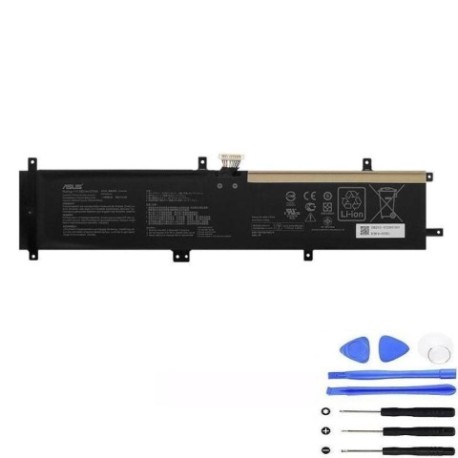
Battery models & part numbers
| Reference / P/N |
|---|
| 0B200-03360300 |
| 0B200-03360400 |
| Asus-C31N1834-57Wh |
Compatible models
| Model |
|---|
| Asus ProArt StudioBook 17 H700GV |
| Asus ProArt StudioBook 17 H700GV-AV023R |
| Asus ProArt StudioBook Pro 17 W700G1T |
| Asus ProArt StudioBook Pro 17 W700G1T-AV012R |
| Asus ProArt StudioBook Pro 17 W700G1T-AV046R |
| Asus ProArt StudioBook Pro 17 W700G1T-AV059R |
| Asus ProArt StudioBook Pro 17 W700G2T |
| Asus ProArt StudioBook Pro 17 W700G2T-AV002R |
| Asus ProArt StudioBook Pro 17 W700G2T-AV065R |
| Asus ProArt StudioBook Pro 17 W700G2T-AV069R |
| Asus ProArt StudioBook Pro 17 W700G3T |
| Asus ProArt StudioBook Pro 17 W700G3T-AV027R |
| Asus ProArt StudioBook Pro 17 W700G3T-AV090R |
| Asus ProArt StudioBook Pro 17 W700G3T-AV103R |
| Asus ProArt StudioBook Pro 17 W700G3T-XH77 |
| Asus ProArt StudioBook Pro 17 W700G3T-XH99 |
| Asus ProArt StudioBook Pro 17 W700GV |
Introduction
ASUS ProArt StudioBook laptops are workhorses for creative professionals across Australia and New Zealand, but even the most powerful machine becomes useless when the battery fails. The C31N1834 57Wh battery is specifically designed for these professional-grade laptops, ensuring you can continue your creative work without interruption.
Common signs you need a replacement
| Symptom | Cause | Verification | Recommendation |
|---|---|---|---|
| Battery drains in under 1 hour | Reduced capacity from age/cycles | Check battery health in Windows | Replace if capacity < 60% |
| Laptop shuts down unexpectedly | Voltage drops under load | Monitor during intensive tasks | Immediate replacement needed |
| Battery won’t charge past 80% | Battery protection mode activated | Check charging status | Replace to restore full capacity |
| Battery swelling or overheating | Internal damage or failure | Visual inspection | Stop using immediately |
| Inaccurate battery percentage | Battery calibration lost | Compare actual vs reported | Replace if recalibration fails |
How to check compatibility
Finding your exact ASUS model number is crucial for battery compatibility. On ProArt StudioBook models, you can locate this information in several ways:
Physical Identification: Check the bottom case of your laptop for the model sticker. For ProArt StudioBooks, this is typically near the battery compartment or on the main chassis. The model number will start with “H700” or “W700” followed by additional characters.
System Information: Press Windows Key + R, type “msinfo32” and look for “System Model” in the System Information window. This displays the exact model your operating system recognises.
ASUS Official Tools: Visit the ASUS support website and use their compatibility checker tool. Enter your serial number or model to verify official part compatibility.
Cross-Reference: Compare your model number against the comprehensive list provided above. All ProArt StudioBook 17 models with H700 and W700 series designations are compatible with the C31N1834 battery.
When to replace
Battery replacement timing depends on your usage patterns and the specific demands of creative work. For ProArt StudioBook users in Australia and New Zealand, consider replacement when:
- Battery health drops below 70% capacity (check via Windows Battery Report)
- You experience sudden shutdowns during rendering or intensive tasks
- The battery no longer holds sufficient charge for your typical work sessions
- Your laptop is 2-3 years old with regular daily use
- You notice physical swelling or the case doesn’t sit flush
Creative professionals should be particularly vigilant, as battery issues can interrupt critical work and potentially cause data loss during intensive processing tasks.
Installation guide
Replacing the battery in your ASUS ProArt StudioBook requires careful attention to detail. These professional laptops have specific design considerations:
Preparation: Power down completely and disconnect from all power sources. Use an anti-static wrist strap if available, and work on a clean, well-lit surface. Have the correct screwdrivers ready – typically Phillips #00 for ProArt models.
Accessing the Battery: Turn the laptop upside down and locate the battery compartment. For most ProArt StudioBook 17 models, you’ll need to remove the bottom panel. Carefully remove all screws, noting their positions as some may be different lengths.
Battery Removal: Once the panel is removed, locate the battery connector. Gently disconnect the battery cable from the motherboard. Remove any screws securing the battery, then carefully lift it out. Avoid using excessive force.
Installation: Place the new C31N1834 battery in position, secure with screws, and reconnect the battery cable. Ensure the connection is firm but don’t force it. Replace the bottom panel and secure all screws.
Initial Setup: Connect the power adapter and turn on the laptop. Allow the battery to charge fully before first use. The system may take a few cycles to calibrate the new battery accurately.
Usage & care tips
Proper battery maintenance extends the life of your C31N1834 replacement and ensures optimal performance for your creative work:
- Charging Habits: Avoid constantly keeping your laptop at 100% charge. For daily use, maintaining between 20-80% is ideal for lithium-ion batteries
- Temperature Management: Keep your ProArt StudioBook between 15°C and 25°C during use. Avoid leaving it in hot cars or direct sunlight
- Storage: If storing for extended periods, charge to 50-60% and power down completely
- Calibration: Perform a full discharge/recharge cycle every 2-3 months to maintain accurate battery reporting
- Power Settings: Use ASUS Battery Health Charging in MyASUS app to optimise charging patterns based on your usage
Safety & recycling in AU/NZ
Battery safety and proper disposal are particularly important in Australia and New Zealand’s regulatory environment:
Safety Precautions: Never attempt to open or modify the battery casing. Avoid exposing batteries to extreme temperatures or moisture. If you notice swelling, overheating, or unusual odours, discontinue use immediately and contact professional disposal services.
Australian Recycling: Use Battery Recycling services available at most office supply stores, electronics retailers, and council waste facilities. Major retailers like Officeworks and JB Hi-Fi offer free battery recycling programs.
New Zealand Options: The Recycle My Battery programme operates through various retail partners including Noel Leeming and PlaceMakers. Many local councils also provide battery recycling services.
Legal Compliance: Both countries have strict regulations against disposing of lithium-ion batteries in household waste due to fire risks and environmental concerns.
FAQ
How long does the C31N1834 57Wh battery typically last?
Under normal usage conditions, expect 2-3 years of reliable performance, or approximately 500 full charge cycles before capacity begins to significantly degrade.
Will this battery work with my specific ProArt StudioBook model?
Yes, the C31N1834 is compatible with all ProArt StudioBook 17 models listed above. The battery uses standardised connectors and voltage specifications across these professional models.
How do I know if I’ve installed the battery correctly?
Your laptop should power on normally and recognise the battery in Windows System Information. The battery icon should show charging status when connected to power.
Can I use a higher capacity battery with my ProArt StudioBook?
No, the C31N1834 57Wh is the designed capacity for these models. Using non-standard batteries can cause compatibility issues and potential damage to your laptop’s power management system.
What warranty comes with replacement batteries?
Quality replacement batteries typically come with 12-24 month warranties. Always purchase from authorised retailers to ensure warranty coverage and product safetyWhy does my new battery show less than 100% capacity immediately?
This is normal for lithium-ion batteries. Manufacturers typically ship them with 50-70% charge to maintain battery health during storage and transport.
How can I maximise battery life during intensive creative work?
Use performance modes strategically. Switch to battery-saving modes during less demanding tasks and reserve high-performance modes for when connected to power during rendering sessions.
Is it safe to leave my ProArt StudioBook plugged in constantly?
While technically safe, it’s not ideal for long-term battery health. Use ASUS’s Battery Health Charging feature to limit maximum charge to 80% if you primarily use your laptop as a desktop replacement.
Don’t let a failing battery interrupt your creative workflow. The ASUS C31N1834 57Wh replacement battery restores your ProArt StudioBook to its full mobile potential, ensuring you can work wherever inspiration strikes across Australia and New Zealand.