ASUS C31N1831 50Wh Battery Replacement Guide for Australian & New Zealand Users
When your ASUS laptop battery starts failing, finding the right replacement can be confusing. This comprehensive guide covers everything Australian and New Zealand users need to know about the ASUS C31N1831 50Wh battery replacement, including compatible models, installation tips, and local recycling options.
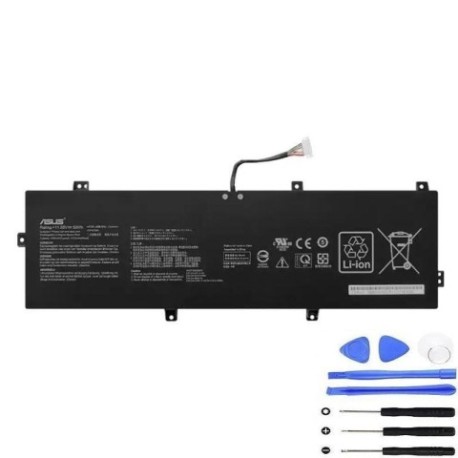
Battery models & part numbers
| Reference / P/N |
|---|
| 0B200-03330100 |
| 0B200-03330200 |
| 0B200-03630000 |
| 0B200-03630200 |
| 3ICP3/91/91 |
| Asus-C31N1831-50Wh |
Compatible models
| Model |
|---|
| Asus Pro P3540FA |
| Asus Pro P3540FA-BQ0065R |
| Asus Pro P3540FA-BQ0067R |
| Asus Pro P3540FA-BQ0068R |
| Asus Pro P3540FA-BQ0412R |
| Asus Pro P3540FA-BQ0413R |
| Asus Pro P3540FA-BQ0415R |
| Asus Pro P3540FA-BR1384R |
| Asus Pro P3540FA-EJ0185 |
| Asus Pro P3540FA-EJ0187 |
| Asus Pro P3540FA-EJ0187R |
| Asus Pro P3540FA-EJ037 |
| Asus Pro P3540FA-EJ0371R |
| Asus Pro P3540FB |
| Asus Pro P3540FB-BQ0033R |
| Asus Pro P3540FB-BQ0034R |
Introduction
The ASUS C31N1831 50Wh battery is specifically designed for ASUS Pro P3540 series laptops, providing reliable power for business and professional users across Australia and New Zealand. This lithium-ion battery delivers optimal performance for mobile computing needs while maintaining safety standards required in our region.
Common signs you need a replacement
| Symptoms | Causes | Verification | Recommendation |
|---|---|---|---|
| Battery drains quickly (under 1 hour) | Natural degradation after 300-500 cycles | Check battery health in Windows Power Options | Replace if capacity below 60% |
| Laptop shuts down unexpectedly | Voltage drops below operating threshold | Monitor battery percentage during sudden shutdowns | Immediate replacement recommended |
| Battery won’t charge past 80% | Cell imbalance or charging circuit failure | Use ASUS Battery Health Charging software | Replace to restore full capacity |
| Battery swelling or bulging | Gas buildup from chemical reactions | Visual inspection of battery compartment | Replace immediately for safety |
| Overheating during charging | Internal resistance increase | Check temperature with hardware monitoring tools | Replace if consistently over 45°C |
How to check compatibility
Finding your exact ASUS model number is crucial for battery compatibility. For ASUS Pro P3540 series laptops, check the bottom label near the battery compartment or serial number sticker. The model should start with “P3540FA” or “P3540FB” followed by additional characters. You can also find this information in Windows System Information (type “msinfo32” in Run dialog) or ASUS official support website by entering your serial number. Always cross-reference with our compatibility table above to ensure perfect fit.
When to replace
Replace your ASUS battery when it shows significant capacity loss (typically after 2-3 years of regular use), exhibits physical damage, or causes system instability. For business users in Australia and New Zealand, consider proactive replacement before critical meetings or travel. The ASUS C31N1831 maintains optimal performance for approximately 500 full charge cycles before noticeable degradation occurs.
Installation guide
Replacing the ASUS C31N1831 battery requires careful handling. First, power off your laptop and disconnect all cables. Flip the device over and locate the battery compartment – most Pro P3540 models have external battery releases. Slide the locking mechanism to unlock, then gently remove the old battery. Align the new C31N1831 battery with the connectors, ensuring proper orientation (the connector usually has a specific shape to prevent incorrect installation). Press firmly until you hear a click, then power on to verify recognition. Always handle lithium-ion batteries with care and avoid touching metal contacts.
Usage & care tips
Maximise your ASUS battery lifespan with proper care: avoid extreme temperatures (ideal range 15-25°C), don’t leave laptop plugged in constantly at 100%, and perform monthly calibration cycles. For Australian climate conditions, never leave your laptop in direct sunlight or hot vehicles. Use ASUS Battery Health Charging software to set maximum charge level at 80% for extended battery life when primarily using AC power.
Safety & recycling in AU/NZ
In Australia and New Zealand, lithium-ion batteries must be disposed of properly through authorised recycling centres. Never dispose of in household waste due to fire risk. Major retailers like Officeworks and JB Hi-Fi offer free battery recycling services. For swollen batteries, place in a fire-proof container and contact your local council for hazardous waste disposal instructions. Always purchase from reputable suppliers to ensure compliance with Australian Consumer Law and electrical safety standards.
FAQ
How long does the ASUS C31N1831 battery last on a single charge?
Under normal usage conditions, expect 4-6 hours depending on screen brightness and applications running. Power-saving mode can extend this to 7+ hours.
Is this battery compatible with my ASUS Pro P3540FA purchased in New Zealand?
Yes, the C31N1831 is designed for all regional variants of ASUS Pro P3540FA and P3540FB models regardless of purchase location.
What warranty comes with genuine ASUS replacement batteries?
Genuine ASUS batteries typically include 12-month warranty covering manufacturing defects and premature capacity loss.
Can I use my laptop while the new battery is charging?
Yes, modern ASUS laptops support simultaneous use and charging without affecting battery calibration or lifespan.
How do I know if my battery replacement was successful?
Check Device Manager for battery recognition and Windows Power Options for battery percentage. The system should show “Plugged in, charging” status.
What’s the difference between C31N1831 and other ASUS battery models?
The C31N1831 is specifically engineered for Pro P3540 series with precise voltage regulation and thermal management for business use.
Are third-party batteries safe for my ASUS laptop?
While some third-party options exist, genuine ASUS batteries ensure perfect compatibility, safety certification, and optimal performance for your device.