ASUS C31N1733 42Wh Laptop Battery Replacement Guide
If your ASUS VivoBook Flip 14 is struggling to hold a charge or won’t power on, you’ve come to the right place. This comprehensive guide covers everything Australian and New Zealand consumers need to know about replacing their laptop battery with the genuine ASUS C31N1733 42Wh model.
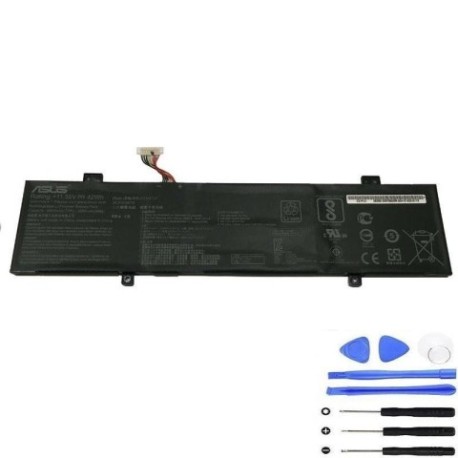
Battery models & part numbers
| Reference / P/N |
|---|
| 0B200-02970000 |
| 0B200-02970100 |
| Asus-C31N1733-42Wh |
| C31PlJ1 |
Compatible models
| Model |
|---|
| Asus VivoBook Flip 14 TP412FA |
| Asus VivoBook Flip 14 TP412FA-EC010T |
| Asus VivoBook Flip 14 TP412FA-EC035T |
| Asus VivoBook Flip 14 TP412FA-EC0637T |
| Asus VivoBook Flip 14 TP412FA-EC082T |
| Asus VivoBook Flip 14 TP412FA-EC131T |
| Asus VivoBook Flip 14 TP412FA-EC134T |
| Asus VivoBook Flip 14 TP412FA-EC175T |
| Asus VivoBook Flip 14 TP412FA-EC223T |
| Asus VivoBook Flip 14 TP412FA-EC224T |
| Asus VivoBook Flip 14 TP412FA-EC226R |
| Asus VivoBook Flip 14 TP412FA-EC272R |
| Asus VivoBook Flip 14 TP412FA-EC350R |
| Asus VivoBook Flip 14 TP412FA-EC362T |
| Asus VivoBook Flip 14 TP412FA-EC363RA |
| Asus VivoBook Flip 14 TP412FA-EC379R |
| Asus VivoBook Flip 14 TP412FA-EC415T |
| Asus VivoBook Flip 14 TP412FA-EC417T |
| Asus VivoBook Flip 14 TP412FA-EC433R |
| Asus VivoBook Flip 14 TP412FA-EC452T |
| Asus VivoBook Flip 14 TP412FA-EC499T |
| Asus VivoBook Flip 14 TP412FA-EC519RA |
| Asus VivoBook Flip 14 TP412FA-EC637T |
| Asus VivoBook Flip 14 TP412FA-EC735T |
| Asus VivoBook Flip 14 TP412FA-EC752T |
| Asus VivoBook Flip 14 TP412FA-EC870T |
| Asus VivoBook Flip 14 TP412FA-EC924T |
| Asus VivoBook Flip 14 TP412UA |
| Asus VivoBook Flip 14 TP412UA-EC034T |
| Asus VivoBook Flip 14 TP412UA-EC047T |
| Asus VivoBook Flip 14 TP412UA-EC053R |
| Asus VivoBook Flip 14 TP412UA-EC053T |
| Asus VivoBook Flip 14 TP412UA-EC059T |
| Asus VivoBook Flip 14 TP412UA-EC069R |
| Asus VivoBook Flip 14 TP412UA-EC069T |
| Asus VivoBook Flip 14 TP412UA-EC085T |
| Asus VivoBook Flip 14 TP412UA-EC113T |
| Asus VivoBook Flip 14 TP412UA-EC115T |
| Asus VivoBook Flip 14 TP412UA-EC752T |
| Asus VivoBook Flip 14 TP412UA-EC969T |
Introduction
Laptop batteries are the heart of your portable computing experience, and when they start to fail, it can be incredibly frustrating. The ASUS VivoBook Flip 14 series represents some of the most popular convertible laptops in the Australian and New Zealand markets, known for their versatility and performance. However, like all lithium-ion batteries, they have a finite lifespan typically lasting 2-4 years with regular use.
Understanding when and how to replace your battery can save you from unexpected downtime and extend the life of your valuable device. This guide is specifically tailored for AU/NZ consumers, addressing local considerations like authorised service centres, recycling programmes, and climate factors that can affect battery performance in our region.
Common signs you need a replacement
| Symptom | Cause | Verification | Recommendation |
|---|---|---|---|
| Rapid power drain | Reduced battery capacity | Check Windows battery report | Consider replacement if below 60% capacity |
| Laptop won’t hold charge | Failed battery cells | Battery drains even when powered off | Immediate replacement needed |
| Swelling/bulging case | Gas buildup in battery | Visible distortion of laptop base | Stop using immediately – safety hazard |
| Overheating during charging | Internal resistance increase | Battery feels unusually hot | Replace to prevent damage to other components |
| Inaccurate battery percentage | Faulty battery management system | Sudden shutdowns at high percentages | Battery calibration or replacement |
| Charger won’t recognise battery | Communication circuit failure | Battery not detected in Device Manager | Professional diagnosis required |
Many VivoBook Flip 14 users report these symptoms appearing around the 2-3 year mark, particularly for those who use their laptops extensively for work or study. The convertible nature of these devices means they often experience more charge cycles than traditional laptops, accelerating battery wear.
How to check compatibility
Before purchasing any replacement battery, verifying compatibility is absolutely essential. For ASUS VivoBook Flip 14 models, there are several reliable methods to ensure you’re getting the correct battery.
Finding your exact model number
The most straightforward method is to check the physical labels on your laptop. Turn your device over and look for the regulatory label, typically located on the bottom case. You should see text similar to “ASUS VivoBook Flip 14 TP412FA-EC010T” or another variant from our compatibility list. This exact model number is what you need to cross-reference.
If the label is worn or missing, you can find this information within Windows:
- Press Windows Key + R, type “msinfo32” and press Enter
- Look for “System Model” in the System Information window
- Alternatively, open Command Prompt and type “wmic csproduct get name”
Using ASUS official resources
ASUS provides excellent support resources for Australian and New Zealand customers. Visit the official ASUS support website and enter your serial number or model number to access the precise specifications for your device. The serial number can typically be found on the original packaging, purchase receipt, or through the ASUS System Control Interface in your BIOS.
Cross-referencing part numbers
The C31N1733 battery is also known by several part numbers including 0B200-02970000, 0B200-02970100and C31PlJ1. If you’re replacing an existing battery, the part number printed on it should match one of these references. Always double-check against our comprehensive compatibility tables above before making your purchase.
Physical compatibility checks
The C31N1733 battery has specific physical dimensions and connector type that must match your VivoBook Flip 14. When inspecting your current battery or a replacement, ensure the connector has the correct pin configuration and the physical dimensions align with your laptop’s battery compartment. Even among TP412 models, there can be subtle variations that affect compatibility.
When to replace your battery
Timing your battery replacement correctly can save you from unexpected downtime. Most ASUS VivoBook Flip 14 batteries will provide optimal performance for 300-500 complete charge cycles, which typically translates to 2-3 years of regular use. However, several factors specific to Australian and New Zealand conditions can affect this timeline.
Consider replacement when:
- Your battery capacity drops below 60% of original (check via Windows battery report)
- You experience sudden shutdowns even when Windows shows 20-30% charge remaining
- The battery swells or causes case deformation (immediate safety concern)
- You need reliable portable use for work or study and current runtime is insufficient
- The battery no longer charges to 100% despite calibration attempts
Australian summers can be particularly harsh on laptop batteries. High temperatures accelerate battery degradation, so if you frequently use your laptop in hot environments or leave it in sun-exposed areas, you may need replacement sooner than the typical lifespan.
Installation guide
Replacing the battery in your ASUS VivoBook Flip 14 is a straightforward process that most technically inclined users can accomplish with care and the right tools. Always prioritise safety and consider professional installation if you’re uncomfortable with any step.
Tools required:
- Phillips #00 screwdriver
- Plastic spudger or guitar pick
- Anti-static wrist strap (recommended)
- Clean, well-lit workspace
- Small container for screws
Step-by-step installation:
- Power down completely: Shut down your laptop and disconnect all cables and peripherals.
- Disconnect power: Remove the AC adapter and any other power sources.
- Ground yourself: Use an anti-static wrist strap or frequently touch a grounded metal object to prevent static discharge.
- Remove bottom case: Turn the laptop over and remove all visible screws from the bottom case. Some may be hidden under rubber feet, so check carefully.
- Open the case: Use a plastic spudger to carefully separate the bottom case from the main body. Work slowly around the edges to avoid damaging plastic clips.
- Locate the battery: The battery is typically centrally located and connected via a cable to the motherboard.
- Disconnect old battery: Gently disconnect the battery cable from the motherboard connector. Some models may have a securing bracket that needs removal first.
- Remove old battery: Unscrew any mounting screws securing the battery and carefully lift it out.
- Install new battery: Place the new C31N1733 battery in position, secure with screws, and reconnect the cable to the motherboard.
- Reassemble: Replace the bottom case, ensuring all clips engage properly, and reinstall all screws.
- Initial charge: Connect the AC adapter and charge the new battery completely before first use.
Important safety notes: Never force connectors or use metal tools near the battery. If you encounter significant resistance at any step, stop and reassess. The battery connector on VivoBook Flip 14 models typically has a small pull-tab for easy disconnection – never pull directly on the wires.
Usage & care tips
Proper battery maintenance can significantly extend the life of your new C31N1733 battery and ensure optimal performance throughout its lifespan. Here are specific recommendations for Australian and New Zealand users:
Optimal charging practices:
- Avoid frequent full discharges – lithium-ion batteries prefer partial discharges between 20-80%
- Calibrate your battery monthly by allowing a full discharge followed by a complete uninterrupted charge
- Remove the AC adapter once charging is complete if you’re working in a fixed location for extended periods
- Never leave your laptop plugged in continuously for days, especially in hot environments
Temperature management:
Australian summers can push temperatures well above 35°C, which is detrimental to battery health. Avoid leaving your laptop in direct sunlight, hot cars, or near heat sources. Ideal operating temperatures for lithium-ion batteries are between 10°C and 35°C. If your laptop feels hot to the touch during use, consider using a cooling pad or adjusting your power settings to reduce heat generation.
Storage recommendations:
If you need to store your VivoBook Flip 14 for extended periods, charge the battery to approximately 50-60% and power down completely. Store in a cool, dry place away from direct sunlight. Every 3-6 months, check the charge level and top up to 50-60% if needed.
Safety & recycling in AU/NZ
Battery safety and proper disposal are particularly important in our region, with specific regulations and programmes available to Australian and New Zealand consumers.
Safety precautions:
- Never attempt to open, puncture, or modify the battery casing
- Discontinue use immediately if you notice swelling, leakage, or unusual heating
- Only use ASUS-approved chargers and power accessories
- Keep batteries away from children and pets
- Never expose batteries to fire or excessive heat
Australian recycling options:
In Australia, multiple programmes accept laptop batteries for safe recycling:
- MobileMuster – accepts batteries at many retail locations
- B-cycle – the official government-backed battery recycling scheme
- Local council e-waste collection events
- Officeworks and other electronics retailers often have collection bins
New Zealand recycling options:
NZ consumers can utilise:
- eDay events in various regions
- TechCollect NZ programme
- Most transfer stations and some retail stores accept e-waste
- Check with your local council for specific battery recycling programmes
Never dispose of lithium-ion batteries in regular household waste – they pose fire risks in landfill and waste valuable resources that can be recovered through recycling.
FAQ
How long does the C31N1733 battery typically last on a full charge?
Under normal usage conditions (web browsing, document editing, moderate brightness), the 42Wh capacity typically provides 4-7 hours of runtime. Heavy usage (video streaming, multiple applications) may reduce this to 3-4 hours, while light usage can extend it to 8+ hours. Actual runtime depends on your specific model configuration, usage patterns, and battery health.
Will replacing the battery void my ASUS warranty?
In Australia and New Zealand, consumer protection laws allow for battery replacement without voiding your overall warranty, provided the replacement doesn’t cause damage to other components. However, any damage occurring during self-installation may not be covered. For devices still under manufacturer warranty, consider using an authorised ASUS service centre for replacement to maintain full coverage.
How can I verify my replacement battery is genuine?
Genuine ASUS batteries feature precise branding, clear labelling with correct part numbers, and proper packaging. The battery should have appropriate safety certifications for the Australian and New Zealand markets. Purchase from reputable suppliers who provide warranties and can verify authenticity. Our recommended supplier offers genuine batteries with full documentation.
My laptop won’t power on even with the new battery – what should I do?
First, ensure the battery connector is firmly seated. Try connecting the AC adapter alone – if the laptop powers on, the issue may be with battery installation. If it still won’t power on, disconnect the battery and AC adapter, hold the power button for 30 seconds to reset, then reconnect. If problems persist, seek professional assistance.
Can I use a higher capacity battery than the original 42Wh?
No, you should only use batteries with the exact specifications designed for your VivoBook Flip 14 model. Higher capacity batteries may have different physical dimensions, voltage requirements, or connector types that could damage your laptop or pose safety risks. Always replace with the specified C31N1733 42Wh equivalent.
How often should I calibrate my new battery?
For optimal accuracy of battery percentage reporting, calibrate monthly by allowing the battery to discharge to around 5-10%, then charging uninterrupted to 100%. Avoid frequent full discharges as they can accelerate wear – the monthly calibration is sufficient for most users.
Where can I get professional installation help in Australia/NZ?
Most computer repair shops can perform battery replacements, but for guaranteed compatibility and workmanship, consider ASUS-authorised service centres. Major cities throughout Australia and New Zealand have multiple options – check the ASUS website for your nearest authorised service provider.
Replacing your ASUS VivoBook Flip 14 battery with the genuine C31N1733 model can restore your laptop’s portability and reliability. With proper installation and care, your new battery should provide years of dependable service, keeping you productive whether you’re working from home, studying on campus, or travelling throughout our beautiful region.