ASUS C31N1431 57Wh Laptop Battery Replacement Guide
If your ASUS laptop is struggling to hold charge or showing battery warning signs, this comprehensive guide covers everything Australian and New Zealand users need to know about the C31N1431 57Wh replacement battery.
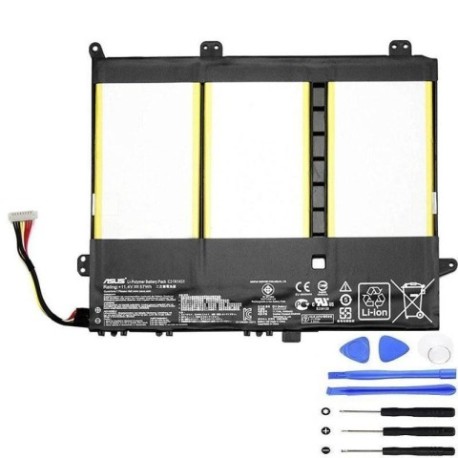
Battery models & part numbers
| Reference / P/N |
|---|
| 0B200-01600000 |
| 0B200-01600100 |
| Asus-C31N1431-57Wh |
| C31Pp95 |
Compatible models
| Model |
|---|
| Asus EeeBook E E403S E403NA R416NA R416SAs |
| Asus EeeBook E403SA |
| Asus Vivobook E14 L403NA R416SA E403NA |
Introduction
Laptop batteries naturally degrade over time, and if you’re experiencing shorter battery life with your ASUS EeeBook or Vivobook, it’s likely time for a replacement. The ASUS C31N1431 57Wh battery is designed specifically for several popular ASUS models commonly used across Australia and New Zealand. This guide will help you understand when to replace your battery, how to ensure compatibility, and provide step-by-step installation instructions.
Common signs you need a replacement
| Symptoms | Causes | Verification | Recommendation |
|---|---|---|---|
| Battery drains quickly (less than 1 hour) | Natural cell degradation after 2-3 years | Check battery health in Windows Power Settings | Consider replacement if capacity below 60% |
| Laptop shuts down unexpectedly | Voltage drops under load | Monitor battery percentage during use | Replace immediately to prevent data loss |
| Battery won’t charge to 100% | Charging circuit protection activated | Check charging status in system tray | Replace if stuck below 80% capacity |
| Battery swelling or bulging | Internal gas buildup from cell failure | Visual inspection of battery compartment | Replace immediately – safety hazard |
| Overheating during charging | Inefficient charging circuits | Feel battery temperature during charge | Replace if uncomfortably hot to touch |
How to check compatibility
Before purchasing any replacement battery, it’s crucial to verify compatibility with your specific ASUS model. For Australian and New Zealand users, here’s how to confirm your laptop matches the C31N1431 57Wh battery:
Finding Your Model Information: Turn your laptop over and locate the white sticker on the bottom casing. Look for “Model Name” or similar designation. For ASUS EeeBook and Vivobook models, this is typically printed clearly near the serial number.
Cross-Reference with Compatible List: Compare your model number exactly with the compatible models listed above. Pay attention to every character – even small differences matter. The C31N1431 battery specifically fits EeeBook E403 series and Vivobook E14 models with specific suffixes.
Using ASUS Official Tools: Visit the ASUS support website and enter your serial number to access official compatibility information. Australian users can contact ASUS Australia support for verification.
Physical Compatibility Check: If possible, remove your current battery and compare the physical dimensions and connector type. The C31N1431 measures approximately 205mm x 60mm x 20mm with a standard 3-pin connector.
When to replace
Most laptop batteries last 2-4 years with regular use. In Australia’s varying climate conditions, batteries may degrade faster due to temperature fluctuations. Consider replacement when:
- Battery holds less than 60% of original capacity
- You experience sudden shutdowns at 20-30% charge
- The battery has completed 500+ charge cycles
- Your laptop is 3+ years old with original battery
- You notice physical swelling or deformation
For Australian users, extreme summer temperatures can accelerate battery degradation, so monitor your battery health more frequently during hot months.
Installation guide
Replacing the battery in your ASUS EeeBook or Vivobook is generally straightforward. Always power off your laptop and disconnect from power before beginning.
Step 1: Preparation
Gather necessary tools: small Phillips screwdriver, plastic spudger or guitar pick. Work on a clean, static-free surface. Ground yourself by touching a metal object.
Step 2: Access the Battery Compartment
Turn your laptop upside down. For most compatible models, you’ll need to remove the entire bottom panel. Locate and remove all screws – note that some may be hidden under rubber feet.
Step 3: Disconnect Old Battery
Once the bottom panel is removed, locate the battery (usually the largest component). Carefully disconnect the battery cable from the motherboard. Use a plastic tool to gently pry the connector if needed.
Step 4: Remove Old Battery
Unscrew any mounting screws securing the battery. Lift the battery straight out, being careful not to damage surrounding components.
Step 5: Install New C31N1431 Battery
Position the new battery in place and secure with mounting screws. Reconnect the battery cable to the motherboard, ensuring it clicks into place securely.
Step 6: Reassembly and Testing
Replace the bottom panel and all screws. Connect your charger and power on the laptop. Check that the system recognises the new battery and begins charging normally.
Usage & care tips
Proper battery maintenance can extend the life of your new C31N1431 57Wh battery. Follow these tips for optimal performance in Australian conditions:
- Avoid Extreme Temperatures: Don’t leave your laptop in hot cars or direct sunlight. Ideal operating temperature is 10-35°C
- Charge Smartly: Lithium-ion batteries prefer partial discharges rather than full cycles. Charge between 20-80% for longest life
- Storage Guidelines: If storing long-term, charge to 50-60% and store in a cool, dry place
- Regular Use: Use your battery regularly – prolonged storage can cause capacity loss
- Power Settings: Use ASUS Power4Gear Hybrid or Windows battery saver modes when on battery power
- Update Drivers: Keep your ASUS battery drivers and BIOS updated for optimal performance
Safety & recycling in AU/NZ
Battery safety and proper disposal are crucial for Australian and New Zealand consumers:
Safety Precautions:
Never attempt to open or puncture a lithium-ion battery. If you notice swelling, overheating, or strange odours, stop using immediately and dispose of properly. Only use authorised chargers and accessories with your ASUS laptop.
Australian Recycling Options:
In Australia, laptop batteries can be recycled through:
• Officeworks battery recycling bins
• Battery World stores
• Council e-waste collection events
• MobileMuster programs
New Zealand Recycling:
In New Zealand, use:
• Computer recycling programmes at Noel Leeming or Harvey Norman
• Council transfer stations with e-waste facilities
• specialised battery recyclers like Ecotech Services
Never dispose of laptop batteries in household rubbish – they contain hazardous materials and valuable resources that can be recovered.
FAQ
How long does the C31N1431 57Wh battery typically last?
With normal use, expect 2-4 years of service life or approximately 500 full charge cycles. Actual lifespan depends on usage patterns, charging habits, and environmental conditions.
Will this battery work with my ASUS laptop if it’s not exactly listed?
We strongly recommend only using this battery with the specifically listed compatible models. Using incompatible batteries can damage your laptop and void warranties.
How do I calibrate my new battery?
After installation, charge to 100%, then use until the laptop shuts down from low battery. Charge uninterrupted to 100% again. This helps the battery gauge accurately report remaining capacity.
Is the C31N1431 battery genuine ASUS or compatible?
This is a high-quality compatible battery designed to meet or exceed original specifications. It’s manufactured to the same standards and includes all necessary safety certifications.
What warranty comes with the battery?
Typically 12-24 months warranty depending on the retailer. Check specific warranty terms at point of purchase.
Can I use my laptop while charging the new battery?
Yes, modern laptops are designed for simultaneous use and charging. However, for optimal battery health, avoid heavy gaming or video rendering while charging as the combined heat can stress the battery.
How do I check battery health in Windows?
Open Command Prompt as administrator and type “powercfg /batteryreport”. This generates a detailed HTML report showing battery capacity history and health metrics.
Replacing your ASUS laptop battery doesn’t have to be stressful. With the right information and quality components like the C31N1431 57Wh battery, you can restore your laptop’s mobility and performance. Australian and New Zealand users can shop with confidence knowing they’re getting a compatible, reliable replacement that will keeptheir devices running smoothly for years to come. Remember to always verify compatibility, follow proper installation procedures, and dispose of old batteries responsibly through authorised recycling programmes in your region.