Complete Guide to ASUS C31N1330 50Wh Battery Replacement for Zenbook UX32 Series
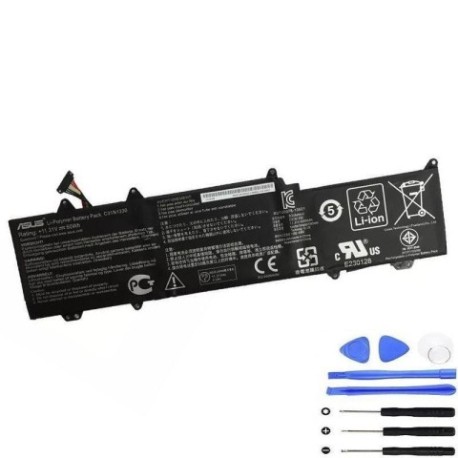
If your ASUS Zenbook UX32LA or UX32LN is struggling with battery life, you’ve come to the right place. This comprehensive guide covers everything AU/NZ users need to know about replacing their laptop battery with the genuine C31N1330 50Wh model.
Battery models & part numbers
| Reference / P/N |
|---|
| 0B200-00070200 |
| Asus-C31N1330-50Wh |
| C31N1330 |
| C31Po95 |
Compatible models
| Model |
|---|
| Asus Zenbook UX32LA |
| Asus Zenbook UX32LN |
Introduction
The ASUS Zenbook UX32 series represents some of the most popular ultrabooks in the Australian and New Zealand markets. Known for their sleek design and reliable performance, these laptops have served students, professionals, and casual users alike. However, like all lithium-ion batteries, the original 50Wh power source has a finite lifespan. After 2-3 years of regular use, you might notice your Zenbook isn’t holding charge like it used to. This guide will walk you through recognising when it’s time for replacement, ensuring compatibility, and safely installing your new C31N1330 battery.
Common signs you need a replacement
| Symptom | Cause | Verification | Recommendation |
|---|---|---|---|
| Battery drains in under 2 hours | Reduced capacity from age/cycles | Check battery health in Windows | Consider replacement if below 60% |
| Laptop shuts down unexpectedly | Voltage drops under load | Monitor during intensive tasks | Replace to prevent data loss |
| Battery won’t charge past 80% | Battery protection mode | Check charging indicators | New battery needed |
| Laptop feels hot near battery | Internal resistance increase | Temperature monitoring | Replace for safety |
| Battery percentage jumps | Calibration issues | Observe percentage changes | Try calibration first |
How to check compatibility
Before purchasing any replacement battery for your ASUS Zenbook, proper compatibility verification is crucial. Start by locating your laptop’s model number, which is typically found on the bottom casing near the serial number or under the battery compartment. For UX32LA and UX32LN models, you should see clear labelling. You can also check within Windows by pressing Windows Key + R, typing “msinfo32”, and looking under System Model. ASUS provides official support documentation on their Australian website where you can enter your serial number to verify compatible parts. The C31N1330 battery is specifically designed for the UX32 series and uses the standard 10.8V configuration with the proprietary ASUS connector. Always cross-reference the physical dimensions (approximately 210mm x 70mm x 5mm) and connector type before purchase.
When to replace
Timing your battery replacement involves both practical and safety considerations. Most ASUS Zenbook batteries last between 500-800 full charge cycles, which typically translates to 2-4 years of regular use. When your battery health drops below 60% of its original capacity (visible in Windows Battery Report), replacement becomes economically sensible. Safety-wise, if you notice any bulging of the battery compartment, unusual heat generation, or the laptop becomes unstable on flat surfaces, immediate replacement is necessary. For AU/NZ users, consider replacing before the summer months when higher ambient temperatures can accelerate battery degradation.
Installation guide
Replacing the battery in your ASUS Zenbook UX32 series is a straightforward process that most users can complete in 15-20 minutes. Begin by shutting down the laptop completely and disconnecting the AC adapter. Turn the laptop over and locate the battery compartment – you’ll need a Phillips #00 screwdriver to remove the securing screws. Gently lift the battery out, taking care not to damage the connector. Align your new C31N1330 battery with the connector, ensuring proper orientation (the connector only fits one way). Press firmly until you hear a click, then replace the securing screws. Power on the laptop and allow it to recognise the new battery. It’s recommended to perform a full charge cycle immediately after installation to calibrate the battery monitoring system.
Usage & care tips
Maximise your new battery’s lifespan with proper care techniques. Avoid frequent full discharges – lithium-ion batteries prefer partial discharges between 20-80%. Don’t leave your Zenbook plugged in constantly at 100% charge, as this stresses the battery. For AU/NZ climates, avoid exposing your laptop to extreme temperatures – never leave it in a hot car or direct sunlight. If storing the laptop for extended periods, charge the battery to around 50% and store in a cool, dry place. Use the original ASUS charger whenever possible, as third-party chargers may not provide optimal charging characteristics. Regular calibration (full discharge followed by full charge) every 2-3 months helps maintain accurate battery percentage readings.
Safety & recycling in AU/NZ
Battery safety is paramount, especially in our Australian and New Zealand environments. Never attempt to open or modify the battery casing, as this can cause short circuits or thermal runaway. If you notice any damage, swelling, or leakage, discontinue use immediately and contact a professional. When disposing of your old battery, never place it in household rubbish. In Australia, take used batteries to authorised collection points at Officeworks, Battery World, or council recycling centres. In New Zealand, most electronics retailers accept used batteries for recycling through the e-waste programme. Proper recycling helps prevent environmental contamination and recovers valuable materials.
FAQ
How long does the C31N1330 battery typically last?
With normal use, expect 4-6 hours of runtime depending on screen brightness and applications running. Heavy gaming or video editing will reduce this to 2-3 hours.
Will replacing the battery void my ASUS warranty?
In Australia and New Zealand, replacing the battery yourself does not void the overall laptop warranty, but any damage caused during installation wouldn’t be covered. The new battery typically comes with its own 12-month warranty.
Can I use this battery in other ASUS models?
No, the C31N1330 is specifically designed for the UX32LA and UX32LN models. Using it in incompatible devices may cause damage or poor performance.
How do I know if I’ve received a genuine battery?
Genuine ASUS batteries feature proper branding, clear labelling with part numbers, and come in official packaging. Counterfeit batteries often have blurry printing and may feel lighter.
What should I do if the new battery isn’t recognised?
First, ensure the connector is properly seated. If issues persist, try resetting the EC (Embedded Controller) by holding the power button for 40 seconds with the battery and AC adapter disconnected.
Is overnight charging safe with this battery?
Modern ASUS laptops include charging circuits that stop charging once full, making overnight charging generally safe. However, for optimal battery health, unplugging once charged is recommended.
Where can I get professional installation help in AU/NZ?
Most computer repair shops and authorised ASUS service centres throughout Australia and New Zealand can install the battery for you, typically for a small labour fee.