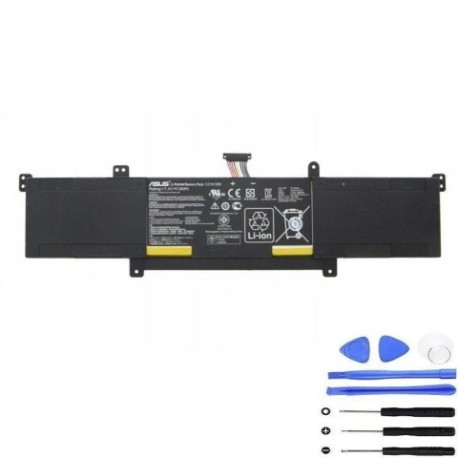
ASUS C21N1309 38Wh Battery Replacement Guide for Australian & New Zealand Users
Introduction
If you’re an ASUS VivoBook user in Australia or New Zealand experiencing battery issues, you’ve come to the right place. The ASUS C21N1309 38Wh battery serves as the power source for several VivoBook models, and understanding your replacement options is crucial for maintaining your laptop’s performance. This comprehensive guide covers everything from compatibility checking to installation and proper battery care specific to our region’s conditions.
Battery models & part numbers
| Reference / P/N |
|---|
| 0B200-00580000 |
| 0B200-00580100 |
| Asus-C21N1309-38Wh |
| C21N1309 |
| PS6354B3 |
Compatible models
| Model |
|---|
| Asus VivoBook Q301LA |
| Asus VivoBook S301LA |
| Asus VivoBook S301LP |
Common signs you need a replacement
| Symptom | Cause | Verification | Recommendation |
|---|---|---|---|
| Battery drains quickly (under 1 hour) | Reduced capacity from age/cycles | Check battery health in Windows | Replace if capacity below 60% |
| Laptop won’t power on without charger | Battery no longer holds charge | Remove charger and try to start | Immediate replacement needed |
| Battery percentage jumps erratically | Faulty battery management system | Monitor percentage changes | Replace to prevent damage |
| Battery swelling or bulging | Internal chemical breakdown | Visual inspection of battery | Stop using immediately and replace |
| Overheating during charging | Internal resistance increase | Feel battery temperature | Replace for safety reasons |
How to check compatibility
Before purchasing any replacement battery for your ASUS VivoBook, proper compatibility verification is essential. Start by locating your laptop’s model number, typically found on the bottom case sticker or in the system information. For ASUS VivoBook Q301LA, S301LA, and S301LP models, the C21N1309 38Wh battery is the correct replacement. You can also check the original battery’s part number – it should match one of the reference numbers listed above. ASUS provides official support tools on their Australian and New Zealand websites where you can enter your serial number to verify compatible parts. Remember that using non-compatible batteries can damage your laptop and void warranties.
When to replace
Lithium-ion batteries like the C21N1309 typically last 2-3 years with regular use. Consider replacement when your battery health drops below 70% capacity, you experience sudden shutdowns, or the battery shows physical signs of wear. In Australia’s warmer climates, battery degradation can accelerate, so monitor performance closely during summer months.
Installation guide
Replacing the battery in your ASUS VivoBook requires careful attention to detail. First, power down completely and disconnect the charger. Remove the bottom panel screws (usually 10-12 screws of varying lengths – keep them organised). Gently pry open the bottom case starting from the corners. Locate the battery connector near the centre-left of the motherboard and carefully disconnect it. Remove the 4-6 screws securing the battery, then lift it out at a 30-degree angle. Install the new C21N1309 battery, reconnect the power connector, and reassemble. Many users find the process takes 15-20 minutes with basic tools.
Usage & care tips
To maximise your new battery’s lifespan in Australian conditions: avoid leaving your laptop in hot cars (temperatures can exceed 60°C), maintain charge between 20-80% for daily use, and perform full discharge cycles monthly. Store at room temperature (15-25°C) when not in use. Australian power fluctuations can affect charging – consider using a surge protector.
Safety & recycling in AU/NZ
Never attempt to open or puncture lithium-ion batteries. In Australia, take old batteries to authorised collection points like Officeworks, Battery World, or council recycling centres. In New Zealand, use designated battery recycling services. Both countries have strict regulations for battery disposal – improper handling can result in fines.
FAQ
How long does the C21N1309 battery typically last?
The 38Wh capacity provides 4-6 hours of typical use. With optimal settings and light usage, some users report up to 7 hours. Actual runtime depends on screen brightness, applications running, and wireless connectivity usage.
Will this battery work with my VivoBook if it has a different part number?
Yes, the C21N1309 is compatible with multiple part numbers including 0B200-00580000, 0B200-00580100, and PS6354B3. These are all cross-compatible references for the same physical battery.
Is professional installation recommended?
While many users successfully self-install, if you’re uncomfortable with electronics, seek professional help. Several Australian computer repair shops offer battery replacement services for around $50-$80 AUD plus parts.
How do I check my current battery’s health?
In Windows, open Command Prompt as administrator and type “powercfg /batteryreport”. This generates a detailed report showing design capacity versus current capacity and cycle count.
What warranty comes with replacement batteries?
Genuine ASUS batteries typically carry 12-month warranties in Australia and New Zealand. Third-party alternatives may offer 6-24 months depending on the supplier and price point.
Can I use my laptop while charging the new battery?
Yes, modern laptops including ASUS VivoBooks are designed for simultaneous use and charging. The system automatically manages power flow to protect both battery and components.
Where can I recycle my old ASUS battery in regional areas?
Most regional council transfer stations accept batteries. Australia Post offices in rural areas often have battery recycling bins, and some larger supermarkets now offer collection services.