Asus C21 X402 38Wh Battery Replacement Guide for Australian & New Zealand Users
Is your Asus VivoBook X402 or S400 series laptop struggling to hold a charge? You’re not alone. Many Australian and New Zealand users experience battery degradation over time, especially with frequent use in our varied climate conditions. This comprehensive guide covers everything you need to know about replacing your Asus battery with the genuine C21-X402-38Wh model.
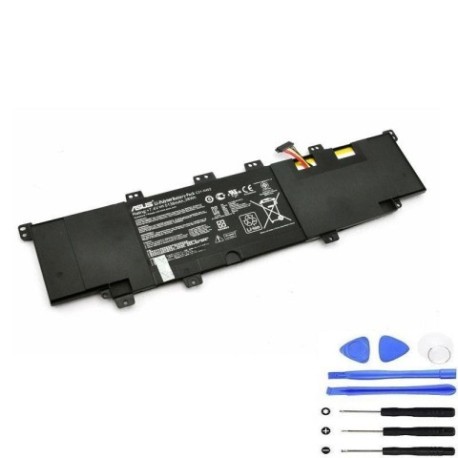
Battery models & part numbers
| Reference / P/N |
|---|
| 0B200-00300700 |
| 0B200-00300800 |
| Asus-C21-X402-38Wh |
Compatible models
| Model |
|---|
| Asus VivoBook X402 X402C X402CA S400 S400C S400CA |
| Asus X402CA |
Introduction
Your Asus VivoBook is designed to be your reliable companion for work, study, and entertainment across Australia and New Zealand. However, like all lithium-ion batteries, it has a finite lifespan. Understanding when and how to replace your battery can save you from unexpected downtime and extend your laptop’s useful life.
Common signs you need a replacement
| Symptom | Cause | Verification | Recommendation |
|---|---|---|---|
| Battery drains quickly | Reduced capacity from age/cycles | Check battery health in Windows | Consider replacement if below 60% |
| Laptop shuts down unexpectedly | Voltage drops under load | Monitor during intensive tasks | Replace to prevent data loss |
| Battery won’t charge fully | Charging circuit or cell failure | Try different power adapter | Replace if issue persists |
| Battery swelling | Gas buildup from degradation | Visual inspection | Replace immediately – safety risk |
| Overheating during charging | Inefficient charging process | Check temperature with hand | Replace to prevent damage |
How to check compatibility
Before purchasing any replacement battery for your Asus laptop, proper compatibility verification is crucial. Start by locating your laptop’s model number, typically found on the bottom case sticker or in the system information (press Windows key + R, type “msinfo32”, and check System Model). For VivoBook X402 and S400 series, the C21-X402-38Wh is your authorised replacement. You can also use Asus’s official support website by entering your serial number for precise part matching. Remember that while third-party batteries might seem cheaper, they often lack the quality control and safety certifications required for reliable performance in our region’s varying conditions.
When to replace
Most Asus VivoBook batteries last 2-3 years with regular use before showing significant degradation. If your battery health shows less than 60% of original capacity in Windows battery report, or if you’re experiencing any of the warning signs mentioned above, it’s time for replacement. Don’t wait until complete failure – proactive replacement ensures you’re never caught without power during important work or study sessions.
Installation guide
Replacing your Asus VivoBook battery is straightforward with the right tools and precautions. You’ll need a Phillips screwdriver, plastic spudger, and anti-static wrist strap. First, shut down your laptop and disconnect all cables. Flip it over and remove the 10-12 screws securing the bottom cover. Carefully pry the cover using the spudger, starting from the corners. Locate the battery connector near the centre – it’s usually secured with a small bracket. Gently disconnect the battery cable, then remove the screws holding the battery in place. Install your new C21-X402-38Wh battery in reverse order, ensuring all connections are secure before reassembling.
Usage & care tips
To maximise your new battery’s lifespan in Australian and New Zealand conditions, avoid extreme temperatures – never leave your laptop in a hot car or direct sunlight. Ideal operating temperature is 10°C to 35°C. For daily use, partial discharges are better than full cycles – charge between 20-80% when possible. If storing for extended periods, charge to around 50% and store in a cool, dry place. Modern lithium-ion batteries don’t require full discharge cycles, so feel free to top up throughout the day.
Safety & recycling in AU/NZ
Battery safety is paramount. Never attempt to open or modify your battery, and avoid physical damage. If you notice swelling, overheating, or leakage, discontinue use immediately and contact professional disposal services. In Australia and New Zealand, never dispose of lithium-ion batteries in household waste. Most electronics retailers offer free battery recycling services, or you can contact your local council for authorised disposal centres. Proper recycling helps protect our unique environment and recovers valuable materials.
FAQ
How long does the C21-X402-38Wh battery typically last?
With normal use, expect 3-5 hours depending on your usage patterns and power settings. Intensive tasks like video editing will drain faster than web browsing.
Will replacing my battery void my Asus warranty?
If your laptop is still under manufacturer warranty, we recommend having replacement performed by an authorised Asus service centre to maintain coverage.
Can I use my laptop while charging the new battery?
Yes, modern laptops are designed for simultaneous use and charging. The system automatically manages power flow to protect both battery and components.
How do I calibrate my new battery?
After installation, charge to 100%, use until it shuts down from low power, then charge uninterrupted to 100% again. This helps the battery gauge accuracy.
What’s the difference between the various part numbers?
The different part numbers (0B200-00300700, 0B200-00300800) represent the same physical battery from different production batches or regions – all are compatible with your VivoBook.
Is overnight charging harmful?
Modern laptops include protection circuits that stop charging at 100%, so overnight charging is generally safe but not necessary for battery health.
Can I upgrade to a higher capacity battery?
The C21-X402-38Wh is the maximum capacity designed for your VivoBook’s chassis. Higher capacity alternatives won’t fit properly and may cause overheating issues.
Remember that investing in a genuine replacement battery ensures compatibility, safety, and performance that matches your Asus VivoBook’s original specifications. Don’t compromise on quality when it comes to powering your essential computing device.